Table of Contents >> Show >> Hide
- What Makes a Great Hurricane Tracker App?
- 1. FEMA App
- 2. MyRadar
- 3. The Weather Channel App
- 4. Zoom Earth
- 5. My Hurricane Tracker
- So, Which Hurricane Tracker App Is Best?
- How to Use Hurricane Apps Without Misreading the Situation
- Experience: What Hurricane Tracker Apps Feel Like in Real Life
- Final Thoughts
When a hurricane has your city in its group chat, your phone becomes less of a phone and more of a tiny emergency operations center. Suddenly, you are checking radar in the grocery store, refreshing forecast cones at 2:13 a.m., and wondering whether “tropical moisture plume” is a weather term or a very dramatic shampoo. That is exactly why having the right hurricane tracker app matters.
The best hurricane tracker apps do more than splash a swirling storm icon across your screen and call it a day. They help you understand what is happening, what might happen next, and what you should do if conditions change fast. Some are best for official alerts. Some shine with radar and map layers. Some are fantastic if you want deep storm data without feeling like you need a meteorology degree and three monitors.
Below are five of our favorite hurricane tracker apps for iPhone and Android, along with what each one does best, where each one can be a little annoying, and how to use them without becoming the person who says, “The cone moved three pixels, cancel school forever.”
What Makes a Great Hurricane Tracker App?
Before we rank favorites, let’s define what actually makes a hurricane tracker app useful. In our book, a strong app should do at least one of these jobs very well:
- Deliver clear storm alerts without making you feel like every cloud is a personal attack.
- Show radar, wind, rain, and storm track information in a way normal humans can understand.
- Help you monitor more than one location, because hurricanes are rude enough to threaten your house and your parents’ house at the same time.
- Make official forecast information easier to follow, not more confusing.
- Give you enough detail to make smart decisions without turning you into a doom-scrolling weather philosopher.
One quick reality check: no app replaces local emergency management, evacuation orders, or official National Hurricane Center guidance. A beautiful interface is nice. A mandatory evacuation order is nicer to obey.
1. FEMA App
Best for: Official alerts and practical emergency prep
If you want one hurricane app that feels like the grown-up in the room, the FEMA app is the easy pick. It is not the flashiest tool on this list, and it is definitely not trying to win an award for cinematic radar drama. What it does offer is something even better during hurricane season: clarity.
The FEMA app is excellent for people who want official alerts, preparedness information, and disaster resources in one place. It is especially useful if your goal is not just to watch the storm but to make sensible decisions while the storm is being rude. It can track multiple locations, which is a huge plus if you are keeping an eye on family across different states or coastal regions.
We like this app because it is practical. It keeps your attention on what matters: alerts, safety guidance, shelters, recovery resources, and readiness steps. In other words, it behaves less like a weather toy and more like a digital emergency kit.
Why it makes our favorites list: It is one of the best choices for people who want official weather and emergency alerts without digging through clutter. If you are helping a household prepare for landfall, possible evacuation, power outages, or post-storm recovery, this app earns a permanent spot on your home screen.
Potential downside: The FEMA app is not the one you download because you love staring at advanced radar loops for fun. It is more about readiness than weather geekery.
2. MyRadar
Best for: Fast radar and severe weather awareness
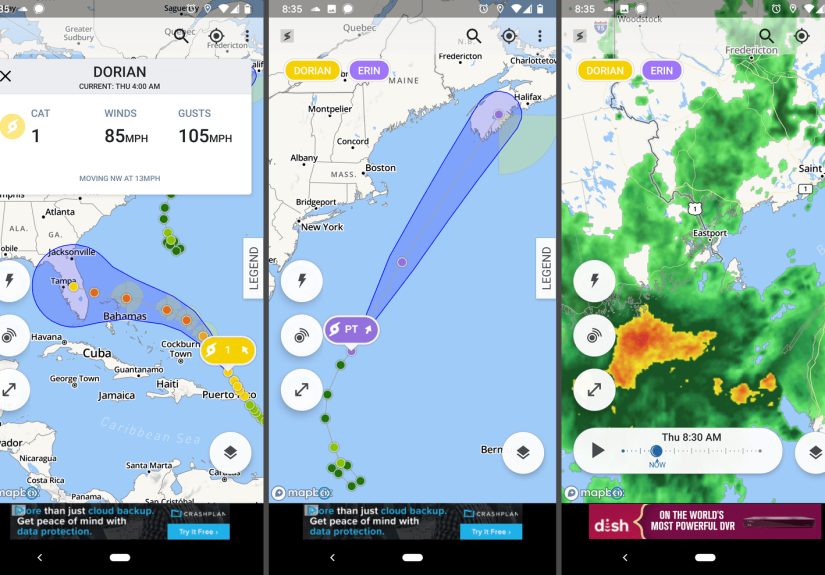
MyRadar is for the person who opens an app and immediately wants to see the sky misbehaving. The app is known for quick animated radar, and that speed matters when you are tracking tropical weather. If a storm is organizing offshore or outer rain bands are beginning to creep inland, MyRadar helps you visualize what is moving and how quickly it is heading your way.
This app is especially handy if you are the type who thinks in motion rather than headlines. Alerts are useful, but radar tells a story. You can watch rain structure build, rotate, and shift. That is not just fascinating. It is useful when your plans depend on timing a store run, securing outdoor furniture, or deciding whether “one quick errand” is actually a terrible idea in flip-flops.
MyRadar also works well for people who already know the basics and want a stronger visual handle on conditions. It feels responsive, modern, and less overloaded than many weather apps that try to cram the entire atmosphere into one screen.
Why it makes our favorites list: It is one of the best radar-first hurricane apps around. If you want a tool that lets you watch storm motion with very little fuss, this one belongs in your weather lineup.
Potential downside: Some advanced hurricane-focused features and premium extras may sit behind subscriptions or add-ons, so casual users may not get the full buffet without paying.
3. The Weather Channel App
Best for: An all-around balance of forecasts, radar, and hurricane coverage
If you want one app that tries to do a little bit of everything, The Weather Channel app is a strong contender. It blends forecasts, maps, radar, alerts, and hurricane coverage into a package that is familiar to a lot of users. That familiarity matters during stressful weather. Nobody wants to learn a new interface while also debating whether to board windows.
What makes this app appealing is its balance. It is accessible for casual users, but it still offers enough storm-tracking depth to be genuinely helpful when tropical weather ramps up. You can move from the bigger forecast picture to radar details without feeling like you accidentally opened a weather simulator built for NASA interns.
It is also a solid pick for households that want one mainstream app everybody understands. Not every family member wants to compare model output. Some people just want clear forecasts, useful radar, storm updates, and alerts that do not require a decoder ring.
Why it makes our favorites list: It is a reliable all-purpose app with enough hurricane-specific usefulness to stay relevant when the tropics get busy. For many users, this is the easiest “one app for most needs” choice.
Potential downside: Like many big weather apps, it can feel a bit busy, and some features may be more polished than others depending on the device and subscription tier.
4. Zoom Earth
Best for: Beautiful satellite views and real-time storm watching
Zoom Earth is the app you open when you want to see the atmosphere put on a very unsettling performance in near real time. This is where hurricane tracking starts to feel visual in the best possible way. Satellite imagery, weather layers, and storm paths come together in a format that is both impressive and genuinely useful.
What we love about Zoom Earth is that it helps users understand the storm as a living system, not just a line on a map. You can watch cloud structure, see how broad the storm has become, and follow the larger weather setup around it. That is incredibly valuable if you want context and not just a single forecast point.
It also has a cleaner, more map-driven personality than some traditional weather apps. That makes it a favorite for visual learners, coastal residents, and people who prefer interactive maps over long text updates. During a busy hurricane season, it can become the app you keep opening “just for one second,” and then somehow 17 minutes vanish.
Why it makes our favorites list: It is one of the most satisfying apps for visually tracking hurricanes, especially if you want current satellite views and layered weather maps that make the storm easier to grasp.
Potential downside: It is wonderful for tracking and visual context, but you may still want a second app focused more heavily on official emergency alerts and preparedness.
5. My Hurricane Tracker
Best for: People who want hurricane-specific information without clutter
Some weather apps try to be everything to everyone. My Hurricane Tracker does something smarter: it stays in its lane. This app is built for storm tracking, and that focus makes it appealing. Instead of burying tropical systems under pollen counts, ski conditions, and whether your patio brunch requires a light sweater, it keeps the attention on storms.
That hurricane-first approach makes it especially appealing during peak season. You can follow active storms, review forecast maps, look at warning information, and even explore historic storms. For users who want a more direct and less cluttered hurricane experience, that is a real advantage.
We also appreciate that it feels approachable. It offers depth, but it does not overwhelm you with unnecessary decoration. If you have family on the Gulf Coast, in Florida, or along the Southeast coast, this is the kind of app that earns repeat use every season.
Why it makes our favorites list: It is one of the cleanest hurricane-specific apps for people who want tropical storm and hurricane information front and center without a lot of weather-app bloat.
Potential downside: Because it is so focused, it may not replace a full-featured daily weather app for year-round use.
So, Which Hurricane Tracker App Is Best?
That depends on how your brain works during storm season.
- Choose FEMA if you want official alerts and practical safety tools.
- Choose MyRadar if radar speed and visual storm movement matter most.
- Choose The Weather Channel if you want a familiar all-in-one weather app.
- Choose Zoom Earth if you love satellite views and layered map detail.
- Choose My Hurricane Tracker if you want a simpler app built specifically for tropical systems.
Honestly, the smartest move is not choosing only one. A two-app setup is often better than relying on a single source. We like pairing one alert-focused app with one radar or map-heavy app. For example, FEMA plus Zoom Earth is a strong combo. So is FEMA plus MyRadar. Think of it as building a weather team, not hiring a lone intern to manage your hurricane anxiety.
How to Use Hurricane Apps Without Misreading the Situation
Here is where a lot of people get tripped up. They see the cone, find their town just outside it, and start acting like they have been blessed by atmospheric immunity. That is not how hurricanes work. Rain, tornadoes, inland flooding, storm surge, and damaging wind do not politely stay inside a neat graphic.
That is why the best hurricane tracker apps are the ones that help you compare different kinds of information: official alerts, radar, track forecasts, wind fields, and local emergency updates. The goal is not to obsess over every tiny wobble. The goal is to notice the bigger picture faster and respond smarter.
These apps are most helpful when you use them to answer practical questions:
- Has the storm track shifted meaningfully?
- Are watches or warnings posted for my location?
- Are outer rain bands arriving earlier than expected?
- Should I prepare for power loss, flooding, or evacuation?
- Do I need to check on relatives in another location?
If an app helps you answer those questions calmly, it is doing its job.
Experience: What Hurricane Tracker Apps Feel Like in Real Life
There is a very specific kind of tension that arrives when a storm enters the forecast cone for somewhere you love. Even before the first rain band shows up, your habits change. You check your phone more. You keep one eye on the sky and the other on the battery percentage. Hurricane tracker apps go from “nice to have” to “open every 11 minutes like it owes you money.”
In real life, each kind of app serves a different emotional and practical purpose. The FEMA app feels reassuring because it cuts through noise. When everyone in the family text chain is sharing half-understood social media screenshots and one cousin is suddenly a self-appointed storm analyst, an app with official alerts and simple guidance is pure oxygen. It reminds you to focus on what matters: warnings, shelters, preparedness, and next steps.
Radar-heavy apps like MyRadar are a different experience entirely. They are for the moment when the storm stops being abstract. You are not just hearing that conditions are worsening. You are watching bands of rain organize, expand, and slide toward your area. That visual movement is powerful. It helps turn vague worry into concrete planning. Maybe you stop putting off bringing patio chairs inside. Maybe you finally fill the car with gas. Maybe you stop pretending one loaf of bread counts as hurricane prep.
Then there are apps like Zoom Earth, which create that strange mix of awe and dread only weather can produce. Seeing a massive storm structure from satellite view is mesmerizing. It reminds you how big these systems really are and how tiny human confidence becomes when the atmosphere decides to freestyle. For visual thinkers, that kind of map-based perspective is incredibly helpful. It puts local weather in regional context.
All-in-one apps like The Weather Channel are often the family app. It is the one grandparents understand, neighbors already have, and everyone can navigate without a tutorial. During hurricane season, that familiarity reduces stress. No one wants to learn a complicated new interface while also trying to remember where they put flashlights, batteries, and the pet carrier the cat already hates on principle.
And hurricane-specific tools like My Hurricane Tracker are especially good for people who want less clutter and more focus. During a real storm threat, that matters. The last thing anyone needs is ten irrelevant weather widgets when all they want to know is where the storm is going, what warnings are active, and whether the forecast has changed in a meaningful way.
The real experience of using hurricane tracker apps is not just about data. It is about feeling less blindsided. They do not eliminate the uncertainty of storm season, but the good ones make uncertainty easier to navigate. They help you shift from panic to preparation, from rumor to information, and from “I should probably do something” to actually doing it.
Final Thoughts
The best hurricane tracker apps do not just tell you that a storm exists. They help you understand what kind of threat it poses, how conditions are changing, and what actions make sense for your household. That is why our favorites are not all carbon copies of each other. Each one fills a different role.
If we had to keep this simple, we would say this: install one official alert app, one strong radar or satellite app, and bookmark official hurricane guidance. That combination gives you a smarter, calmer way to get through hurricane season. Because when a storm is on the map, the last thing you need is bad information wrapped in a pretty interface.
Download wisely, prepare early, and remember: the forecast cone is helpful, but it is not a magical force field. Unfortunately, neither is positive thinking.