Table of Contents >> Show >> Hide
- How One Cat And His Toy Monkey Became ‘World Travelers’
- What Makes Cat Photoshop Challenges So Addictive?
- How Photoshop Battles Work (And Where This Challenge Fits In)
- How To Create Your Own Traveling Cat Masterpiece
- Creative Destination Ideas For Your Cat And His Toy
- Why These Silly Challenges Actually Matter
- What I Learned After Joining A Traveling Cat Photoshop Challenge
- Conclusion: One Photo, Infinite Adventures
If you’ve ever stared at your cat and thought, “You deserve a vacation more than I do,” you’re in the right place. One cat owner did exactly that and turned a simple snapshot of their kitty and a stuffed monkey into a full-blown Photoshop challenge: “Help My Cat And His Toy Travel The World.” When the image hit the Bored Panda community, the internet did what it does bestturned one ordinary photo into dozens of ridiculous, heartwarming, and wildly creative adventures.
From sunsets on distant beaches to soaring over famous landmarks, this cat and his toy monkey became unlikely globe-trotters thanks to a handful of clever editors and an open invitation to play. In this article, we’ll dive into what made this Photoshop challenge so charming, how these online “battles” work, and how you can create your own traveling-cat masterpieceno plane ticket required.
How One Cat And His Toy Monkey Became ‘World Travelers’
The Original Photo That Started It All
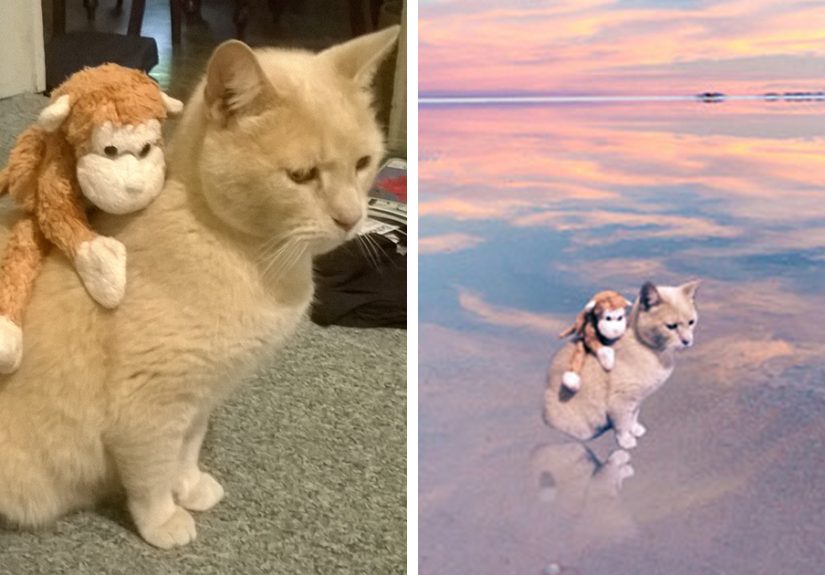
The starting image was delightfully simple: a calm, cream-colored cat sitting on the floor with a small stuffed monkey perched on his back. No exotic scenery, no perfect lighting, no studio setupjust an everyday moment between a pet and a beloved toy. That simplicity is exactly what makes it ideal for a Photoshop challenge. A clear subject, minimal distractions, and a neutral background give editors plenty of room to build new worlds around the cat.
On Bored Panda, the pet’s human posted the photo and asked fellow “Pandas” to Photoshop the cat and monkey “anywhere, from your backyard to the Pyramid of Giza.” The prompt was open-ended and playful, inviting people of all skill levels to join in. Within the community, these posts often spark chains of increasingly imaginative editsspace missions, underwater scenes, historical parodies, you name it.
From Living Room Floor To Bucket-List Destinations
Once the challenge went live, the pair started “traveling” fast. In one image, they might be walking together along a pink-and-gold beach at sunset. In another, they’re soaring over lush green rivers in a toy airplane. Some creators dropped them into classic tourist shots, others into fantasy landscapes, and a few went completely absurdthink movie posters, video-game covers, or meme crossovers.
This mix of heartfelt and hilarious edits is typical of cat-focused Photoshop battles online. Other viral examples have turned awkward cat photos into action scenes, sci-fi posters, or epic paintings, proving that the internet never gets tired of remixing feline content. The cat and his toy monkey fit right into that tradition, becoming unofficial ambassadors of low-budget, high-creativity “world travel.”
What Makes Cat Photoshop Challenges So Addictive?
So why do thousands of people flock to these Photoshop challenges, especially when cats are involved? It comes down to a few key ingredients: emotion, simplicity, and shared creativity.
They Tell Tiny, Visual Stories
Each edit of the traveling cat is like a mini story. Maybe the cat is bravely climbing a mountain, or chilling in a street café in Paris with his monkey buddy. The characters are the same, but the setting and mood shift every time. That narrative hook keeps people scrollingand contributing their own twist on the story.
They’re Easy To Join, Even If You’re New
You don’t need to be a professional designer to take part. Many editors use basic selection tools, simple cut-and-paste techniques, and a few adjustments to blend the cat into a new background. Some edits are polished and photorealistic; others are proudly chaotic and meme-ish. Both styles get love from the community because the goal isn’t perfectionit’s fun.
They Create A Low-Pressure Creative Community
Photoshop battles and challenges thrive on friendly competition and collaboration. People see each other’s work, riff on the best ideas, and escalate the silliness. That sense of “we’re all playing with the same toy box” makes it much less intimidating than posting a standalone piece of art on a portfolio site.
How Photoshop Battles Work (And Where This Challenge Fits In)
The “Help My Cat And His Toy Travel The World” post is part of a broader culture of online image-editing contests. Sites like Bored Panda regularly feature these threads, often curating highlights from communities that specialize in Photoshop battles. Here’s how they typically operate.
Step 1: The Starter Image
Everything begins with a single image that’s visually clear but a bit unusual: a cat melting down stairs, a kid asleep in a strange pose, or, in this case, a cat carrying a toy monkey. The best starter images are:
- High contrast, so it’s easy to cut the subject out.
- Lightly cluttered or plain, so backgrounds can be replaced.
- Emotionally expressivecute, weird, dramatic, or oddly calm.
Step 2: The Community Remix
Once the starter image is posted with an open invitation, people download it and create their own edits. Some sites coordinate around themes (travel, sci-fi, retro posters), but often the theme emerges naturally as people play off each other’s jokes. In the cat-and-monkey challenge, the theme was built-in: “Send them around the world.”
Step 3: Voting, Sharing, And Going Viral
On many platforms, users can vote for or “like” their favorite edits. The most popular ones rise to the top and sometimes get picked up by blogs or social media pages that repost the best entries. Bored Panda, for example, frequently curates “greatest Photoshop battles ever,” featuring before-and-after comparisons that introduce these creative edits to a much wider audience.
How To Create Your Own Traveling Cat Masterpiece
Inspired to send your cat (or dog, or houseplant) on an imaginary world tour? You don’t need a studio or a high-end camera. You just need a decent photo, a bit of patience, and any image-editing software that supports layers.
1. Start With A Clear Photo Of Your Cat And Toy
Choose a photo where your cat is well lit and the toy is fully visible. Avoid blurry shots or busy backgrounds. Natural daylight near a window works wonders. Position your cat so you can easily imagine them standing, sitting, or walking through a new environmentbeaches, city streets, or even ancient ruins.
2. Cut Out The Cat Cleanly
In Photoshop, you can use tools like Object Selection, Quick Selection, or the Pen tool to isolate your cat and toy. Refine the edges, especially around fur and whiskers. This step takes patience, but it’s key to making the final composite look believable. If you’re using a free editor, look for tools labeled “magic cut,” “background remover,” or “smart selection.”
3. Pick A Background That Matches The Mood
Is your cat backpacking through the Andes or sipping espresso in Rome? The background sets the tone. Choose high-resolution images with similar lighting direction to your cat photo. If the light is coming from the left in your original shot, try to pick backgrounds where the light feels similarthat’s one of the easiest ways to avoid a “sticker” look.
4. Match Light, Color, And Shadows
Once the cat and monkey are dropped into the new scene, adjust brightness, contrast, and color balance so they blend in. Add a subtle shadow beneath the cat using a soft brush on a low-opacity layer. A slight blur on background elements can mimic camera depth of field and make your subject feel truly “there.”
5. Add Small, Storytelling Details
This is where great edits shine. Maybe the monkey gets a tiny pair of sunglasses. Maybe the cat leaves paw prints in the sand. Maybe there’s a little boarding pass on the ground next to them. These details reward viewers who zoom in and give your image extra personality.
6. Export And Share With The Community
Save a high-quality version for posting and a smaller, compressed version if you’re sharing on social media. Then jump into creative communities, fan groups, or challenge threads and share your work. The point isn’t to out-Photoshop everyoneit’s to contribute another playful chapter to the cat’s ongoing “travel log.”
Creative Destination Ideas For Your Cat And His Toy
Stuck on where to send your feline explorer next? Try these themed ideas:
- World landmarks: The Eiffel Tower, the Statue of Liberty, the Great Wall, or the Pyramids. Bonus points if the cat looks unimpressed, as cats often do.
- Extreme adventures: Surfing monster waves, climbing icy peaks, or riding a tiny plane over a rainforest.
- Movie posters: Reimagine famous travel or adventure films with your cat and monkey as the leads.
- Historical mashups: Drop them into old paintings, vintage postcards, or classic travel ads.
- Sci-fi trips: Space stations, alien planets, or alternate dimensionsbecause why stop at Earth?
As long as your edit keeps the cat and toy visible and recognizable, you can push the concept as far as your imagination goes.
Why These Silly Challenges Actually Matter
On the surface, a cat and his toy monkey “traveling the world” is pure sillinessand that’s a feature, not a bug. Lighthearted creative play has real benefits. It encourages people to practice technical skills, experiment with new tools, and share their work without the anxiety that comes with more serious projects.
For many participants, these challenges become a low-pressure way to learn image editing: figuring out selections, layers, color grading, and composition while working on something inherently fun. Others find that making and sharing edits gives them a sense of connection and community, especially when life feels stressful or isolating.
And of course, there’s the emotional core: the original owner simply wanted their beloved pet and his toy to “have a great adventure.” Every edit becomes a small act of kindness, granting that wish in a playful, digital way.
What I Learned After Joining A Traveling Cat Photoshop Challenge
Let’s talk about the human side of all this. Imagine you jump into a challenge like “Help My Cat And His Toy Travel The World.” You download the starter image, open your editor, and suddenly it’s just you, a cat, a monkey, and a blinking cursor. Here’s what the experience is really likeand what you can learn from it.
Perfection Is Overrated (And Often Over-Edited)
The first time you try a Photoshop challenge, it’s tempting to overdo everything. You might pile on filters, add dramatic lens flares, and crank up saturation until the cat looks like it’s glowing in radioactive neon. Then you scroll through other entries and realize that the ones getting the most love aren’t necessarily the most technically complexthey’re the most readable and clever.
One simple edit of the cat calmly riding a bike through a quiet European street might get more attention than a hyper-complex sci-fi scene, because viewers instantly understand the story. The lesson? Aim for clarity and concept first, polish second. A clean idea beats a noisy masterpiece every time.
Feedback From Strangers Can Be Surprisingly Wholesome
Posting artwork online can feel risky, but Photoshop challenges tend to attract people who are there to have fun. Comments are often lighthearted: “I love how serious the cat looks,” or “That monkey is living his best life.” Even constructive feedbacklike tips on matching lighting or adding shadowsusually comes with encouragement.
Over time, you might notice your skills improving just from paying attention to what others are doing. Maybe you learn to add realistic reflections in water because someone else nailed it. Maybe you start thinking more about composition after seeing a beautifully balanced entry. The community becomes an informal classroom where everyone’s homework is the same cat photo.
Your Cat Is Already The Main Character
If you eventually decide to post your own pet for a challenge, you’ll get a new appreciation for how others see them. That slightly grumpy expression you’re used to might be exactly what makes your cat perfect for dramatic or comedic edits. A floppy ear or crooked whisker becomes part of their “brand.”
Watching strangers build whole stories around your petturning them into astronauts, explorers, or rock starscan be surprisingly moving. It’s a reminder that ordinary, everyday moments have creative potential. Your cat doesn’t need fancy costumes or elaborate props; they just need to be themselves, with one good photo and a community ready to play.
Travel Is A Vibe, Not A Plane Ticket
In a way, the “travel the world” part of the challenge is less about geography and more about imagination. The cat and his toy don’t actually need to go anywhere physically. With a few layers and some clever blending, they can visit places many of us will only ever see in photos. That’s oddly comforting: even if your passport has been gathering dust, your creativity doesn’t have to.
And that’s the real magic of the “Help My Cat And His Toy Travel The World” challenge. It turns a single snapshot into a group storytelling project, one that spans continents, time zones, and skill levels. Whether you’re a seasoned designer or someone opening an image editor for the first time, you’re invited to send this cat and his monkey somewhere newif only for a single, delightful frame.
Conclusion: One Photo, Infinite Adventures
From a modest living-room photo to a series of globe-trotting adventures, the cat and his toy monkey show how far a single image can travel when you hand it to a creative community. Photoshop challenges like this blend technical skill, humor, and heart, giving people a low-pressure way to practice art and connect with others.
Whether you’re planning to join the next Bored Panda challenge, start your own with your pet, or simply enjoy scrolling through the results, remember: you don’t need a perfect camera, a fancy vacation, or a giant budget. You just need one good picture, a playful idea, and the willingness to let your cat become the main character in a story that the whole internet helps tell.