Table of Contents >> Show >> Hide
- The quick answer
- What actually happens when you block someone on Snapchat
- Why blocking doesn’t “delete messages” (and why it can feel like it did)
- So… do messages delete for the other person?
- Blocking vs. clearing vs. deleting vs. removing: the Snapchat confusion menu
- If you want messages actually gone, here are your realistic options
- FAQs people always ask (and Snapchat makes us earn)
- Bottom line
- Experiences people commonly have after blocking someone on Snapchat (real-world scenarios)
- Experience 1: “I blocked them and the whole chat vanishedso I assumed it deleted everything.”
- Experience 2: “I blocked them to stop messages, but we were still in a group chat together.”
- Experience 3: “I blocked them because I wanted to delete what I sent… and then I couldn’t access the chat anymore.”
- Experience 4: “I cleared the conversation to ‘delete’ it, but it came back later.”
- Experience 5: “I blocked them to erase evidence… but I realized screenshots exist.”
You block someone on Snapchat and suddenly their name vanishes like a magician’s assistant behind a velvet curtain.
The obvious question is: did the messages vanish tooor did they just scamper off to a hidden folder like
your phone charger every time you need it?
Here’s the truth: blocking isn’t the same thing as deleting. Snapchat is built around messages that
disappear by default, but the “block” button is more like putting up a velvet rope than tossing your chat history
into a digital shredder.
The quick answer
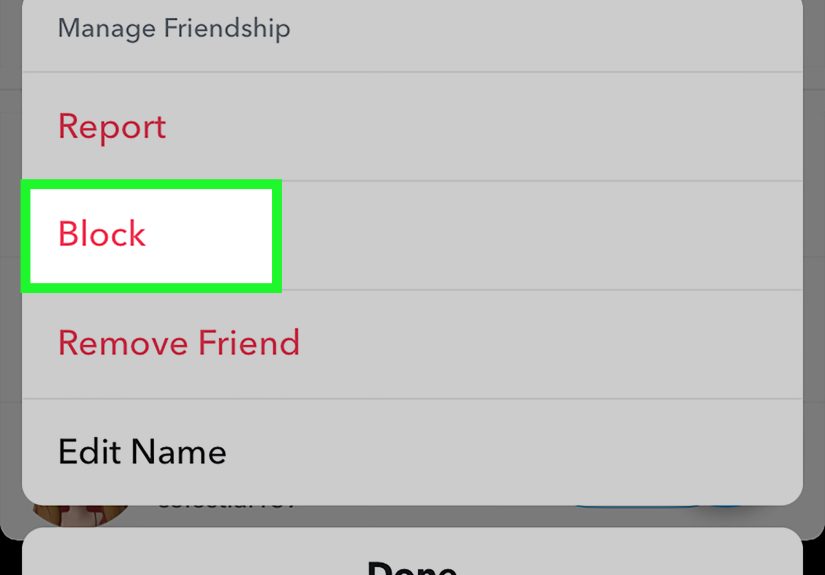
Noblocking someone on Snapchat does not automatically delete your messages. What it does do is
cut off communication and make the conversation no longer visible/accessible from your side.
If you later unblock them, Snapchat says your old chat history can still be availablewhich is a
pretty strong clue that “blocked” does not mean “deleted.”
What actually happens when you block someone on Snapchat
Snapchat’s own help guidance is clear about the big effects of blocking:
- They can’t send you Snaps or Chats.
- They won’t see your Stories or Charms (and your Snap Map location is hidden from them).
- You disappear from each other’s visibility in key places like search and suggestions.
- From your perspective, their name and active 1:1 conversation won’t be visible.
-
Group chats are different: if you share a group, blocking doesn’t remove you from it, and you may
still see their group messages (unless you leave the group). - If you unblock later, your old chat history may still be there.
So blocking is mostly about access and interaction: it stops new contact and hides that 1:1 thread
from your chat list. It doesn’t come with a “delete everything we ever said” side quest.
Why blocking doesn’t “delete messages” (and why it can feel like it did)
Snapchat’s messaging system can make this confusing because several different things can happen to messages,
depending on settings and whether messages were saved.
1) Snapchat deletes many chats automaticallyblocking or not
Snapchat’s default behavior is “delete after viewing,” but chats can also be set to delete
24 hours after viewing, 7 days after viewing, or never.
In many 1:1 and group conversations, chats are deleted by default after everyone has viewed them (or after a time
limit), unless someone saves, replies, or reacts to keep them around.
Translation: if your conversation was set to disappear quickly, messages may have been on a timer anyway.
If you block someone and the thread disappears from your chat feed, it can feel like messages got deleted
but often it’s a visibility change stacked on top of Snapchat’s normal auto-delete behavior.
2) Saved messages and “Chat Media” are a different beast
Snapchat lets people save messages (and certain snaps) in chat. Saved items stick around per your settings and
actionsbecause someone explicitly told Snapchat, “Keep this.”
If a message or snap was saved, blocking doesn’t magically revoke that saved status. In fact, Snapchat notes that
once you block someone, you won’t even be able to see the chat thread anymoremeaning you also can’t manage (save or
delete) items from that blocked chat while it’s blocked.
3) Blocking hides the thread; it doesn’t run a cleanup crew
Snapchat describes blocking as making active one-on-one conversations no longer visible on your side, and says old
chat history can still be available if you unblock. That’s the core idea:
blocking removes accessit does not erase history by default.
So… do messages delete for the other person?
This is the part everyone cares about, and it’s also where the internet gets loud. Here’s the most reliable way to
think about it:
- Blocking stops new messages. You’re not going to keep chatting unless you unblock.
-
Anything that was already saved or retained by settings can still exist. That may include saved
chat messages, saved snaps in chat, and chat media. -
Auto-deleting chats still auto-delete. If messages weren’t saved, Snapchat’s normal retention
rules applyblocking doesn’t “freeze” them into permanence.
In plain terms: blocking is not a guaranteed “delete for both sides” button. If you’re blocking someone because
you want a clean slate, you should assume they may still have access to whatever was already saved or already
deliveredespecially if they saved it in chat or captured it (screenshots, screen recordings, etc.).
Blocking vs. clearing vs. deleting vs. removing: the Snapchat confusion menu
Snapchat has multiple actions that sound similar but do very different things. Here’s the cheat sheet.
| Action | What it changes | Does it delete messages? | Best for |
|---|---|---|---|
| Block | Stops contact; hides the person/thread from your view; affects story/profile visibility | No (does not automatically delete; chat history can return if unblocked) | Cutting off contact, privacy, avoiding harassment |
| Clear Conversation (from Chat feed) | Removes the conversation shortcut from your chat list | No (Snapchat says clearing does not delete saved or sent content) | Decluttering your chat list without deleting content |
| Delete a message you sent | Removes a specific message you sent (attempts removal from servers and friends’ devices) | Yes-ish (Snapchat attempts removal, but it may not work instantly in all cases) | Undoing a sent message (typo, regret, wrong chat) |
| Remove Friend | Unfriends someone, but doesn’t fully block interaction depending on your privacy settings | No | Reducing interaction without full blocking |
If your real goal is “make the messages disappear,” blocking is the wrong tool. Blocking is about boundaries, not
erasure.
If you want messages actually gone, here are your realistic options
Option A: Delete specific messages you sent
Snapchat allows you to delete messages you sent by pressing and holding a message, then tapping “Delete.”
Snapchat warns that friends can still screenshot before you delete, and that deletion attempts may not always work
immediately if someone has poor connection or an outdated app.
Option B: Ask the other person to unsave or delete (yes, awkwardbut effective)
If the message is saved in chat (especially if they saved it), you may not have full control over whether
it stays visible on their side. If it’s truly sensitive, the only guaranteed social solution is… social:
ask them to remove it.
Option C: Adjust chat retention settings going forward
Snapchat lets conversations be set to delete after viewing, 24 hours, 7 days, or never. Some retention features have
been introduced and tested over time to give more control over how long chats stick around. The key point:
these settings affect future behavior more than retroactively deleting what’s already saved.
Option D: Don’t confuse “clear conversation” with “delete”
Clearing a conversation from your chat feed is basically sweeping the shortcut under the rug. Snapchat explicitly
notes that clearing won’t delete saved or sent content. If you clear it and later start a new chat with that person,
saved items may still be there waiting like, “Hi, remember me?”
FAQs people always ask (and Snapchat makes us earn)
If I unblock someone, will the messages come back?
Snapchat says that if you unblock someone, your old chat history can still be available. So yes, in many cases,
unblocking can make the old thread/history visible again.
If I block someone, can I still delete messages from that chat?
Snapchat notes that if you block someone, you won’t be able to see your chat anymoreso you won’t be able to save or
delete messages from that chat while they’re blocked.
Does blocking delete snaps or chat media that were saved?
Not automatically. Saved items are governed by saving actions and retention settings. Blocking is about access.
How can I tell if someone blocked me?
Common signs include the conversation disappearing, not being able to find their profile in search, and messages
failing to deliver. (This can also happen if they unfriended you or changed privacy settings, so it’s not a perfect
detective test.)
Bottom line
Blocking someone on Snapchat is a strong boundary move: it cuts off contact, hides your content from them, and makes
the conversation disappear from your chat list. But it’s not a delete button, and it’s definitely not a
time machine. If messages were saved, retained, or captured, they can still exist somewhere.
If your priority is privacy, use the right tools: delete specific messages you sent (when possible), review chat
retention settings, and treat anything truly sensitive like it might outlive the momentbecause sometimes it does.
Experiences people commonly have after blocking someone on Snapchat (real-world scenarios)
The internet is full of “I blocked them and…” stories because blocking feels dramatic, but the aftermath is usually
more mundanelike closing a door and realizing the conversation is still sitting in the hallway.
Here are some common experiences users report and why they happen.
Experience 1: “I blocked them and the whole chat vanishedso I assumed it deleted everything.”
This is probably the most common reaction. You hit “Block,” go back to your chat list, and the thread is gone.
Mentally, it’s easy to translate “not visible” into “deleted.” But Snapchat’s design encourages that confusion:
chats often disappear anyway, and blocking removes the thread from your view immediately. Later, people sometimes
unblock (for closure, curiosity, or accidental block cleanup) and discover the old chat history can reappear.
That’s the “aha” moment: the block didn’t deleteit hid.
Experience 2: “I blocked them to stop messages, but we were still in a group chat together.”
Group chats are the plot twist. Some users block someone expecting total silence, then open a shared group and see
the person still posting messages. That’s not Snapchat being pettyit’s how group conversations work.
Blocking is aimed at preventing private contact and limiting profile/story visibility, but it doesn’t
automatically remove you from shared spaces. People often solve this by leaving the group if they want a complete
separation. It feels awkward the first time you realize blocking isn’t a social force field.
Experience 3: “I blocked them because I wanted to delete what I sent… and then I couldn’t access the chat anymore.”
This one stings. Someone sends a message they regret, panics, blocks the person, and then realizes they can’t even
open the chat thread to delete the message afterward. Snapchat notes that blocking removes your ability to see the
chat, meaning you can’t manage messages inside it while it’s blocked. The lesson people take away:
if you need to delete a message you sent, do that before you blockor be prepared to unblock briefly to
manage the chat (if that’s safe and appropriate for your situation).
Experience 4: “I cleared the conversation to ‘delete’ it, but it came back later.”
Clearing a conversation from the chat feed is like removing a bookmark, not ripping pages out of the book.
People clear a conversation and feel relieved because their chat list looks clean. Then they message the person
againor the person messages themand suddenly the thread returns, sometimes with saved messages still visible.
Snapchat explicitly says clearing a conversation doesn’t delete saved or sent content. So the experience is normal,
even if it feels like Snapchat is “undoing” your decision. It’s not: it’s just showing the conversation again once
there’s new activity.
Experience 5: “I blocked them to erase evidence… but I realized screenshots exist.”
Many people learn (the hard way) that “disappearing” is a design goal, not a guarantee. Messages can be saved in
chat. Screenshots and screen recordings can happen. Even if you delete a message you sent, Snapchat warns it’s
possible the other person already captured it. The experience isn’t about Snapchat failingit’s about digital life
being copyable. This is why people who care about privacy tend to adopt a rule of thumb:
if you wouldn’t want it immortalized, don’t send iteven on an app built around disappearing content.
In short: blocking is powerful for stopping contact and controlling visibility, but it’s not a cleanup tool.
If you’re blocking for peace of mind, it works great. If you’re blocking to “delete everything,” it’s going to feel
like bringing a broom to a job that needs a paper shredder.