Table of Contents >> Show >> Hide
- What Makes the EufyMake E1 Different?
- First Impressions: More Tool Than Toy
- Print Quality: Where the E1 Starts Showing Off
- But It Is Not Magic, and It Is Definitely Not Foolproof
- Speed, Workflow, and Daily Use
- Operating Costs: The Real Plot Twist
- Who Should Actually Buy the E1?
- Extended Experiences With the EufyMake E1 UV Printer
- Final Verdict
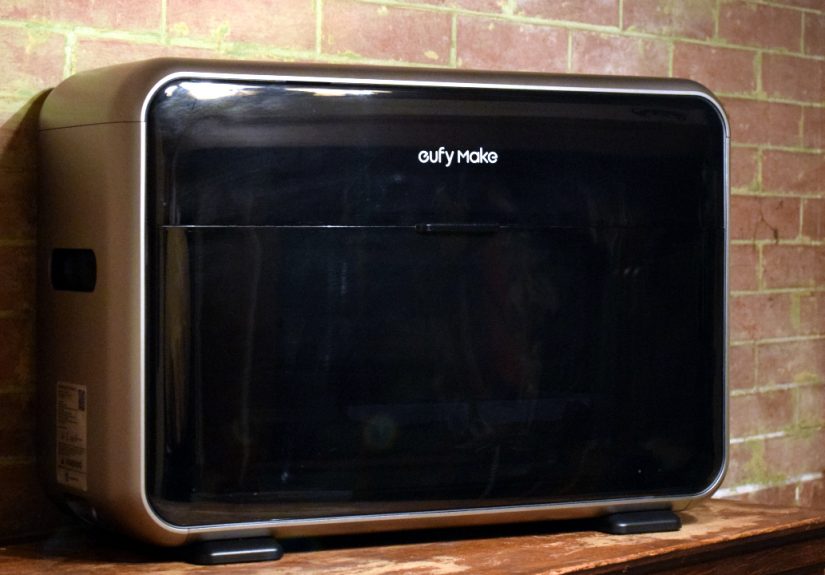
If your regular inkjet printer is the office intern, the EufyMake E1 is the eccentric art director who shows up wearing paint-splattered sneakers and insists on printing directly onto wood, glass, metal, leather, and the side of a tumbler just because it can. That, in a nutshell, is why the E1 has made so much noise in the maker world. It is not a normal printer, not a typical 3D printer, and definitely not the sort of machine you buy just to print your tax return and one photo of your dog.
Instead, the EufyMake E1 is a compact UV printer aimed at hobbyists, side hustlers, creators, and small businesses that want to put custom full-color graphics and raised textures on physical objects. Based on current hands-on coverage and official product details, it is one of the most ambitious desktop creative tools to arrive in years. It can print flat graphics, create embossed effects up to 5 mm, work on a long list of materials, and even handle curved objects like mugs and bottles with the optional rotary setup. That sounds flashy on paper. In actual use, the more interesting question is whether the machine delivers results worth the money, ink, and desk space.
The short version: yes, with some important asterisks. The E1 looks like a real step forward for consumer UV printing, but it is still a serious tool with real costs, a learning curve, and a few quirks that separate casual crafters from committed tinkerers. If you have ever wanted to turn a blank coaster, a wood panel, a phone case, or a metal sign into something that looks shop-made rather than hobby-made, the E1 starts to make a surprisingly strong case for itself.
What Makes the EufyMake E1 Different?
At its core, the E1 uses UV-curable ink. Instead of laying down standard ink and waiting for it to dry like a traditional printer, the machine cures the ink with ultraviolet light almost immediately. That lets it print on far more than paper, and it also allows the E1 to build up layers to create texture. So while it is not “3D printing” in the filament-spitting, helmet-making sense, it does borrow the idea of layering material to create dimension.
That difference matters. Traditional UV printers have usually lived behind the velvet rope of industrial shops, sign businesses, and print houses, where prices can soar into the tens of thousands. The EufyMake E1 is trying to drag that category into the home studio and small-business market. That pitch is a big reason it exploded on Kickstarter and ended up as one of the buzziest creative machines in recent memory.
Officially, the printer supports a work area up to roughly 13 by 16.5 inches, can print at up to 1440 DPI, and is marketed for use on more than 300 materials. Those materials include wood, acrylic, ceramic, stone, glass, canvas, leather, fabric, film, and metal. Optional attachments expand the system further, including a rotary module for cylindrical objects and UV DTF capability for sticker-like transfers. In plain English, the E1 is less “printer” and more “small customization studio that happens to sit on a desk.”
First Impressions: More Tool Than Toy
One thing that stands out in hands-on coverage is that the E1 does not come across like a flimsy crowdfunding gadget. Reviewers consistently describe it as well-built, thoughtfully designed, and easier to set up than you might expect from a machine doing this much. That is important, because the E1 is attempting to bridge a tricky gap: it has to be powerful enough for makers and small sellers, but approachable enough for newcomers who have never touched a UV printer before.
The hardware seems to do a lot of the heavy lifting. Reviewers point to the E1’s camera-and-laser positioning system as one of its best features. Instead of guessing where a design will land, users can scan the object, see the printable area in the app or desktop software, and position the artwork more precisely. That sounds like a small feature until you imagine trying to line up a logo on a coaster, a graphic on a phone case, or a tiny design on a Lego-style brick without it. Suddenly, it becomes the kind of feature that saves your sanity and your materials budget.
The modular design also adds flexibility without turning setup into a mechanical scavenger hunt. There is a smaller flatbed for compact projects, support for larger flat work, and expansion for mugs, tumblers, cones, and transfers. For creators who bounce between home decor, merch, gifts, and prototypes, that kind of variety is the whole appeal. One day you are printing a textured art panel; the next, you are customizing drinkware for a local event. The E1 clearly wants to be the Swiss Army knife of desktop surface printing.
Print Quality: Where the E1 Starts Showing Off
The strongest theme across reviews is that the E1 can produce genuinely impressive output. Colors are widely described as vibrant, crisp, and detailed, especially on smaller objects and bright imagery. Several reviewers were especially impressed by the way the printer handles texture and faux-finish effects. If your idea of “custom printing” is still stuck in the era of flat decals and cheap-feeling stickers, the E1 is here to bully that expectation in broad daylight.
Raised textures are where the machine earns its spotlight. The E1 can simulate effects that resemble brushstrokes, embossed details, leather-like surfaces, and other tactile finishes that make a print feel more premium. On the right material, the results seem to move beyond novelty and into the territory of actual sellable products. That is a big reason the E1 is drawing interest from Etsy sellers, market vendors, prop makers, and small custom shops. It is not just about making something personal. It is about making something that looks expensive.
Flat prints can also look excellent. Hands-on coverage mentions sharp text, strong detail, and beautiful output on coasters, magnets, mugs, and wood panels. One of the more compelling real-world takeaways is that the E1 does not just perform on manufacturer demo pieces. It seems to work well on a broad range of practical, giftable, and market-friendly items, which is exactly the category where a machine like this has to prove itself.
But It Is Not Magic, and It Is Definitely Not Foolproof
Now for the less glamorous part. The E1 can be impressive, but it is not a cheat code for instant perfection. Larger prints appear to be more error-prone than smaller ones, and several reviewers noted that the machine rewards experimentation and patience. In other words, the E1 may democratize UV printing, but it does not completely remove the maker part of making.
Some reviewers saw issues such as overspray, blotchiness, registration drift, muddy dark areas, or unexpected texture artifacts, particularly on larger or more demanding prints. One review noted visible grid patterns at certain angles on a large print. Another found that larger jobs benefited from running a cleaning cycle first, since errors become much more painful when the print is big, the material is expensive, and the job has already been running for a while. That is the classic creative-tool experience: thrilling, slightly humbling, and occasionally accompanied by the urge to stare at the machine and whisper, “We were rooting for you.”
Material compatibility also has fine print. Yes, the E1 supports a long list of surfaces, but “supports” does not mean “every random object in your house is instantly production-ready.” Surface prep matters. UV-friendly blanks matter. Shape matters. One hands-on test reported that a print on a personal phone case rubbed off quickly, while UV-ready sample cases supplied with the printer performed better. That is a useful reminder that the E1 is a serious customization tool, not a magical stamp that ignores chemistry.
Speed, Workflow, and Daily Use
The E1’s workflow seems to be one of its biggest strengths. Reviewers describe setup as relatively straightforward, and the software gives users a useful mix of beginner-friendly guidance and deeper controls. The app can show estimated ink consumption before you start a print, which is a practical feature once you realize this machine does not run on wishes and optimism. It runs on proprietary ink, and every print is a tiny business decision.
Speed is more complicated. Small flat items can be done in minutes, which makes the E1 feel pretty nimble when you are producing coasters, tags, magnets, or similar pieces. Add texture, size, or more elaborate jobs, and print times can expand quickly. That is normal for this category, but it also means the E1 is not really designed for impatient button-mashers. If your dream workflow is “press print and immediately receive a textured masterpiece,” the E1 would like a word.
That said, the slower pace is easier to accept when the output looks premium. There is a big difference between waiting 45 minutes for a bland craft-store result and waiting 45 minutes for a custom piece that looks like something from a boutique shop. The E1 seems to lean toward the second category often enough to justify the wait, especially for creators selling finished goods rather than just making one-off experiments.
Operating Costs: The Real Plot Twist
Here is where the E1 stops flirting and starts asking serious questions. The printer itself is not cheap, and the official U.S. store currently shows the E1 in the roughly $2,300 to $2,900 range depending on bundle, with the top-line pre-order price shown at $2,499. That alone puts it outside impulse-buy territory.
Then there is ink. Multiple reports peg a replacement ink and cleaning cartridge kit at about $299, and that expense is central to understanding the E1. UV printing is not cheap to operate, and the E1 does not change that law of nature. The software’s ink-estimate feature is helpful because it turns every job into a visible tradeoff. Is this print worth the materials? Is a retry worth it? Is a textured version worth the extra cost over a flat one? That may sound tedious, but for small businesses it is exactly the kind of transparency you want.
There are also maintenance realities. Reviews mention noise, noticeable odor, and the fact that the printer circulates ink to keep the print head healthy. That is good for reliability, but not as fun when you realize that idle time and shutdown behavior can affect ink usage too. Adhesive mats eventually wear out. Space matters. Ventilation matters. If you are thinking of putting the E1 next to your cereal bowls, maybe give that plan one more draft.
Who Should Actually Buy the E1?
The best fit seems pretty clear. The E1 makes the most sense for serious hobbyists, craft sellers, prop makers, event-product businesses, custom gift shops, and small studios that can turn its flexibility into revenue or at least heavy use. If you regularly customize wood signs, tumblers, ornaments, coasters, promotional items, art panels, or branded goods, the E1 looks like the kind of machine that could unlock entirely new product lines.
It is also appealing for designers and makers who care about texture as much as color. A lot of desktop customization tools can put an image on a surface. Far fewer can create something that feels tactile, layered, and deliberately finished. That is where the E1 separates itself.
On the other hand, if you only want a machine for occasional crafts, casual stickers, or basic image transfers, the E1 is probably overkill. It is too expensive, too specialized, and too capable to spend most of its life acting as a very dramatic label maker. This is a workshop tool dressed in stylish consumer clothing.
Extended Experiences With the EufyMake E1 UV Printer
The most revealing part of the E1 story is not the spec sheet. It is what happens when people start feeding the machine real projects instead of perfectly curated marketing demos. That is where the printer starts to feel less like a novelty and more like a genuinely flexible production tool.
For smaller items, the E1 seems to shine fast. Coasters, fridge magnets, and drinkware repeatedly come up as sweet spots. They are small enough to keep print times reasonable, flat or predictable enough to avoid chaos, and profitable enough to make sense for sellers. This is the kind of work the E1 appears to handle with confidence. Reviewers described strong color, crisp details, and output that looked polished rather than homemade. For a machine living on a desk instead of in a commercial print room, that is no small feat.
Wood is another standout material. One reviewer found especially beautiful results using black-and-white imagery on rough boards, letting the natural grain become part of the final piece. That is the sort of happy collision between tool and material that creative people live for. The E1 is not just stamping a design onto a surface; in the right hands, it can collaborate with the material itself. Wood grain, canvas texture, and metallic sheen all become part of the final visual language.
The machine also seems to reward people who enjoy a little problem-solving. A clever example came from experiments with tiny bricks and novelty parts, where alignment was initially tricky. The solution was not some grand engineering breakthrough, just a practical jig-like setup using cardboard to create a better printable area. That is a very maker-style success story: half technology, half “I fixed it with whatever was on the table.”
Of course, the E1 still has boundaries. Large prints raise the odds of streaks or alignment issues. Dark scenes can lose subtle detail. Non-UV-ready surfaces may disappoint. And yes, there is a smell during operation that you will probably notice unless your nose has already retired. But even those caveats reinforce the larger point: this is real equipment for real making. It rewards good prep, smart material choices, and patience.
What makes the E1 compelling is that it turns ideas into physical products that feel premium. A blank tumbler becomes event merch. A plain wooden board becomes wall art. A boring phone accessory becomes a custom one-off. A standard coaster becomes something textured enough to earn compliments and suspiciously long stares. That transformation is the machine’s real selling point. It does not just print images. It adds finish, personality, and commercial potential to everyday objects.
And that is why the E1 keeps generating excitement. For creators, it opens a door that used to be guarded by industrial pricing and commercial-shop complexity. It is still expensive, still imperfect, and still a machine you have to learn. But when it clicks, it does something wonderfully rare in the hardware world: it makes you immediately think of ten more things you want to try.
Final Verdict
The EufyMake E1 UV Printer looks like the rare desktop machine that actually deserves the word “game-changer,” provided you use that phrase responsibly and not like a caffeinated marketing intern. It brings UV printing and textured surface customization into a more accessible price bracket, wraps it in user-friendly software, and delivers output that can look genuinely premium on the right materials.
It is not for everyone. The upfront price is serious, the ink costs are real, the smell is not exactly aromatherapy, and the best results still require patience and practice. But if you are a serious hobbyist, a seller, or a maker who wants to expand into custom goods with a tactile, polished finish, the E1 makes a strong argument for itself. It does not replace a traditional printer. It does not replace a standard 3D printer either. It carves out its own lane, and right now that lane looks surprisingly exciting.
For the right user, the EufyMake E1 is not just a fun machine. It is a product generator, a prototyping studio, and a creative rabbit hole with a power cord. Enter at your own risk. You may come back with custom mugs, embossed art panels, branded merch, and a sudden desire to print on absolutely everything that stays still long enough.