Table of Contents >> Show >> Hide
- Why Cleaning Your Dyson Regularly Really Matters
- Before You Start: Safety and Supplies
- Step-by-Step: How to Clean a Dyson Vacuum
- How to Clean a Dyson Filter (The Right Way)
- How Often Should You Clean or Replace a Dyson Filter?
- Signs Your Dyson Filter Needs Attention
- A Simple Dyson Maintenance Schedule
- Extra Tips to Keep Your Dyson in Top Shape
- Real-Life Experiences: What You Learn After Cleaning a Dyson the Hard Way
- Conclusion
If your Dyson suddenly sounds louder, smells a little funky, or seems to be just pushing crumbs around
instead of picking them up, it’s not mad at youit just needs a spa day. A quick, regular deep-clean of
your Dyson vacuum and its filter can restore suction, protect the motor and battery, and keep dust and
allergens from flying right back into your air. Dyson itself recommends washing filters about once a month
to keep performance up and strain off the motor.
Think of this guide as the Family Handyman approach to Dyson care: practical, step-by-step, and
slightly obsessed with getting the job done right. We’ll walk through exactly how to clean your Dyson
vacuumfrom canister to brush barand give your filter the thorough rinse and dry time it deserves, using
tips pulled from Dyson’s own support pages and other expert home-care sources.
Why Cleaning Your Dyson Regularly Really Matters
It’s easy to assume a high-end vacuum like a Dyson is basically maintenance-free. In reality, all that
cyclonic power depends on clear air pathways and a healthy filter. When the filter clogs or the bin is
jammed full, air can’t move freely. The motor compensates by working harder, which weakens suction and can
even shorten the life of the battery on cordless models.
A clean Dyson vacuum and filter can help:
- Restore suction power so you’re not going over the same crumbs ten times.
- Improve indoor air quality by letting the multi-stage filtration do its job trapping fine dust and allergens.
- Extend battery and motor life by reducing strain on the system.
- Reduce odors caused by stale dust, pet hair, and whatever mystery grit lives under your couch.
The good news: cleaning a Dyson vacuum and its filter is simple once you know the order of operationsand
you don’t need fancy detergents or special cleaners.
Before You Start: Safety and Supplies
Before you grab that filter, slow down for 60 seconds and set yourself up the right way.
Unplug and Power Down
- Corded models: Switch the machine off and unplug it from the outlet.
- Cordless models: Turn the vacuum off. For deeper maintenance, remove the battery if your model allows it.
This isn’t just about safetyturning the machine off also lets fine dust settle so it’s less likely to end
up floating around your face when you open the bin.
Gather Your Cleaning Tools
You don’t need much to clean a Dyson well:
- Soft, lint-free microfiber cloths
- Cold or lukewarm water (never hot)
- Small scissors or a seam ripper for cutting hair off the brush bar
- An old toothbrush or small detail brush (optional, for crevices)
- A well-ventilated spot where filters and brush bars can air-dry for at least 24 hours
Skip detergents and soaps on the filter. Dyson specifically warns against using cleaners or hot water, which
can damage the filter material and reduce its efficiency.
Step-by-Step: How to Clean a Dyson Vacuum
While each Dyson model looks a little different, the basic cleaning order is the same: bin, cyclone, brush
bar and floorhead, then attachments and exterior. Always double-check your owner’s manual or Dyson’s online
support page for model-specific disassembly instructions.
1. Empty and Clean the Dust Bin
- Hold the vacuum over a trash can.
- Press the red release button or lever on the bin to open the base flap and dump the dust. (On many stick models, the bin slides downward and “ejects” the debris.)
- Once empty, remove the bin completely if your model allows it.
- Wipe the inside and outside of the bin with a damp microfiber cloth. Don’t submerge the whole bin unless your manual says it’s safe.
- Let the bin air-dry completely before you clip it back on.
Overfilling the bin above the “MAX” line is one of the fastest ways to kill suction. Empty it as soon as
debris reaches that linedon’t wait until the thing is bursting.
2. Clean the Cyclone Assembly
The cyclone is that futuristic-looking plastic tower above the bin that spins dust out of the air. It does
not want a bubble bath.
- Remove the bin so you can access the cyclone assembly.
- Hold the cyclone over a trash can and gently tap it to dislodge loose dust.
- Use a soft brush (or the brush side of a combination tool) to remove lint from the cyclone shroudthe perforated metal or plastic section.
- Do not pour water into the cyclone or submerge it. Moisture inside the cyclone can trap dust and damage internal parts.
3. Detangle and Clean the Brush Bar
If your Dyson sounds like it’s chewing carpet, the brush bar is probably wrapped in a wig made of hair,
thread, and pet fluff.
- Flip the cleaner head over and look for a coin slot or release tab on the end cap.
- Use a coin to turn the fastener and remove the end cap, then slide out the brush bar.
- Use small scissors or a seam ripper to carefully cut along the length of the bar, freeing tangled hair. Avoid snipping the bristles.
- Pull off all loosened hair, thread, and fibers.
- If your manual allows, rinse the brush bar under cold water only. Shake off excess water.
- Stand the brush bar upright and let it air-dry for at least 24 hours before reinstalling.
4. Wipe Down Attachments, Wand, and Exterior
Finally, give the rest of the vacuum a quick beauty treatment:
- Use a dry or slightly damp microfiber cloth to wipe the wand, handle, and main body.
- Check each attachment for blockages and tap out any debris.
- Let everything dry fully before you click parts back together.
How to Clean a Dyson Filter (The Right Way)
The filter is the real MVP of your Dyson. It traps microscopic dust that would otherwise recirculate into
your home’s air. When it’s clogged, suction drops fast and the motor or battery has to work harder. Dyson
recommends cleaning filters about once a month, though light users may stretch that a bit and heavy users
might need to clean more often.
Most Dyson stick vacuums and many upright models use washable filters. Here’s the safe,
manufacturer-approved way to clean them.
1. Remove the Filter
Depending on your model, the filter may be:
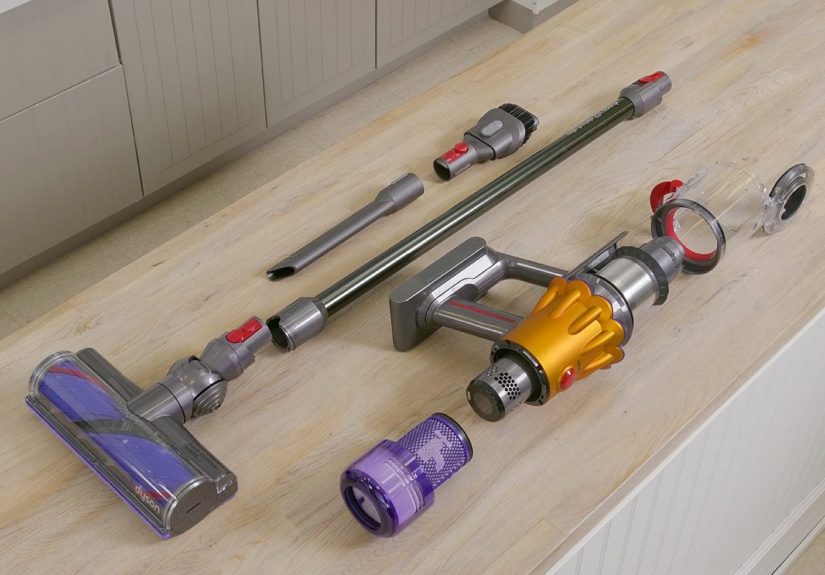
- A purple cone-shaped pre-filter on top of the cyclone (common on V6, V7, V8).
- A rear circular filter that twists off the back of the motor (common on V10, V11, V12, V15).
- Separate pre- and post-motor filters on some upright and canister models.
Gently twist or pull the filter out according to your manual. If the filter looks cracked, torn, or
permanently stained, skip washing and replace it instead.
2. Knock Out Excess Dust
Holding the filter over a trash can or sink, tap it gently to loosen dry dust and debris.
Some Dyson guides suggest lightly tapping on the side of a sink or bin.
3. Rinse With Cold Water Only
- Run cold water over the filter, inside and outside.
- Use your fingers to gently massage the filter material until the water runs clear.
- Avoid any soaps, detergents, or hot waterthese can break down the fibers and reduce filtration performance.
4. Shake Out Excess Water
When the filter looks clean, give it a few gentle shakes over the sink to remove extra water. Don’t wring,
twist, or squeeze it hardthis can tear the material or distort the shape, preventing a proper seal when you
reinstall it.
5. Air-Dry for at Least 24 Hours
This is the step people like to rush, and it’s where a lot of problems start. A damp filter will pull dust
into a sticky, muddy layer and can even lead to mold or motor damage.
- Set the filter somewhere warm and well ventilatedon a wire rack, windowsill, or counter.
- Let it dry for at least 24 hours, sometimes longer in humid climates.
- Keep it away from direct heat sources like radiators, ovens, or hair dryers. High heat can warp the plastic and damage the fibers.
Do not reinstall until the filter feels completely dry and cool to the touch.
6. Reinstall the Filter
When dry, slide or twist the filter back into place. Many newer Dyson models will even show a “filter
missing” or “filter not sealed” message on the display if it’s not properly seated, so make sure you hear or
feel it click or lock into position.
How Often Should You Clean or Replace a Dyson Filter?
Dyson’s general rule of thumb is to wash your filters about once a month during regular
use. However, how often you should clean or replace depends on:
- Your usage: Daily use in a busy home with pets may require more frequent cleaning.
- Filter type: Washable foam or fabric filters can usually be cleaned monthly and replaced every 6–12 months, while some paper or HEPA filters are designed to be replaced instead of washed.
- Your environment: Dusty areas, lots of pet hair, or renovation dust will clog filters faster.
As a simple rule: if suction drops, the motor sounds strained, or there’s a dusty smell, it’s probably time
to clean the filtereven if the calendar says it’s “too soon.”
Signs Your Dyson Filter Needs Attention
Watch for these red flags between regular cleanings:
- Noticeably weaker suction even with a clear bin.
- The vacuum leaves behind a faint dusty or musty odor.
- Your cordless battery drains faster than usual or the vacuum overheats.
- Visible gray buildup on the filter surface that doesn’t tap off easily.
- Warning lights or on-screen prompts telling you to clean the filter (on LCD-equipped models).
A Simple Dyson Maintenance Schedule
To keep things easy, think of Dyson care in three levels. Adjust based on how often you vacuum and how
messy your household is.
After Every Few Uses
- Empty the bin whenever it hits the MAX line.
- Check the cleaner head opening and wand for obvious blockages.
Every Month
- Wash the washable filter(s) with cold water and let dry fully for 24 hours.
- Quickly wipe the bin, wand, and body with a microfiber cloth.
- Check the brush bar for hair and string; cut away tangles as needed.
Every 6–12 Months
- Replace filters that are no longer cleaning up well, even after washing.
- Inspect seals, clips, and latches for damage.
- Consider a deeper clean of the cyclone and accessories.
Building these steps into your routine makes your Dyson run closer to “like new” for years instead of
slowly turning into a very expensive crumb pusher.
Extra Tips to Keep Your Dyson in Top Shape
- Don’t overuse “Boost” mode. That max-power setting feels satisfying but can drain batteries quickly if your filter is clogged. Clean the filter instead of living in Boost.
- Park it clean. Try to empty the bin and check for tangles before docking or putting it away.
- Use the right attachment. Soft roller heads and delicate tools are easier on floors and prevent debris from getting stuck where it shouldn’t.
- Listen for changes. A higher-pitched whine, more heat, or odd smells are your Dyson’s way of begging for maintenance.
Real-Life Experiences: What You Learn After Cleaning a Dyson the Hard Way
If you’ve ever delayed cleaning a Dyson filter, you’re in good company. A lot of people buy a premium vacuum,
assume it’ll handle anything, and then slowly notice the performance sliding downhill. Here’s what typically
happensand what you pick up along the way.
First, the suction gets weaker, but you convince yourself it’s your imagination. You start blaming the rug
instead: “This shag just traps everything.” Then you notice you’re running the vacuum longer, switching to
Boost mode more often, and still finding crumbs a few hours later. On cordless models, the battery might
suddenly feel “bad,” because it can barely last a cleaning session anymore.
The turning point usually comes when you finally open the filter and see what’s going on. Fine gray dust,
pet dander, fibers, and carpet fuzz are packed into the filter like insulation. It’s not that the Dyson has
failed youit has been doing its job so well that the filter is now completely clogged.
The first thorough clean is oddly satisfying:
- You tap the filter and watch a cloud of dust fall out.
- You rinse it under cold water and see how much grime has been hiding there.
- You cut years’ worth of hair from the brush bar and realize, “Oh, that’s why it kept stalling on the rug.”
Once everything dries and you reassemble the vacuum, the difference is immediate. The motor sounds smoother
instead of strained. The vacuum glides more easily over the floor. Crumbs disappear in a single pass. If you
have allergies or pets, the air feels a little fresher, because the filter can finally trap fine dust again
instead of just recirculating it.
Another common lesson is how important drying time really is. Many people rinse the filter in the morning,
get impatient, and pop it back in the same afternoon while it’s still slightly damp. The vacuum works for a
while, but the damp filter grabs dust even faster, forming a dense, muddy layer that clogs more stubbornly
than before. Letting the filter dry a full 24 hours (or even overnight plus a day), in a warm, airy spot,
makes a huge difference in how long that “just cleaned” performance lasts.
With experience, you also get better at spotting early warning signs. You learn the normal sound of your
Dyson so that when it gets louder, whinier, or more high-pitched, you know it’s filter time. You notice when
the bin starts to fill faster in shedding season or during a renovation and adjust your cleaning schedule
accordingly. Instead of waiting for the vacuum to struggle, you start treating filter maintenance as part of
your general housecleaning rhythm.
Finally, you discover that a well-maintained Dyson actually saves time. You don’t have to redo sections of
the floor. You don’t need to follow up with a second vacuum. You’re not constantly stopping to clear
blockages because hair wrapped around the brush bar. The ten minutes you spend once a month rinsing the
filter and checking the brush bar pay off all month long in faster, more efficient cleaning.
In short, the “hard way” teaches a simple lesson: your Dyson can absolutely handle everyday messes, but it
can’t maintain itself. A clean filter is the difference between a tired, noisy vacuum and the powerful,
efficient machine you thought you were buying in the first place.
Conclusion
Cleaning a Dyson vacuum and its filter isn’t complicated, but it makes a dramatic difference in how well
your machine performs. Empty the bin before it overfills, keep the cyclone and brush bar free of buildup,
and give your filter a thorough cold-water rinse and a full day to dry once a month. Those simple habits help
your Dyson maintain strong suction, protect its motor and battery, and keep the air in your home cleaner.
Treat your Dyson like a tool that deserves occasional tune-ups instead of a magic box that works forever on
its own, and it’ll reward you with faster, easier cleaning for years to come.