Table of Contents >> Show >> Hide
- Quick Safety & Common-Sense Note (Before You Hit “Reset”)
- What “Oil Life” Actually Means on a Honda Civic
- Step 1: Identify Your Civic’s Reset Style (It’s Mostly About the Display)
- How to Reset Oil Life on a Honda Civic (By Model/Display Type)
- Method A: 2022–2025 Civic (HOME Button + Selector Wheel, Wrench Screen)
- Method B: 2016–2021 Civic (Driver Information Interface: “i” Button + ENTER)
- Method C: 2016–2021 Civic (Information Display: TRIP Knob/Button on the Cluster)
- Method D: 2012–2015 Civic (i-MID Menu: MENU → Vehicle Info → Maintenance)
- Method E: 2006–2011 Civic (SEL/RESET Button on the Gauge Cluster)
- What About Honda Maintenance Minder Codes (A, B, 1, 2…)?
- Troubleshooting: When the Oil Life Won’t Reset (or Resets Wrong)
- Best Practices After Resetting Oil Life
- FAQ: Quick Answers for Busy Humans
- Real-World Experiences: What It’s Like Resetting Oil Life on a Honda Civic (And What People Learn the Hard Way)
Your Honda Civic is basically a very polite robot that only asks for a few things: fuel, tire pressure, and the occasional
spa day in the form of an oil change. When it’s time for that spa day, the Maintenance Minder / oil life indicator shows up
on your dash like: “Hey bestie… we should talk.”
Resetting oil life after an oil change is important because it tells your Civic to start tracking a fresh maintenance interval.
If you don’t reset it, the car can keep nagging you early (or worseget its service timing wrong). On newer Civics, you can
even reset specific maintenance items, not just the oil life percentage.
Quick Safety & Common-Sense Note (Before You Hit “Reset”)
- Reset the oil life only after you actually changed the oil (and filter, if required).
-
If you reset without doing service, your maintenance tracking becomes inaccurateand that can lead to real mechanical
problems later (your Civic’s manual is not subtle about this). -
If you just bought the car used and the oil life reads 100%, that doesn’t automatically mean the oil is fresh. It may just
mean someone reset it. (Yes, people do that. No, it doesn’t make the engine feel loved.)
What “Oil Life” Actually Means on a Honda Civic
Honda’s Maintenance Minder doesn’t rely on a fixed “change every 3,000 miles” rule. Instead, it estimates remaining oil life
based on operating conditions (and, on some models, accumulated engine operating behavior). The display counts down from
100% toward 0%. You’ll typically see reminders around 15% (“due soon”), and more urgent messages as it gets lower.
What you might see on the dash
- Oil life percentage (example: 40%, 15%, 5%, 0%).
- A wrench icon (Maintenance Minder indicator) and possibly a message like “SERVICE.”
- Service codes (like A, B, and numbers such as 1, 2, 3…). These tell you what maintenance items are due.
Step 1: Identify Your Civic’s Reset Style (It’s Mostly About the Display)
Honda Civics fall into a few common “reset styles.” You don’t need to memorize generations like a superfanjust match what
your dashboard and steering wheel look like:
-
2022–2025 (and many late models): Driver Information Interface with a HOME button and a
selector wheel (often on the steering wheel). You’ll find a wrench screen where you can reset items. -
2016–2021: Either a Driver Information Interface (with an i/Display button and
ENTER) or a simpler information display using a TRIP knob/button on the cluster. -
2012–2015: i-MID style menu navigation (MENU / Vehicle Info / Maintenance), typically using steering wheel
buttons like MENU and SOURCE. -
2006–2011 (and similar): Classic cluster reset using the SEL/RESET button on/near the gauge
display.
How to Reset Oil Life on a Honda Civic (By Model/Display Type)
Method A: 2022–2025 Civic (HOME Button + Selector Wheel, Wrench Screen)
If your Civic has the newer driver information interface (common on 2022+), your reset is done through the Maintenance
Minder screen. The good news: it’s clean and modern. The “mildly annoying” news: you have to hold a wheel for about 10
seconds, which feels like a test of patience.
- Set the power mode to ON (engine can be off; you just need the electronics on).
- Press the HOME button on the steering wheel.
- Roll the selector wheel until you reach the wrench (Maintenance Minder) screen.
- Press the selector wheel to open the Maintenance Minder screen (you’ll see oil life % and due items).
- Press and hold the selector wheel for about 10 seconds to enter reset mode.
-
Choose what to reset:
- All Due Items (best after completing everything that’s currently due), or
- A single item (helpful if you did one maintenance task but not others).
- Press the selector wheel again to confirm the reset.
- If you have other due items you completed, repeat the selection/reset process.
Tip: Some Civics show the Maintenance Minder using a right selector wheel instead of the left, depending on
the meter/display type. The idea is the same: get to the wrench screen, hold the wheel ~10 seconds, then choose what to reset.
Method B: 2016–2021 Civic (Driver Information Interface: “i” Button + ENTER)
Many 10th-gen Civics (2016–2021) use a driver information interface where you navigate using the Display/Information button
(often marked with an “i”), arrow buttons, and ENTER.
- Set the power mode to ON (or turn ignition ON).
- Press the Display/Information (“i”) button until you find the wrench icon.
- Press ENTER to open the Maintenance Minder screen.
- Press and hold ENTER for about 10 seconds to enter reset mode.
-
Use the arrow buttons to select:
- All Due Items (reset everything currently due), or
- A specific maintenance item you completed.
- Press ENTER to confirm the reset.
- Repeat for other items if needed.
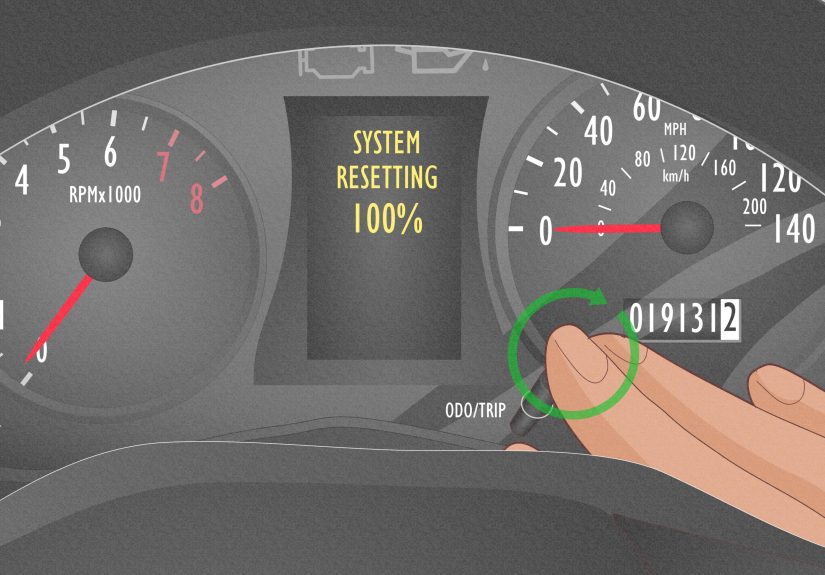
Method C: 2016–2021 Civic (Information Display: TRIP Knob/Button on the Cluster)
Some Civics in this era use a simpler instrument cluster display. If your dash has a TRIP knob/button that cycles screens,
you can reset maintenance from there.
- Turn ignition to ON (engine off is fine), and make sure the car is stopped/parked.
- Press the TRIP knob/button repeatedly until the Maintenance Minder/oil life screen shows.
- Press and hold the TRIP knob for 10 seconds or more to enter reset mode.
- Rotate the TRIP knob to select the item you want to reset (or all due items, if available).
- Press and hold the TRIP knob for 5 seconds or more to confirm the reset.
Method D: 2012–2015 Civic (i-MID Menu: MENU → Vehicle Info → Maintenance)
On many 2012–2015 Civics, the reset is done through the i-MID (intelligent Multi-Information Display). The button names can
vary slightly by trim, but you’re generally navigating a menu with steering wheel controls.
- Turn ignition to ON (don’t start the engine).
- Press MENU on the steering wheel to open the i-MID menu.
- Scroll to Vehicle Information and select it.
- Find and open Maintenance Info (or “Maintenance”).
- When the oil life screen appears, select Reset or Yes.
- Confirm, and the oil life should return to 100%.
If you’re not seeing “Maintenance Info”: Some trims require you to press a specific select/confirm button (often
labeled SOURCE/ENTER) once you highlight the menu item. The flow is the sameget to Maintenance Info, then confirm reset.
Method E: 2006–2011 Civic (SEL/RESET Button on the Gauge Cluster)
This is the classic Honda reset style. It’s simple, fast, and a little retrolike using a flip phone that still somehow has
better battery life than anything made today.
- Turn the ignition to ON (II) (engine off).
- Press SEL/RESET repeatedly until the oil life indicator appears.
- Press and hold SEL/RESET for about 10 seconds until the oil life and maintenance codes blink.
- Release the button.
- Press and hold SEL/RESET again for more than 5 seconds until the display resets to 100%.
What About Honda Maintenance Minder Codes (A, B, 1, 2…)?
Resetting oil life is often tied to the Maintenance Minder codes you see. These are not random. They’re Honda’s way of saying,
“Here’s what your car needs,” without writing you a novel on the dashboard.
Common examples you might see
- A: Replace engine oil.
- B: Replace engine oil and oil filter, plus inspections (brakes, fluids, suspension/steering items, etc.).
- 1: Tire rotation.
- 2: Air cleaner and cabin (dust/pollen) filter and drive belt inspection (varies by model/year).
- 3: Transmission fluid (varies by model/year/conditions).
- 4: Spark plugs and valve clearance inspection (varies by model/year/engine).
- 5: Engine coolant (varies by model/year).
- 7: Brake fluid (and Honda commonly recommends brake fluid service by time as well).
Practical takeaway: If your Civic shows something like B1, that’s not a weird secret code. It’s basically:
“Oil + filter + inspections, and rotate tires.” If you only changed the oil, don’t reset “All Due Items” unless you truly did
everything that’s currently due.
Troubleshooting: When the Oil Life Won’t Reset (or Resets Wrong)
1) “I reset it, but the wrench/service message is still there.”
That usually means you reset only one item (or didn’t confirm the reset). Go back into reset mode and check whether there
are additional due items besides oil life. On newer systems, you may need to reset “All Due Items” or reset each due item
individually.
2) “It shows negative mileage or looks ‘past due.’”
Some older Hondas show that the vehicle has gone beyond the maintenance point. Get the service done as soon as possible,
then reset using the appropriate method for your display.
3) “I can’t find the Maintenance screen anywhere.”
- Make sure the car is in ON mode (not just ACC).
- Try cycling with the Display/i button or the TRIP knob to reach the wrench/oil life screen.
- If you’re using the infotainment screen method, look under Settings → Vehicle → Maintenance Info (if equipped).
4) “I reset it by accidentcan I undo it?”
There’s no simple “undo” button. If you reset without doing the service, the smart move is to change the oil soon (or verify
service history) so your maintenance tracking matches reality again.
Best Practices After Resetting Oil Life
- Write down the date and mileage of your oil change (notes app, glovebox log, or a maintenance app).
- Check your oil level after the change and again after a short drive (proper level, no leaks).
- Use the correct oil recommended for your Civic’s engine and climate (your owner’s manual is the final boss here).
- Don’t ignore other codes: If your Civic is asking for additional service items (filters, fluids, rotation), plan them.
FAQ: Quick Answers for Busy Humans
Can I reset oil life without changing the oil?
You can, but you shouldn’t. The Maintenance Minder is part of your car’s maintenance tracking. Resetting without service makes
the interval inaccurateand that can lead to missed maintenance down the road.
Do I need to reset oil life if a shop changed the oil?
Most shops reset it automatically. If they didn’t (it happens), you can reset it yourself in under two minutes.
Should I reset “All Due Items”?
Only if you actually completed all due maintenance items listed. If you only did the oil change, reset just the oil life item
(or the specific due item) where your Civic allows it.
Real-World Experiences: What It’s Like Resetting Oil Life on a Honda Civic (And What People Learn the Hard Way)
If you’ve never reset oil life before, the first attempt often feels like playing a very small, very polite video game inside
your instrument cluster. People expect a single button that says “Reset Oil,” and Honda says, “Welcome to the Wrench Menu,
traveler.” The good news is that once you’ve done it one time, it becomes one of those oddly satisfying car-owner skillslike
perfectly timing a gas pump click so it lands on a round dollar amount.
One of the most common experiences Civic owners report is resetting the wrong thing the first time. For example, they’ll reset
“All Due Items” after only doing an oil change, then realize later that the car had also been due for tire rotation or a filter.
It’s not catastrophic, but it does remove the reminder that would have nudged them to schedule (or DIY) that other service.
The fix is simple: start keeping a quick maintenance note with mileage and what you actually did. Even a basic list like
“oil + filter at 52,120 miles” makes you feel like the responsible adult your Civic always believed you could be.
Another classic moment: someone changes the oil, gets in the car, and the dashboard still shows 10% oil life. That’s when the
panic spiral begins. “Did I use the wrong oil?” “Is the car mad?” “Do I need to call my uncle who ‘knows cars’?”
Usually, it’s just that the reset step was missed. Many owners say the trick is to slow down and watch for the “blinking”
phaseon older models, you have to hold the button long enough for the display to blink, then hold again to confirm. On newer
models, you have to enter reset mode (the long press) and then confirm the item selection. Honda systems are consistent, but
they really want you to confirm what you’re doing.
Civic owners with different trims often compare notes and realize they’re not even resetting the same way. A friend with a
newer Civic might use the HOME button and selector wheel, while someone with an older cluster uses SEL/RESET. That leads to
the second most common experience: searching online and finding instructions that look almost right… but don’t match your
buttons. The easiest workaround is to follow the logic: get power mode ON, navigate to oil life/wrench screen, long-press to
enter reset mode, then confirm the reset. Once you know the pattern, the specific buttons are just the “controller.”
People who do their own oil changes also share a small but useful habit: after resetting, they immediately turn the car off,
then back ON to confirm the display shows 100%. It’s like checking you locked your front doorexcept your door doesn’t track
engine wear. Some also like to keep the oil life percentage visible for a few days just to reassure themselves everything is
tracking correctly. (Is it necessary? Not really. Is it comforting? Absolutely.)
Finally, there’s the “I bought the car used” experience. Many used Civic buyers see 100% oil life and assume the car is freshly
serviced. Sometimes it is. Sometimes it’s a reset with mystery oil of unknown vintage. Owners who’ve been through this usually
recommend doing a baseline oil change after purchase (unless you have clear, recent records) and then resetting the oil life so
you are the one in charge of the maintenance timeline. It’s not just about the number on the dashit’s about knowing
what’s actually in the engine. Your Civic will thank you by continuing to be a ridiculously reliable little legend.