Table of Contents >> Show >> Hide
- What a “focus timer app” actually needs to do (and what’s just glitter)
- Quick comparison: best picks by “type of distraction”
- The best focus timer apps (with real-world strengths and honest tradeoffs)
- 1) Focus To-Do: Best “timer + task list” combo for structured work
- 2) TickTick: Best for people who want focus timers inside a daily plan
- 3) Forest: Best for breaking the “pick up phone, forget life” loop
- 4) Freedom: Best cross-device distraction blocker for serious focus windows
- 5) Cold Turkey Blocker: Best “hard mode” app for desktop focus
- 6) RescueTime: Best for people who want data, accountability, and focus sessions
- 7) Pomofocus: Best simple web-based Pomodoro timer (no installs, no drama)
- 8) Be Focused: Best straightforward Pomodoro timer for Apple users
- 9) Tide: Best focus timer if you want calming soundscapes built in
- 10) Focus Friend: Best “gamified accountability” timer when you need motivation
- Don’t ignore the built-in tools you already have
- A simple “focus stack” that works for most people
- Common mistakes that make focus timers feel “ineffective”
- Final takeaway: pick a timer that removes decisions
- Experiences: what it’s really like using focus timer apps at work
If your attention span has started acting like a toddler in a candy aisletouching everything, committing to nothingyou’re not alone.
The modern workday is basically a buffet of interruptions: pings, pop-ups, “quick” messages that turn into 37-minute side quests, and a brain that
suddenly remembers it must reorganize the spice drawer right now.
That’s where focus timer apps come in. At their best, they do two things:
(1) turn your work into short, doable sprints, and (2) add friction between you and your favorite distractions.
Think of them as a friendly bouncer for your brain: “Sorry, TikToklist isn’t tonight.”
What a “focus timer app” actually needs to do (and what’s just glitter)
A focus timer is usually based on the Pomodoro technique: work for a set time (often 25 minutes), take a short break, repeat, and then take a longer break.
But you don’t have to worship at the shrine of 25:05. The best apps let you customize the intervals so your timer matches your actual job
(and not an idealized version of you who lives in a cabin and writes novels by candlelight).
The features that matter most
- Custom intervals: 25/5 is classic, but many people work better with 40/10, 50/10, or 90/15.
- Distraction controls: app/website blocking, notification silencing, or “locked mode” that prevents easy quitting.
- Task connection: the timer should know what you’re working on (or at least let you label sessions).
- History + insights: even basic stats help you spot patterns like “I focus better before lunch and after deleting Twitter.”
- Low-friction workflow: the best timer is the one you’ll actually start without a pep talk.
How to choose the right app for your work style
Instead of picking “the best” app in the abstract, pick the best app for your distraction profile:
- If your problem is phone scrolling: choose a phone-first timer that makes leaving the app feel expensive (gamified focus).
- If your problem is websites: get a blocker that can schedule sessions and lock you in.
- If your problem is switching tasks: use a timer that’s attached to a task manager or daily plan.
- If your problem is “I forget time exists”: use an app with strong reminders and session summaries.
Quick comparison: best picks by “type of distraction”
Use this table as a shortcut. You can always change your mind later (productivity is a hobby for many of us, and that’s fine).
| Best for | App | Why it works | Ideal use case |
|---|---|---|---|
| Pomodoro + tasks in one place | Focus To-Do | Timer + to-do list + stats, designed for work/study sprints | Students, writers, anyone who likes checking boxes |
| Task manager with built-in focus modes | TickTick | Pomodoro/focus modes inside your task list and calendar planning | People who plan their day and want the timer attached to tasks |
| Make your phone less tempting | Forest | Gamified “stay off your phone” focus sessions | Phone-driven distractions, studying, deep reading |
| Block distractions across devices | Freedom | Cross-device website/app blocking with scheduling and locked mode | Remote work, social media loops, “I’ll just check one thing…” |
| Hardcore “nope” mode on desktop | Cold Turkey Blocker | Strong lock options; great for “I uninstall blockers” energy | Deep work blocks, exam prep, writing deadlines |
| Know where your time goes (and block during focus) | RescueTime | Automatic time tracking + focus sessions that block distractions | People who want accountability and behavior data |
| Simple, fast, free web timer | Pomofocus | No install; clean interface; works anywhere with a browser | Quick “start a sprint” moments, shared computers |
| Minimal, Apple-friendly Pomodoro | Be Focused | Classic Pomodoro workflow with task lists and progress tracking | Mac/iPhone users who want a straightforward focus timer |
| Focus + calming soundscapes | Tide | Nature sounds + focus timers + relaxation tools | Stressy days, reading, gentle routines |
The best focus timer apps (with real-world strengths and honest tradeoffs)
1) Focus To-Do: Best “timer + task list” combo for structured work
Focus To-Do is for people who like the productivity equivalent of meal prep: plan it, label it, track it, feel oddly satisfied.
It combines a Pomodoro timer with a to-do list so you’re not bouncing between apps just to remember what you meant to do in the first place.
Why it’s great: you can capture tasks, run focus sessions tied to those tasks, and review stats to see how your day actually went (not how you
emotionally feel it went).
- Best feature: keeping tasks and focus sessions in one workflow
- Watch out for: over-planningdon’t spend 45 minutes color-coding a list to avoid starting the list
- Try this setup: 40-minute focus + 8-minute break for creative work; 25/5 for admin tasks
2) TickTick: Best for people who want focus timers inside a daily plan
If you already live in your task manager, TickTick is a smart choice because it bakes focus timers into the place where your
day is already organized. It’s especially helpful if your distraction isn’t just social mediait’s “what should I do next?”
A strong workflow here is: pick a task, start a focus timer, finish a sprint, then either continue or switch intentionally. That last word matters:
you’re trying to stop “accidental switching,” not become a productivity robot.
- Best feature: focus modes tied to tasks and planning
- Watch out for: trying to manage your entire life in one dayuse it for today’s priorities first
- Try this setup: 3 focused sprints for your single most important task before you open email
3) Forest: Best for breaking the “pick up phone, forget life” loop
Forest is the app you download when you realize your phone has become a portal to the Upside Down.
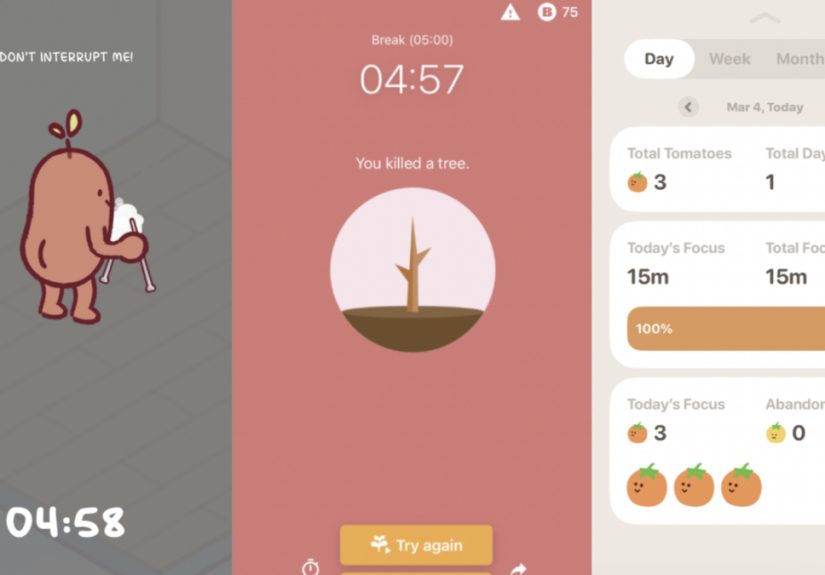
It’s gamified: you start a focus session and “plant” a tree; the tree grows while you stay focused.
The gimmick works because it adds emotional frictionleaving the session feels like you’re messing up your tiny digital garden.
Forest is especially good for study sessions, reading, and any work where your biggest enemy is unlocking your phone.
- Best feature: gamification that makes staying focused feel rewarding
- Watch out for: using it as a moral scoreboardfocus is a skill, not a personality test
- Try this setup: 30-minute sessions for reading; stack 2–3 sessions for deeper work
4) Freedom: Best cross-device distraction blocker for serious focus windows
Some distractions are relentless because they’re everywhere: laptop, phone, tablet, browser, apps. Freedom shines because it can
block distracting websites and apps across multiple devices, which is key if you’ve ever “quit Instagram” on desktop and then immediately opened it on your phone.
Freedom also supports scheduled sessions and a locked mode, which helps when your future self is trying to protect you from your present self.
(Your present self is sweet, but also easily bribed by notifications.)
- Best feature: synchronized blocks across devices
- Watch out for: over-blockingkeep exceptions for the tools you actually need
- Try this setup: schedule two daily “deep work” blocks (morning + mid-afternoon), and keep them sacred
5) Cold Turkey Blocker: Best “hard mode” app for desktop focus
Cold Turkey Blocker is for anyone who has ever outsmarted their own blocker, then felt weirdly proud and immediately disappointed.
It’s designed to be tough to bypass once you lock in a block, and it can enforce time away from distracting sites and apps on your computer.
Cold Turkey is especially useful for writing deadlines, exam prep, and deep work where you want your environment to stop negotiating with you.
If you know you’ll “just turn it off,” this is the kind of tool that says, “No, actually.”
- Best feature: strong lock options and scheduled blocks
- Watch out for: setting an aggressive block without planning breaksdon’t punish yourself into burnout
- Try this setup: block social + video sites for 90 minutes, then take a real break away from the screen
6) RescueTime: Best for people who want data, accountability, and focus sessions
RescueTime is what you use when you want the truth. It automatically tracks how you spend time on apps and websites, and it supports
“Focus Sessions” that block distracting activities during a work sprint.
This is great if your day feels busy but your output feels… mysterious. With time data, you can identify your actual distraction triggers:
certain websites, certain times of day, certain “quick checks” that never stay quick.
- Best feature: automatic tracking plus distraction blocking during focus sessions
- Watch out for: becoming obsessed with metricsuse data to improve decisions, not to shame yourself
- Try this setup: run a 60-minute focus session, then review the report once per week (not every hour)
7) Pomofocus: Best simple web-based Pomodoro timer (no installs, no drama)
Pomofocus is a clean online timer that works in your browser. It’s perfect for people who want to start now,
not research “the best system” for two days like they’re buying a yacht.
The biggest win here is simplicity: open tab, start timer, do work. It’s also handy if you’re using a shared computer or you want
something lightweight that doesn’t demand a new account, a subscription, and your life story.
- Best feature: fast start, customizable Pomodoro intervals, browser-based convenience
- Watch out for: it won’t block distractionspair it with Focus/Do Not Disturb modes
- Try this setup: 25/5 for admin; 45/10 for writing; 15-minute “starter sprint” for procrastination
8) Be Focused: Best straightforward Pomodoro timer for Apple users
Be Focused is a classic Pomodoro-style timer with tasks, configurable breaks, and progress tracking.
It’s a great fit if you want a no-nonsense timer that plays nicely across Apple devices and helps you keep a simple rhythm during the day.
This is especially helpful if you work in repeatable cycles: drafting, editing, coding, studyinganything where “one more sprint” is a useful way
to keep going without burning out.
- Best feature: task list + configurable intervals + progress tracking
- Watch out for: treating breaks like optional suggestionsbreaks are part of the method
- Try this setup: 4 cycles before a long break; keep the long break screen-free if you can
9) Tide: Best focus timer if you want calming soundscapes built in
Tide blends focus timers with relaxing audio and wellness features. If your distractions are fueled by stress (or your brain is
running 47 tabs emotionally), the “calm environment” piece can make focus feel less like wrestling a bear.
It’s not just for work either: Tide is great for reading sessions, creative work, and wind-down routines when you want a timer that feels
soothing instead of strict.
- Best feature: nature soundscapes + focus timer in one place
- Watch out for: making the audio selection your new procrastination hobby
- Try this setup: 50/10 with a consistent soundscape you associate with deep work
10) Focus Friend: Best “gamified accountability” timer when you need motivation
Some days, you don’t need a stricter blockeryou need a reason to start. Focus Friend is built around a cute, motivational loop:
you stay off your phone during focus time, and the app rewards you through progression and playful incentives.
This style can be especially helpful if you have ADHD tendencies or you respond better to “tiny rewards” than to “tiny punishments.”
It turns focus into something you can feel, not just something you’re supposed to do.
- Best feature: motivation through gamified focus sessions
- Watch out for: relying on noveltypair it with a clear plan for what you’ll do during focus time
- Try this setup: one 20-minute session to “warm up,” then a longer session once momentum kicks in
Don’t ignore the built-in tools you already have
Sometimes the best focus timer is the one that’s already installed. Built-in systems won’t always have Pomodoro-style stats and fancy graphs,
but they can dramatically reduce distractions with almost zero setup.
Use your phone’s Focus modes to silence the chaos
- iPhone Focus: temporarily silence notifications or allow only specific people/apps while you work.
- Android Focus mode: pause selected distracting apps and schedule Focus mode automatically.
Use calendar-based focus time for “real life boundaries”
If meetings are the main reason your day gets shredded, try scheduling focus time directly in your calendar.
It’s a simple way to communicate, “I’m workingplease don’t book me like a conference room.”
Windows Focus Sessions for structured work blocks
If you’re on Windows, Focus Sessions in the Clock app can help you set a work interval and support a consistent routine.
The key is to treat it like an appointment with your most important project (because it is).
A simple “focus stack” that works for most people
You don’t need a perfect systemjust a system you’ll actually use. Here’s a practical stack:
- Pick one timer: Focus To-Do, TickTick, Be Focused, or Pomofocus.
- Add one friction layer: Freedom, Cold Turkey, or your phone’s Focus mode.
- Choose a default sprint length: 25 minutes if you’re starting; 45–60 if you already have momentum.
- Write a one-sentence goal: “Draft outline,” “Fix bug,” “Study chapter 3.” Keep it small and concrete.
- Use breaks on purpose: stand up, water, light stretch, look far away (your eyeballs will thank you).
Specific examples: matching apps to common work scenarios
-
If you write for work: Use Pomofocus (simple sprinting) + Freedom (block news/social).
Start with one “ugly draft” sprint where quality doesn’t matteronly progress does. -
If you’re a student: Use Forest (phone temptation) + Focus To-Do (assign sessions to topics).
Do 3–4 cycles, then take a longer break away from screens. -
If you’re in remote work chaos: Use TickTick (plan + timer) + Cold Turkey (block social/video).
Schedule two deep-work windows per day and protect them like they’re paid meetings.
Common mistakes that make focus timers feel “ineffective”
1) Making the timer the goal instead of the work
Completing Pomodoros is not the mission. The mission is finishing meaningful work. If you’re collecting sessions like Pokémon cards but not shipping
anything, simplify: one task, one sprint, one deliverable.
2) Over-customizing before you have a habit
Customization is great after week two. In week one, it’s often procrastination in a trench coat. Start with a default interval and refine later.
3) Taking “breaks” that are secretly new distractions
If your break is “scroll social,” your brain doesn’t resetit gets hooked. Try breaks that actually recharge:
stand up, grab water, look outside, or do one small physical reset.
Final takeaway: pick a timer that removes decisions
The best focus timer app is the one that helps you start quickly, stay in it long enough to make progress, and stop fighting your own environment.
Choose one app, try it for a week, and adjust based on what actually happensnot what your ideal self says should happen.
Experiences: what it’s really like using focus timer apps at work
My first week using a focus timer app felt oddly dramatic, like I was signing a contract with my attention span. I started simple: one task, one timer,
no complicated rules. The immediate surprise was how much energy I’d been wasting just starting. I used to “warm up” by checking messages,
opening tabs, and rereading the same paragraph like it was going to reveal a secret map. The timer changed that. When the countdown began, my brain got
a clear signal: this is the part where we do the thing.
The second surprise was the emotional side of distractions. I assumed I was distracted because I lacked discipline. Nope. Half the time I was distracted
because I felt slightly uncertainabout what to write next, how to begin a difficult task, or whether I was doing it “right.” The timer didn’t solve
uncertainty, but it did shrink it. I stopped asking, “Can I finish this today?” and started asking, “Can I push it forward for 25 minutes?” That’s a
friendlier question. It’s also harder for your brain to argue with, which is important because your brain is an excellent lawyer.
When I tried a distraction blocker alongside a timer, I learned an even funnier lesson: convenience is my biggest weakness. If a distracting website was
one click away, my willpower did not stand a chance. But if the site was blockedand I had to decide whether to stop my focus session to access itI
usually didn’t bother. That tiny layer of friction was enough to break the automatic habit loop. I didn’t magically become a monk. I just stopped
wandering into the same digital snack aisle every five minutes.
Not every “focus feature” helped. Gamified apps worked best when I was tired or unmotivated, because the reward loop gave me a nudge to start. But on
days when I was already in flow, the gamification felt unnecessarylike wearing a party hat to a dentist appointment. Meanwhile, stats were helpful in
moderation. Weekly reviews were great; hourly reviews were… not. Checking focus charts mid-day made me too self-conscious, like my productivity was being
graded in real time. Once I switched to a simple weekly check-in, the data became useful instead of distracting.
Breaks were the biggest skill upgrade. At first, I treated breaks like a suggestion. Then I noticed my focus quality collapsing later in the day.
Taking short breaks on purposestanding up, stretching, getting watermade the next sprint smoother. I also learned that “phone breaks” are a trap for me.
If I scroll during a break, I carry that scattered feeling back into work. A better break is boring in the best way: it resets your nervous system and
gives your brain a clean slate.
The most practical change I kept was creating a “default work ritual.” I start a session, write a one-sentence goal, and do one tiny action immediately
(open the doc, write the first line, outline the next step). That tiny action matters because it converts intention into motion. Over time, the timer
becomes less of a tool and more of a cue: it’s the sound of choosing your priorities on purpose. And honestly, in a world designed to steal your attention,
that feels like a superpower.