Table of Contents >> Show >> Hide
- What “Opens With an iPhone or Apple Watch” Actually Means
- Why Home Key Feels So Much Better Than “Just Use the App”
- The Newest Smart Locks You Can Tap With iPhone or Apple Watch
- What’s Coming Next: Beyond Tap-to-Unlock
- Buying Guide: How to Pick the Right “iPhone / Apple Watch” Smart Lock
- Security and Privacy: The Stuff People Worry About (Rightly)
- Setup Tips That Prevent 90% of Smart Lock Regrets
- Real-World Experiences: What It’s Like Living With an iPhone / Apple Watch Smart Lock (Extra Notes)
- Conclusion
For decades, the “front door experience” has been: dig for keys, drop groceries, mutter words your smart lock can’t hear, then finally get inside.
But a new wave of smart locks is quietly upgrading the routine to something that feels more like boarding a subway: tap your iPhone or Apple Watch and the door clicks open.
No app. No Bluetooth roulette. No “why is it asking me to log in again?” at the worst possible moment.
The magic trick behind most of these “tap to enter” locks is Apple Home Key, a digital key stored in Apple Wallet.
If you’ve used Apple Pay, you already understand the motion: bring your device close, let NFC do its thing, walk in like you own the place (because you do).
And yesthis is exactly the kind of small convenience that becomes impossible to un-love once you get used to it.
What “Opens With an iPhone or Apple Watch” Actually Means
Not every lock that “works with Apple” works the same way. Here are the three levels of Apple-friendly, from “fine” to “future spouse material”:
1) Apple Home compatible (control in the Home app)
You can lock/unlock in the Apple Home app, run automations, and use Siri. Useful, but it still feels like using your phone as a remote control.
2) “Auto-unlock” (hands-free-ish, often via Bluetooth + location)
Some locks unlock when your phone is nearby. When it works, it’s delightful. When it doesn’t, you’re standing on your porch doing the
“phone out, app open, refreshing… refreshing…” dance.
3) Apple Home Key (tap-to-unlock with Wallet)
This is the headliner: tap your iPhone or Apple Watch on the lock and it opensoften without unlocking your phone first, if you enable Express Mode.
It’s simple, fast, and surprisingly satisfying.
Why Home Key Feels So Much Better Than “Just Use the App”
Most smart-lock frustration comes from one thing: too many steps. Apps are great for managing access, but terrible for “I need inside right now.”
Home Key reduces entry to one motion: tap. That’s it.
- It’s immediate: NFC tap beats waiting for Bluetooth to connect or Wi-Fi to respond.
- It’s consistent: the gesture is the same as Apple Pay, so your brain doesn’t need a tutorial.
- It can be more forgiving: Express Mode can let you tap without Face ID/Touch ID every time.
- It’s still usable when your battery is low: iPhone power reserve can keep certain Express Mode keys working for a while after the phone “dies.”
The Newest Smart Locks You Can Tap With iPhone or Apple Watch
Below are standout options that support tap-to-unlock with Apple Wallet (Home Key), plus a few forward-looking models that hint at where the market is headed next.
Availability, finishes, and connectivity vary, so think of this as a “best-fit” menu rather than a one-size-fits-all list.
Schlage Encode Plus
If smart locks had a “reliable friend with a pickup truck” award, the Encode Plus would be in the running.
It pairs Apple Home Key tap-to-enter with a built-in keypad (great for guests, kids, dog walkers, and your own “my watch is charging” moments).
It’s also a popular pick for Apple households because it blends everyday convenience with very normal-human backup options.
Best for: people who want Home Key and a keypad, and don’t want to gamble on a brand-new ecosystem.
Yale Assure Lock 2 Plus
Yale’s Assure line is like the well-dressed cousin who still shows up on time.
The Assure Lock 2 Plus supports Apple Home Key, typically includes a keypad, and adds features many homeowners actually use:
auto-lock, activity history, and “give someone a code without giving them your entire life story.”
Best for: households that want Apple tap-to-enter plus strong guest-code management.
Level Lock+ and Level Lock Pro
Level’s signature move is invisibility. The lock is designed to keep your existing hardware lookmeaning your door doesn’t suddenly scream,
“I am a smart lock, please troubleshoot me.” The tradeoff is that you’re often choosing stealth over a built-in keypad.
The newer Level models also lean into modern connectivity, including Matter-over-Thread on certain versions, which can improve responsiveness and reduce
the “edge-of-the-network” problem that door locks love to have.
Best for: design-focused homeowners, condos with strict exterior hardware rules, or anyone who hates the “futuristic keypad face” look.
Aqara Smart Locks with Home Key (U100, U50, and newer lines)
Aqara has been aggressive about packing features into approachable pricing.
Depending on model, you may get combinations like keypad + fingerprint + NFC/Home Key tap.
Some setups benefit from (or require) an Aqara hub for richer remote control and Matter featuresso it can be amazing if you’re building an ecosystem,
and slightly annoying if you just wanted a lock, not a new hobby.
Best for: value hunters and smart-home tinkerers who like lots of unlock methods.
Ultraloq Bolt NFC
Ultraloq’s Bolt NFC is part of the new generation of “tap first” locks: Apple Home Key for iPhone/Apple Watch, plus NFC options aimed at broader phone support.
If your household is a mixed-device world (or will be soon), this category is getting more interesting fast.
Best for: households that want Apple tap-to-unlock now, with an eye toward wider NFC compatibility.
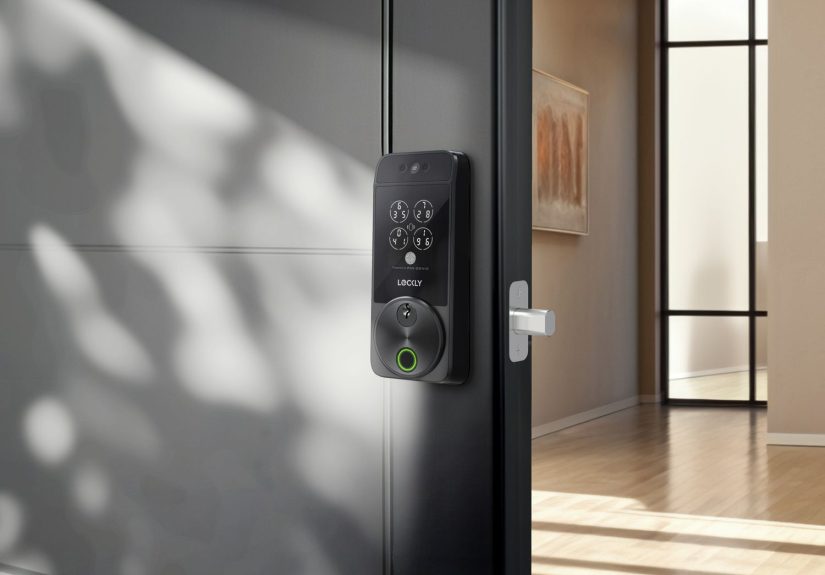
Lockly’s newest high-end locks (video + biometrics + Home Key)
At the premium end, some Lockly models combine multiple “future door” featureslike video, displays, facial recognition, and Apple Home Key.
This is the “front door becomes a gadget” approach: powerful, flashy, and potentially a lot of settings.
Best for: people who want an all-in-one lock + camera vibe and don’t mind paying for it.
What’s Coming Next: Beyond Tap-to-Unlock
Tap-to-unlock is great, but the industry is clearly chasing the next step: hands-free unlocking that’s actually reliable.
Ultra Wideband (UWB) can detect distance and direction more precisely than Bluetooth, which helps avoid the classic auto-unlock problems:
unlocking too early, unlocking from inside the house, or unlocking when you walk past the door on the sidewalk.
Newer announcements from major lock makers point to a future where your phone or watch becomes the credential,
and the lock decides intelligently when to openwithout you touching anything.
At the same time, the broader industry is working on standards like Aliro to make mobile keys more interoperable across devices and brands.
Buying Guide: How to Pick the Right “iPhone / Apple Watch” Smart Lock
Choose your “backup plan” first
- Keypad: best for kids, guests, service pros, and short-term rentals.
- Physical key: boring, reliable, and still the best “power outage + chaos” option.
- Fingerprint: fast, but think through wet hands, gloves, and sensor cleanliness.
Pay attention to connectivity (it affects speed and battery life)
Door locks sit at the edge of your home network and get used multiple times per day, so connectivity matters more than it does for, say, a smart bulb.
In broad strokes:
- Wi-Fi: convenient for remote access without extra hubs, but can be tougher on batteries.
- Bluetooth: often stable at close range, but remote features may require a hub or bridge.
- Thread / Matter-over-Thread: typically faster and lower powergreat when supported well in your home setup.
Know the Apple requirements (and why “sharing” can be the gotcha)
Many Home Key locks require specific iPhone/Apple Watch models and iOS/watchOS versions.
If multiple people in the household want to use Home Key, you may also need an Apple Home hub (like a HomePod or Apple TV) and to set up Home sharing properly.
Translation: the lock is easyyour family group chat is the hard part.
Think about the door itself
Most smart deadbolts fit standard U.S. doors, but real life is messy. Before buying, check:
door thickness, backset, existing deadbolt type, and whether your current hardware is integrated with a handle set.
Also consider whether you need a specific finish to match your exterior trim (because nobody wants “brushed nickel lock, matte black handle” unless you’re going for chaos chic).
Security and Privacy: The Stuff People Worry About (Rightly)
A smart lock is both a security product and a convenience product, and you should judge it like one.
Here’s the sane way to think about it:
“Can someone hack it from the street?”
For reputable Home Key locks, a random stranger tapping your lock with their phone won’t do anything unless they have a valid key credential.
Your bigger risks are usually boring ones: weak account passwords, sloppy guest-code habits, and old devices that never get updates.
“What if my phone dies?”
If you enable Express Mode and your device supports it, Apple’s power reserve can keep certain keys usable for a limited time after the phone appears out of battery.
Still, it’s smart to keep at least one non-phone entry method available (key, keypad, or another household member with access).
“Where is my key stored?”
With Apple Wallet-style keys, the general model is that keys are stored locally on the device, with strong device-level protections.
That’s good. It also means your best security habit is the simplest: protect your Apple ID, keep your devices updated, and use strong device passcodes.
Setup Tips That Prevent 90% of Smart Lock Regrets
- Decide Express Mode per person: some people love tap-and-go; others want Face ID every time.
- Use Home Key for yourself, keypad codes for everyone else: it’s cleaner than teaching guests a new tech ritual.
- Place your Home hub strategically: locks near exterior walls can have spotty connections if your hub is buried in the center of the house.
- Turn on notifications thoughtfully: “door unlocked” alerts are great until they become background noise you ignore.
- Keep a spare battery plan: whether it’s AAs in a drawer or a charging reminder, don’t let your front door become a low-battery moral lesson.
Real-World Experiences: What It’s Like Living With an iPhone / Apple Watch Smart Lock (Extra Notes)
The first week with a Home Key lock feels like a tiny superpower. You walk up, tap your phone or watch, and the door opens.
No fumbling. No “where are my keys?” scavenger hunt. No juggling groceries while your elbow tries to type a keypad code like it’s entering a cheat code in 1999.
It’s not a life-changing upgradeuntil you realize how often you used to do the key dance.
One of the most common “aha” moments happens when your hands are full. Picture the classic scenario: bags, coffee, maybe a kid who has forgotten how walking works.
With a traditional lock, you’re doing awkward choreography. With an Apple Watch, it’s a quick tap and you’re inside.
Many people end up tapping their watch more than their phone simply because it’s already on their wrist and faster to present to the lock.
Then you hit the second phase: other people. Smart locks aren’t just for you; they’re for roommates, partners, kids, parents,
dog sitters, cleaners, and the friend who says, “I’ll be there in five minutes” and arrives in thirty-seven.
This is where keypad codes (or app-based guest access) become the hero.
Home Key is fantastic for primary users, but expecting every visitor to configure Wallet access is like expecting guests to bring their own Wi-Fi router.
A simple code is often the most practical “hospitality feature” you can give your door.
There’s also the “automation honeymoon.” People love setting up auto-lock after the door closes, or schedules that lock the door at night.
It’s calminglike your house is quietly tidying up behind you.
But automations should be treated like seasoning: enough improves the meal, too much ruins it.
The best setups are usually simple: auto-lock after a short delay, and notifications only at times that matter (like when you’re away).
Battery behavior is where reality checks in. Smart locks don’t usually die suddenly; they give warnings for weeks.
The real issue is human nature: we ignore warnings until the exact moment we shouldn’t.
A lot of experienced users keep spare batteries in the same drawer as the scissors and tapethe “things I only need when I desperately need them” drawer.
If your lock supports a backup power option, that can be reassuring too, but don’t let it replace the obvious plan: change batteries when the lock tells you.
Connectivity quirks can also shape your day-to-day happiness. Tap-to-unlock (NFC) is typically very consistent because it’s close-range.
Remote features (checking status, unlocking for a delivery, getting alerts) depend more on the lock’s connectivity and where your home hub/router sits.
If your door is far from your network gear, Thread-capable options or a better-placed hub can be the difference between “instant” and “why is it spinning?”
Finally, there’s a subtle emotional benefit: you worry less. Many people don’t install smart locks because they want to feel futuristic;
they install them because they’re tired of second-guessing whether they locked the door.
Being able to check (and lock) from your phone can reduce those “turn around the car to confirm” moments.
Combine that peace of mind with the sheer convenience of Apple Home Key tap-to-enter, and it starts to feel less like a gadget and more like a normal part of the house.
Conclusion
The best “opens with iPhone or Apple Watch” smart locks do two things at once: they make entry ridiculously easy and they keep your backup options practical.
If you want the smoothest day-to-day experience, prioritize Apple Home Key support, choose a lock with the right fallback (keypad, key, or both),
and make sure your home network and Apple Home setup are ready to support it.
Once tap-to-unlock becomes your new normal, you’ll wonder why front doors took so long to catch up.