Table of Contents >> Show >> Hide
- Quick Overview: What You’re Doing (and Why It Works)
- Before You Start: Tools, Battery Type, and a 30-Second Safety Talk
- Step-by-Step: How to Change a Honda Key Fob Battery (Most Common Style)
- Step 1: Remove the built-in mechanical key
- Step 2: Find the seam or slot (the “open here” hint Honda hides in plain sight)
- Step 3: Pry the case open gently (keyword: gently)
- Step 4: Remove the old battery and note the orientation
- Step 5: Install the new battery (match polarity, seat it fully)
- Step 6: Reassemble the fob
- Step 7: Test everything
- Honda Key Fob Variations: Smart Key vs. Remote Transmitter vs. Two-Way Remote
- Common Mistakes (and How to Avoid Them)
- Troubleshooting: If Your Honda Key Fob Still Won’t Work
- How Much Does It Cost to Replace a Honda Key Fob Battery?
- Pro Tips to Make the New Battery Last Longer
- FAQ
- Real-World Experiences & Lessons Learned (500+ Words)
- Conclusion
Your Honda key fob is basically a tiny roommate: it never pays rent, it’s always “missing,” and it chooses the most inconvenient moment possible to stop working.
The good news? Swapping a Honda key fob battery is usually a five-minute DIY jobno dealership appointment, no engineering degree, no ritual sacrifice to the
Parking Lot Gods.
In this guide, you’ll learn how to identify your Honda fob type, open it without snapping the case (or your patience), replace the coin-cell battery the right
way, and troubleshoot common “why won’t you just work?!” momentsplus real-world tips people wish they knew before prying at the wrong spot.
Quick Overview: What You’re Doing (and Why It Works)
Most Honda key fobs use a small coin-cell batteryvery commonly a CR2032to power the buttons, transmitter, and indicator light. When that
battery gets weak, you’ll notice reduced range, delayed unlocking, or a low-battery message. Honda owner’s manual instructions for multiple models specify
a CR2032 battery and emphasize replacing it with the correct polarity (orientation). The process is typically: remove the built-in key,
separate the case along a seam/slot, replace the coin cell, then snap the case back together.
Before You Start: Tools, Battery Type, and a 30-Second Safety Talk
What you’ll need
- A replacement coin-cell battery (often CR2032)
- A small flathead screwdriver, plastic pry tool, or a coin
- A soft cloth (microfiber is perfect) to prevent scratches
- (Optional) Cotton swab and a tiny bit of isopropyl alcohol for cleaning contacts
How to confirm the correct battery (don’t guess)
Many Honda remotes use a CR2032, but not every fob on earth is identical. The fastest way to confirm is:
- Open the fob and read the battery code printed on the old battery (e.g., CR2032).
- If you prefer to confirm first, check the owner’s manual for your exact model and year.
Button battery safety (seriouslydon’t skip this)
Coin/button batteries are small, shiny, and dangerously snack-shaped. They can cause severe internal chemical burns if swallowed, especially in children.
Keep both new and used batteries out of reach, and seek immediate medical attention if ingestion is suspected. Store spares high up and preferably in
child-resistant packaging.
Also: try not to touch the new battery’s flat surfaces with your fingers. Skin oils can reduce conductivity and shorten battery lifeyour key fob deserves better
than your snack-grease fingerprint legacy.
Step-by-Step: How to Change a Honda Key Fob Battery (Most Common Style)
These steps fit many modern Honda “smart key” and keyless remotes. Your exact fob may differ slightly, but the flow is usually the same.
Step 1: Remove the built-in mechanical key
Look for a small release tab or button on the fob. Press it and slide the built-in key out. Set it asideyou’ll often use it as a gentle prying aid.
Step 2: Find the seam or slot (the “open here” hint Honda hides in plain sight)
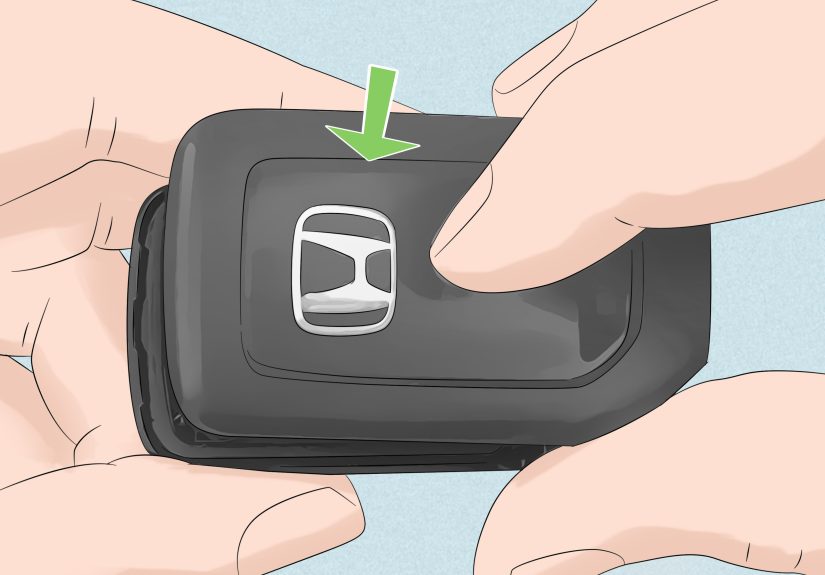
Turn the fob over and look for a seam that runs around the perimeter. Many Honda designs have a small slot where you can carefully pry the cover apart.
A helpful trick from Honda’s own manual instructions: wrap your tool (or key grip) with a cloth to prevent scratches.
Step 3: Pry the case open gently (keyword: gently)
Insert your wrapped flat-tip screwdriver, coin, or the mechanical key into the slot. Twist slightly to separate the two halves. Work slowly around the edge until
the cover pops off. If you force it like you’re opening a stubborn jar of pickles, you’re more likely to crack the plastic clips.
Step 4: Remove the old battery and note the orientation
Lift the coin cell out carefully. Pay attention to which side is facing up. The new battery must go in the same way. Many Honda manuals warn to replace the battery
with the correct polaritythis matters more than your pride.
Step 5: Install the new battery (match polarity, seat it fully)
Place the new coin cell into the holder in the same orientation as the old one. Press it gently until it sits flat and secure. If the battery is crooked or not fully
seated, the fob may act like it’s still “dead.”
Step 6: Reassemble the fob
Align the two halves and press them together until you hear/feel the clips snap into place. Slide the mechanical key back in.
Step 7: Test everything
- Stand near the vehicle and test lock/unlock.
- Test the trunk button (if applicable).
- If you have push-button start, confirm the car recognizes the fob inside the cabin.
Honda Key Fob Variations: Smart Key vs. Remote Transmitter vs. Two-Way Remote
Honda uses a few fob styles across trims and years. Some models include a two-way remote that can confirm lock status or trigger additional functions. Honda’s manual
guidance for certain two-way remotes notes the transmitter may include both a replaceable CR2032 coin cell and an integral rechargeable battery, and
recommends replacing the CR2032 every few years to avoid damage to the rechargeable component.
Translation: even if your fob still “kind of works,” don’t wait until it’s fully dead if your manual recommends a replacement interval. A fresh battery is cheaper
than the stress tax of being locked out at 10 p.m. in the rain.
Common Mistakes (and How to Avoid Them)
Mistake 1: Using too much force and snapping a clip
Fix: Pry at the seam/slot and work around the edges slowly. Use a cloth-wrapped tool to avoid gouges and reduce slip.
Mistake 2: Installing the battery upside down
Fix: Note the original orientation before removal and match it exactly. Honda documentation commonly emphasizes correct polarity.
Mistake 3: Touching contacts and leaving oils/grime
Fix: Avoid touching the circuit board and the battery’s flat surfaces. If you see residue on contact points, gently wipe with a soft cloth or swab.
Mistake 4: “I changed the battery and it still says low!”
Fix: Confirm the battery type is correct, the battery is new (not a drawer relic from 2019), and seated properly. If the warning persists, try a second known-good
battery from a reputable brand and re-check the contacts for corrosion or bending.
Troubleshooting: If Your Honda Key Fob Still Won’t Work
1) Double-check battery type and freshness
Make sure you used the right battery code (CR2032 is common, but verify). Also check the packaging date or expiration. Coin cells can lose punch over time.
2) Confirm the battery is fully seated
Some fobs have a retaining clip that must snap over the battery edge. If the battery sits “high,” the terminals may not touch.
3) Inspect and gently clean the contacts
Look for white/green residue or rust. Clean lightlyno scraping like you’re restoring an ancient artifact.
4) The car starts, but buttons don’t respond from far away
Weak range can happen when the battery is low, but it can also be interference, or a fob that needs cleaning/inspection. Start with the simplest fixes first:
new battery, correct orientation, clean contacts, and reassembly check.
5) Emergency method: starting your Honda with a dead fob battery
If your Honda has push-button start and the fob battery is too weak to transmit normally, many models can still start because the car can read the fob at very close range.
One common method is to press the brake and touch/hold the fob against the START/STOP button area, then press the button. Honda’s manuals also describe procedures for
“battery weak” situations, emphasizing prompt button press timing after alerts. (And yes, the hidden mechanical key can unlock the door if the remote won’t.)
How Much Does It Cost to Replace a Honda Key Fob Battery?
Typically, the coin-cell battery itself is inexpensive, and the DIY replacement takes a few minutes. Parts stores and battery retailers often publish step-by-step
guides and may also offer in-store help. The main cost is usually not moneyit’s the emotional damage of dropping the tiny battery and watching it roll under the seat
like it has a signed contract with the Shadow Realm.
Pro Tips to Make the New Battery Last Longer
- Don’t store the fob right next to the car (especially overnight). Constant proximity can keep keyless systems “chatty,” potentially affecting battery life.
- Avoid button-mashing during “range tests.” One press is a press. Twenty presses is a cry for help.
- Keep it clean and dry. Moisture and grime can mess with contacts and buttons.
- Replace proactively if you notice lag, reduced range, or warningsbefore you’re locked out.
FAQ
Do I need to reprogram my Honda key fob after changing the battery?
Usually, no. Battery replacement typically doesn’t erase programming. If it doesn’t work after the swap, the issue is more likely battery orientation, poor contact,
or using the wrong battery type.
How often should I replace the battery?
Many drivers replace coin-cell fob batteries every few years. Some Honda documentation for certain remotes specifically suggests replacing the CR2032 every three to
four years (especially for remotes that also include a rechargeable component), but your usage patterns can shorten or extend that timeline.
What if my key fob case won’t open?
Look for the correct seam/slot and use a cloth-wrapped tool. If it still won’t budge, don’t escalate to “crowbar mode.” A parts store or dealership can help open it
without cracking the housing.
Real-World Experiences & Lessons Learned (500+ Words)
If you’ve never replaced a Honda key fob battery before, here’s what people commonly experienceand what they wish someone had told them five minutes earlier. First:
the case almost always feels tighter than expected the first time. That’s normal. The fob is designed to survive pockets, purses, cupholders, and the occasional
“oops, I sat on it,” so the clips hold on like they’re protecting state secrets. The trick is not to pry harderit’s to pry smarter. Find the seam or designated slot,
use a cloth-wrapped tool, and work your way around the perimeter. When you hear a small “pop,” that’s the clip releasing, not the sound of your weekend plans
collapsing.
Second: buttons can sometimes shift when the fob opens. Some designs keep everything neatly in place; others act like they’re auditioning for a magic trick where the
rubber button pad teleports onto the floor. A simple habit helps: open the fob over a table, not over your lap, not over the driveway, and definitely not over a
floor vent that leads to Narnia. If something does move, don’t panicjust note how the pieces align before snapping it back together.
Third: battery orientation is the #1 “why is it still dead?” culprit. In real life, people get excited, swap the coin cell, snap the case shut, and then… nothing.
The fix is almost always to reopen it and confirm polarity. The old battery’s orientation matters; the new one should match it exactly. It’s not a vibe-based decision.
It’s physics. If the battery is flipped, the fob can’t power up, and it will sit there silently judging you.
Fourth: don’t underestimate the power of clean contact points. In everyday use, key fobs live in environments filled with dust, lint, hand lotion, and the mysterious
crumbs that appear in every pocket. If the battery contacts look dull or have residue, a gentle wipe can improve reliability. People often discover that the “new
battery didn’t fix it” was really “the new battery can’t connect because the contacts are gunky.” A light cleaning (carefully, without soaking anything) is usually
enough.
Fifth: the “dead fob” moment is rarely the end of the road. Many Honda owners are surprised to learn they can still unlock the door with the hidden mechanical key,
and in many push-button start setups, the car can still recognize the fob when it’s held directly at the start button area. In other words: even if your fob battery
dies at the worst possible timelike when you’re carrying groceries, it’s raining, and your phone is at 2%you typically have a backup plan. Knowing that backup in
advance turns a stressful situation into a mild inconvenience.
Finally: after you replace the battery, your fob may feel “like new” againbetter range, faster response, fewer missed clicks. That little improvement is why many
people end up replacing the battery proactively next time, instead of waiting for total failure. The best real-world tip is boring but effective: if the fob starts to
lag, replace the battery before it becomes a full-blown parking lot drama. Your future self will be gratefuland your key fob will stop acting like it’s on a coffee
break.