Table of Contents >> Show >> Hide
- Why Facebook Events Still Matters for Local Discovery
- How to Find Events Near You on Facebook on Mobile
- How to Find Events Near You on Facebook on Desktop
- Best Ways to Improve Facebook Event Recommendations
- Common Problems When Finding Events Near You on Facebook
- Practical Examples of Searching for Facebook Events
- Final Thoughts
- Extra Experience-Based Insights: What It Actually Feels Like to Use Facebook Events in Real Life
Finding local events used to mean squinting at flyers taped to coffee shop windows or hearing about a concert three days after it happened. Facebook changed that. Love it or roll your eyes at it, the platform still acts like a giant community bulletin board where festivals, fundraisers, trivia nights, art markets, workshops, and neighborhood meetups all compete for your attention.
If you have ever opened Facebook and thought, “Surely there is something fun happening near me that does not involve reorganizing my sock drawer,” you are in the right place. This guide explains how to find events near you on Facebook using both the mobile app and desktop, how to improve the quality of your recommendations, and what to do when Facebook seems determined to show you events two states away.
Whether you are hunting for weekend plans, local business events, live music, family-friendly activities, or community happenings, Facebook Events can still be surprisingly useful when you know where to look. The trick is not just opening the Events section. The real magic comes from using location filters, date options, interests, Pages, Groups, and search terms that help Facebook stop guessing and start helping.
Why Facebook Events Still Matters for Local Discovery
Facebook Events remains valuable because it blends social signals with location-based discovery. In plain English, that means Facebook does not just show what is happening. It also tries to show what might matter to you based on your city, your activity, the Pages you follow, your friends’ interest, and the types of events you have clicked before.
That can be incredibly useful or hilariously random. One minute you are looking for a farmers market, and the next minute Facebook is pitching a reptile expo, a startup mixer, and a salsa class. Still, that mix is part of the appeal. It helps you discover events you might not have searched for directly.
For people who want to find events near them on Facebook, the platform is often strongest in a few categories: local entertainment, community meetups, business events, charity activities, public festivals, and events posted by venues, organizers, and neighborhood Groups. It may not replace every ticketing platform, but it is excellent for discovery.
How to Find Events Near You on Facebook on Mobile
The Facebook mobile app is often the fastest way to discover nearby events because it is built around location, scrolling, and quick taps. In other words, it was designed for people who claim they are “just checking one thing” and then accidentally spend twenty minutes planning a weekend.
1. Open the Menu and Go to the Events Section
Start by opening the Facebook app on your phone and tapping the Menu icon. From there, look for Events. In some app layouts, Facebook may place it directly in your shortcuts. In others, you may need to tap See More or search for it.
Once you enter the Events area, Facebook typically shows a mix of recommendations, upcoming events, online events, and local happenings. The names of tabs and buttons can vary a little by app version, but the purpose is usually the same: helping you browse what is happening around you.
2. Allow or Confirm Your Location
If you want relevant local recommendations, location matters. A lot. Make sure your phone location settings are turned on for Facebook, or manually confirm the city or area you want to browse. If Facebook thinks you live in one place but you are traveling or recently moved, your event suggestions can get weird fast.
Look for a location field or city setting in the Events section. Adjust it to your current city, a nearby town, or even a destination you plan to visit. This is one of the easiest ways to find events near you on Facebook without relying on the algorithm to read your mind.
3. Use Date and Category Filters
Do not stop at the main feed. Use filters to narrow events by date, type, interest, or category. On mobile, this might include options like Today, This Week, This Weekend, or broader categories such as music, food, nightlife, sports, family, or community.
This is where Facebook goes from “digital chaos machine” to “actually kind of helpful.” If you know you want something this weekend within driving distance, filter for time and browse categories instead of endlessly scrolling through everything.
4. Try the Search Bar Inside Facebook
Sometimes the best route is not the Events tab at all. Use Facebook’s search bar and type phrases like events near me, live music in Chicago, book fair near me, or free family events this weekend. Add your city name for better precision.
Search works especially well for niche interests. If you want food truck nights, local networking events, anime meetups, yard sales, church events, car shows, or craft fairs, typing a specific keyword often beats waiting for Facebook to suggest it first.
5. Save, Mark Interest, or RSVP
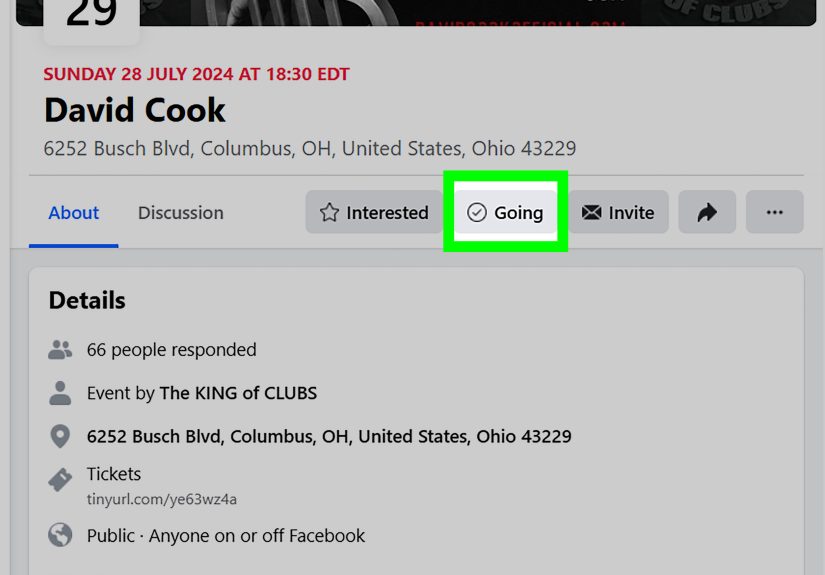
When you find something promising, use Facebook’s event actions. You can mark yourself as Interested, select Going, or save the event for later. This does two useful things. First, it helps you remember the event. Second, it teaches Facebook what kinds of local events you care about.
The more clearly you interact with good recommendations, the better your future event feed tends to become. Think of it as training a very distracted assistant.
How to Find Events Near You on Facebook on Desktop
The desktop version of Facebook gives you more screen space and often makes browsing easier when you want to compare several events at once. It is less thumb-friendly, obviously, but better for focused planning.
1. Open Facebook and Locate Events
Log into Facebook on your computer and look for Events in the left-hand navigation menu. If it is not visible, open the broader menu of tools and shortcuts. In some desktop layouts, Facebook may tuck it behind a menu rather than showing it front and center.
Once inside, you will usually see recommended local events, events from Pages or Groups you follow, invitations, and suggestions based on your activity and location.
2. Set Your Location and Browse Nearby Suggestions
Check the location shown in the Events area. If needed, change it to your city or the area you want to explore. This is especially helpful if you are planning ahead for a trip, checking events in a nearby metro area, or trying to avoid seeing events that are technically “nearby” only if you own a helicopter.
Desktop browsing is useful because you can scan event titles, dates, venues, hosts, and cover images more quickly. That makes it easier to compare multiple options before deciding what deserves your precious Saturday.
3. Filter by Date, Type, and Interest
Use desktop filters to narrow results. Date-based browsing is one of the simplest ways to find local events on Facebook. Start with today, tomorrow, this week, or this weekend. Then layer in categories that match your mood, whether that mood says “street food festival” or “silent book club.”
Filtering saves time and reduces the chances of ending up in a rabbit hole of unrelated events. It also helps if you are researching content ideas, marketing opportunities, or networking events for business purposes.
4. Search Pages, Groups, and Venues
One of the smartest desktop strategies is to go beyond the main Events hub. Search for local restaurants, bars, museums, theaters, community centers, libraries, schools, nonprofits, and event venues. Many organizers post their events through a Page long before Facebook decides to recommend them broadly.
Groups are another gold mine. Neighborhood Groups, parenting Groups, hobby communities, creator circles, and local business communities often share events that feel more relevant than the generic event feed. If the main feed feels bland, Groups can make Facebook Events suddenly feel alive again.
Best Ways to Improve Facebook Event Recommendations
If your Facebook Events feed feels off, the issue is often not that there are no nearby events. It is that Facebook lacks enough signals to sort the good stuff from the nonsense. Here is how to fix that.
Follow Local Pages That Actually Post Events
Start following local venues, city Pages, arts organizations, farmers markets, libraries, restaurants, clubs, parks departments, colleges, small businesses, and entertainment hubs. Facebook tends to use those relationships when recommending new events.
If you only follow national brands and meme pages, Facebook has less local context to work with. That is fun for jokes, not so great for finding jazz in the park.
Join Community and Interest-Based Groups
Local Groups often surface hidden gems: neighborhood movie nights, volunteer opportunities, school fairs, charity walks, and niche interest meetups. These events may not always dominate the main Events feed, but they can be exactly what you were hoping to find.
Interact With Good Events
Clicking, saving, sharing, and responding to events matters. The more you engage with events that match your interests, the more Facebook learns what “near you” should actually mean for you. Local comedy, live music, workshops, food festivals, church gatherings, startup meetups, and family events all leave different signals.
Use Better Search Terms
Generic searches bring generic results. Instead of searching only events near me, try phrases like free events in Austin this weekend, small business networking in Miami, kids events in Seattle today, or art workshops in Brooklyn. Specific searches produce better event discovery.
Common Problems When Finding Events Near You on Facebook
The Events Tab Is Missing
Facebook changes layout often enough to keep everyone humble. If the Events shortcut is missing, check the main menu, search for “Events,” or customize shortcuts if that option is available in your app or desktop settings.
Your Location Is Wrong
If you keep seeing irrelevant events, confirm your city or location setting. Also check your device location permissions if you are on mobile. A wrong city can make Facebook look unhelpful when it is really just confidently lost.
The Recommendations Feel Random
This usually happens when Facebook has weak local signals. Follow more local Pages, join relevant Groups, and interact with event types you actually enjoy. Over time, recommendations often become more useful.
You Want Truly Nearby Events, Not “Nearby-ish” Ones
Use city names, neighborhood names, and venue types in search. The more specific your search, the better your chances of finding events within a realistic distance.
Practical Examples of Searching for Facebook Events
Let’s say you live in Dallas and want something casual for Friday night. On mobile, you could open Events, set your location to Dallas, tap This Weekend, and browse music, nightlife, or food categories. On desktop, you might search Dallas live music Friday Facebook events and then check local venue Pages for more options.
If you are a parent in Orlando looking for family activities, try filtering by date and searching phrases like kids events Orlando, family festival Orlando, or free community events Orlando this weekend. Then check local museum, library, school, and city recreation Pages for additional event posts.
If you are traveling, change your location before you arrive. That way you can plan ahead, save events, and avoid spending your trip asking strangers what is going on while pretending you love spontaneity.
Final Thoughts
If you want to find events near you on Facebook, the easiest path is simple: open the Events area, confirm your location, filter by date, search by interest, and follow the local Pages and Groups that actually know what is happening. Mobile is better for quick discovery. Desktop is better for deeper browsing and comparing options. Used together, they make Facebook a surprisingly strong local event finder.
No, it is not perfect. Yes, it occasionally suggests things that make you question the algorithm’s life choices. But when you use the right filters and local signals, Facebook can help you uncover everything from concerts and community festivals to business mixers and neighborhood pop-ups. That is a lot better than spending another weekend telling yourself you will “figure something out.”
Extra Experience-Based Insights: What It Actually Feels Like to Use Facebook Events in Real Life
Using Facebook Events to find things to do near you is a little like thrift shopping. Sometimes you walk in and instantly find exactly what you need. Other times you dig through a mountain of randomness before discovering something unexpectedly great. That is honestly part of the experience. Facebook is not always elegant, but it is often useful in a way that feels very local and very human.
One of the most common experiences people have is opening Facebook with low expectations and then stumbling across an event they never would have searched for directly. Maybe it is a neighborhood art walk, a small-town chili cook-off, a used book sale, or a free outdoor movie in the park. These are the kinds of events that often live on Facebook because local organizers, churches, schools, independent venues, and community Groups still use it heavily. That gives Facebook an edge over platforms that focus mostly on ticketed or larger-scale events.
Another real-world pattern is that mobile and desktop feel very different emotionally. On mobile, event discovery feels spontaneous. You are in line for coffee, lying on the couch, or pretending to answer a text, and suddenly you are browsing weekend plans. On desktop, the process feels more intentional. You compare dates, open several tabs, check maps, read descriptions, and maybe even coordinate plans with friends. In that sense, mobile is for inspiration, while desktop is for strategy.
People also notice that the quality of recommendations improves once they start behaving more deliberately. The first few times you use Facebook Events, the feed can feel generic. But after you follow local venues, click Interested on a few events, join neighborhood Groups, and search for specific topics, the system becomes more relevant. It starts surfacing events that sound like they were chosen by a reasonably observant friend instead of a dartboard.
There is also a social comfort factor. Facebook Events can make local participation feel easier because you get a preview of what is happening before you go. You can see the event description, photos, who is hosting, whether people are interacting with the post, and sometimes whether friends are interested or going. For some people, especially those trying new social activities, that context lowers the barrier to showing up.
Of course, the experience is not always flawless. Some users run into outdated event details, weak descriptions, or events that are technically nearby but not close enough to make sense. Others find that the most useful results come not from the main Events tab, but from Pages and Groups connected to their city. That is why the best Facebook event strategy is rarely passive. The people who get the most value tend to search intentionally, update their location, and build a local ecosystem of follows and Groups over time.
In the end, the experience of finding events near you on Facebook is less about one perfect button and more about learning a rhythm. Check Events. Search with better keywords. Follow local organizers. Browse by date. Save what looks promising. Repeat. Once you do that, Facebook stops feeling like a giant noisy platform and starts acting more like a living calendar for your community.