Table of Contents >> Show >> Hide
- Quick Answer: Can You Actually Leave a Group Text on Android?
- First, Figure Out What Kind of Group Thread You’re In
- How to Leave a Group Text on Android When the Chat Supports It
- How to Mute a Group Text on Android
- How to Delete a Group Text on Android
- How to Archive a Group Text Instead of Deleting It
- How to Block or Report a Group Text on Android
- What to Do If You Cannot Leave the Group
- Common Problems and Fixes
- Real-World Experiences With Leaving, Muting, or Deleting Group Texts on Android
- Final Thoughts
Group texts are wonderful for about six minutes. After that, they turn into a digital popcorn machine: nonstop popping, zero mercy, and somebody is always replying with “LOL” at 2:13 a.m. If you are trying to figure out how to leave, mute, or delete a group text on Android, the good news is that you have options. The mildly annoying news is that Android does not always handle group conversations the same way across every phone, messaging app, and carrier.
That means there is no one magical escape hatch that works in every situation. Sometimes you can leave. Sometimes you can only mute. Sometimes you can delete the thread from your phone, only to watch it rise from the dead the next time Uncle Dave sends a blurry photo of barbecue. Glamorous? No. Manageable? Absolutely.
This guide breaks down exactly how group texts work on Android, when you can truly leave a conversation, how to mute notifications without causing social panic, and how to delete or block a thread when enough is enough. Whether you use Google Messages, Samsung Messages, or a carrier-flavored setup, this article will help you reclaim your peace, your lock screen, and possibly your sanity.
Quick Answer: Can You Actually Leave a Group Text on Android?
Here is the honest answer: sometimes, but not always.
If your conversation is a traditional SMS or MMS group text, Android usually does not offer a clean, universal “Leave group” button. In that situation, your best options are usually to mute the thread, archive it, block it, or delete it from your device. If you want to stop being included entirely, you may need to ask the group creator to remove you or ask everyone to start a new thread without your number.
If the conversation is an RCS chat, you may have more control. RCS group chats can support richer features like group names, larger groups, and member management. On some devices and app versions, that can make leaving or being removed from a group more realistic. Still, Android messaging is not identical across every brand, so the menu you see may differ from the menu your friend sees. Welcome to Android: powerful, flexible, and occasionally a little dramatic.
First, Figure Out What Kind of Group Thread You’re In
Before you start tapping random icons like you are trying to disarm a spaceship, it helps to know what kind of conversation you have opened.
SMS/MMS Group Text
This is the classic carrier-based group message. It works over your texting service instead of modern chat features. These threads are common when not everyone in the group uses the same app or when chat features are turned off. They are also the reason so many people believe group texts were designed by tiny notification goblins.
RCS Group Chat
RCS is the upgraded version of texting on many Android phones. It can include typing indicators, read receipts, better media sharing, and more advanced group controls. If your thread feels more like a modern chat app and less like a 2009 text storm, you may be in an RCS conversation.
Why does this matter? Because your ability to leave a group text on Android depends heavily on whether the chat is SMS/MMS or RCS. If you do not see a leave option, that is not because your phone hates you personally. It is usually because the conversation format simply does not support it.
How to Leave a Group Text on Android When the Chat Supports It
If you are lucky and your chat supports richer group controls, here is the general process:
- Open your messaging app, usually Google Messages.
- Tap the group conversation you want to escape.
- Tap the group name, conversation details, or the three-dot menu in the upper-right corner.
- Open Group details or the group info screen.
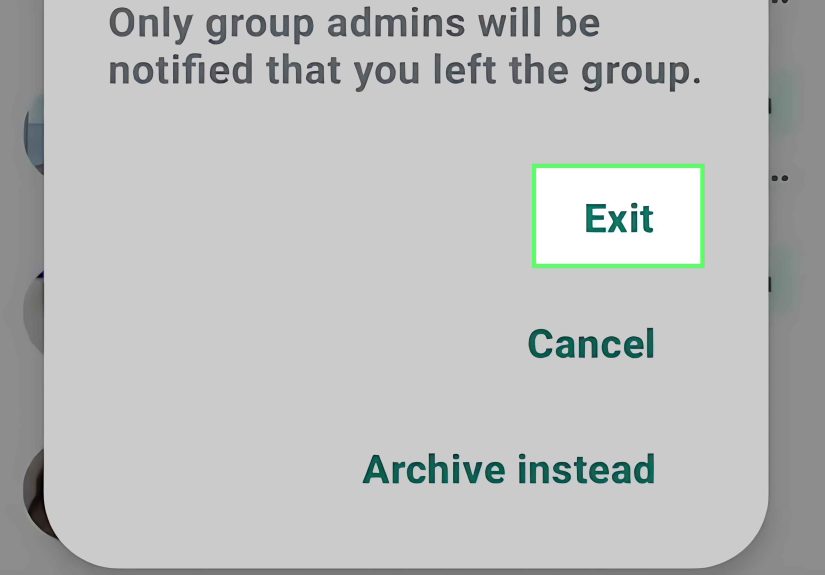
- Look for a Leave group, Exit, or membership-related option.
If you see it, congratulations. You have found the unicorn. Tap it, confirm your choice, and walk into the sunset like a person who no longer needs 47 alerts about lunch plans.
If you do not see a leave option, that usually means one of three things:
- The thread is a standard SMS/MMS group text.
- Your messaging app version does not expose that control.
- Your phone brand or carrier handles group texting differently.
In that case, skip the fantasy of a dramatic exit and move on to the methods that actually work: muting, deleting, archiving, or blocking.
How to Mute a Group Text on Android
For most people, muting is the best solution. It lets you stay technically in the conversation without getting pinged every time somebody discovers the Reply All button and misuses it like a hobby.
Mute a Group Text in Google Messages
- Open Google Messages.
- Open the group conversation.
- Tap the three-dot menu or open Group details.
- Tap Notifications.
- Select Silent.
This is one of the most reliable ways to mute a group text on Android. Depending on your phone, you may also be able to adjust bubbles, sound, vibration, and priority settings for that conversation.
If you still see banners or badges after muting the thread, check your phone’s system notification settings too. Android likes to give you options, which is wonderful until those options start hiding behind other options like nesting dolls with anxiety.
Mute a Group Text in Samsung Messages
- Open Samsung Messages.
- Select the group conversation.
- Tap the three-dot menu.
- Tap the bell icon or adjust the conversation’s notification sound settings.
Samsung also gives you broader notification controls through Settings > Notifications, where you can manage app categories, choose silent alerts, and customize sounds. So if your group chat is still screaming into your life, Samsung gives you a few extra levers to pull.
How to Delete a Group Text on Android
Deleting a group text does one very important thing: it removes the thread from your phone. It does not necessarily remove you from the conversation on everyone else’s devices. So think of deletion as housekeeping, not diplomacy.
Delete a Group Conversation in Google Messages
- Open Google Messages.
- Touch and hold the group conversation.
- Tap the Delete icon.
- Confirm the deletion.
In Google Messages, deleting a conversation is permanent on your device. If new messages arrive in that same thread later, the conversation may reappear. So yes, deleting can feel less like closing a door and more like swatting a mosquito.
Delete a Group Conversation in Samsung Messages
- Open Samsung Messages.
- Touch and hold the conversation.
- Tap Delete or Delete all.
- Confirm by moving it to Trash.
Samsung has one useful advantage here: deleted messages can often be recovered from Trash for a limited time. That is helpful if you accidentally delete the soccer schedule, the family reunion details, or evidence that your cousin said he was “five minutes away” three hours ago.
How to Archive a Group Text Instead of Deleting It
If you want the thread out of sight but not gone forever, archiving is the polite middle ground. It is like putting a noisy box in the closet instead of throwing it into the ocean.
Archiving is especially useful if the conversation contains information you may need later, such as event details, addresses, school reminders, work updates, or screenshots of somebody confidently being wrong.
In some Android messaging apps, you can archive by touching and holding the conversation and selecting Archive. The chat disappears from your main inbox but can be restored later. This is a great option if you are not ready to delete the thread but are very ready to stop looking at it.
How to Block or Report a Group Text on Android
If the conversation is not just annoying but actually unwanted, suspicious, or spammy, blocking is the stronger move.
Block in Google Messages
- Open the conversation.
- Tap More, then Details or Group details.
- Tap Block & report spam.
- Confirm.
This is helpful for scam texts, fake delivery notices, mystery coupon kingdoms, and every other message thread that feels like it was created by a robot with bad intentions.
Block in Samsung Messages
- Open Samsung Messages.
- Tap the conversation or touch and hold it from the inbox.
- Use the menu to select Block or go to Settings > Block numbers and spam.
If blocking at the app level is not enough, some carriers also provide line-level or account-level message blocking tools. That can be useful if you are dealing with repeated spam or persistent unwanted texts.
What to Do If You Cannot Leave the Group
If the leave option does not exist, do not waste your afternoon hunting for a button that the software never intended to show you. Instead, choose the right workaround for your situation:
| Situation | Best Move | Why It Works |
|---|---|---|
| It is busy but harmless | Mute | You stay in the thread without constant alerts. |
| You may need it later | Archive | It cleans up your inbox without deleting the conversation. |
| You never want to see it again | Delete | It removes the thread from your device until new messages arrive. |
| It is spam or abusive | Block and report | It helps stop future messages and may flag spam. |
| You want out socially and technically | Ask to be removed | Often the only real fix for SMS/MMS group texts. |
That last option may sound awkward, but a short message works: “Hey, could you start a new thread without me? I’m trying to cut down on group text notifications.” Clean, honest, and only slightly less dramatic than throwing your phone into a lake.
Common Problems and Fixes
I Deleted the Group Text, but It Came Back
That usually means someone sent a new message to the same thread. Deleting removes the conversation from your phone, but it does not erase the group for everyone else. If the conversation keeps returning, muting or blocking will be more effective than repeated deletion.
I Muted the Chat, but I Still See Something
Check both the app’s conversation settings and your phone’s broader notification settings. On Samsung phones, notification categories can affect how alerts behave. On Android in general, badges, bubbles, previews, and priority settings can create the illusion that muting “did not work” when one layer of notifications is still active.
I Want to Stop All Message Noise for a While
Use Do Not Disturb. This will not solve the group thread itself, but it is excellent when your phone starts sounding like a slot machine. You can set temporary silence and choose what, if anything, is allowed through.
I Am in a Work Group That Never Sleeps
Mute the thread, then turn on priority notifications only for the people or apps you absolutely need. That way, the group can continue debating spreadsheets at midnight while you continue being unconscious like a champion.
Real-World Experiences With Leaving, Muting, or Deleting Group Texts on Android
In real life, most people do not search for how to leave a group text on Android because they are bored. They search because a conversation has crossed the line from useful to absurd. It usually starts innocently. A family chat is created for holiday plans. A parent group forms to coordinate pickup. A work thread begins with “quick update” and ends six months later with 814 unread messages and one person still saying “following.”
One of the most common experiences is the family group text spiral. You open your phone expecting one message from Mom and instead discover a full documentary told through 53 texts, nine heart emojis, a blurry casserole photo, and an argument about what time dinner starts. In that situation, muting the thread is often the perfect solution. You are still in the family loop, but your phone no longer buzzes every time Aunt Linda discovers voice messages.
Then there is the work group text, which can be even trickier. You may not feel comfortable leaving, and deleting it may not be wise if it contains addresses, schedules, or last-minute changes. Here, archiving or muting is usually the smartest move. You keep the information, lose the noise, and avoid looking like the person who rage-quit the team because someone replied “Thanks!” seventeen times.
Another common scenario is the event-planning thread. These are born with good intentions and then mutate into chaos. You join to hear the restaurant time, but soon the group is debating parking, weather, shoes, side dishes, and whether anyone has a charger. If you cannot leave, muting helps you maintain your dignity. You can check in when needed instead of living inside a constant storm of “Does 7 work?” and “Actually make it 7:15.”
For spam or unknown group messages, the experience is very different. These threads feel invasive right away. Maybe it is a scam, maybe it is a marketing blast, maybe it is a wrong-number thread that somehow keeps going like a cursed sitcom. In those cases, blocking and reporting the conversation makes the most sense. There is no prize for being polite to a fake delivery alert.
Many Android users also learn the same frustrating lesson: deleting a group text is not the same as leaving it. People delete the thread, feel triumphant for approximately nine minutes, and then the chat reappears when someone sends another message. That moment has a special kind of emotional flavor. Part disappointment, part betrayal, part “I knew I should have muted this instead.”
The most successful long-term approach is usually simple. If the conversation is important but loud, mute it. If it is useful but cluttered, archive it. If it is spammy or inappropriate, block it. If you truly want out and the chat does not support leaving, ask to be removed and move on. Not every digital battle needs a dramatic exit. Sometimes peace looks like one silent thread and a much quieter lock screen.
Final Thoughts
If you came here hoping for one universal Android button labeled “Please remove me from this chaos,” I wish I had better news. But the practical answer is still very good: you can almost always mute, archive, delete, or block a group text on Android, and in many real-world situations, that solves the problem faster than hunting for a leave option that may not exist.
The smartest move depends on your goal. Want peace without social fallout? Mute it. Want a cleaner inbox? Archive or delete it. Want the messages to stop completely? Block and report the thread, or ask the group creator to leave you out of the next one. Group texts may be noisy, messy, and occasionally powered by pure chaos, but your Android phone still gives you enough tools to fight back.