Table of Contents >> Show >> Hide
- What Is VBScript, Exactly?
- Step 1: Set Up Your VBScript File and Learn How It Runs
- Step 2: Learn the Core VBScript Building Blocks
- Step 3: Use VBScript for Real Tasks and Learn Basic Debugging
- A Sample VBScript Program That Ties Everything Together
- Is VBScript Still Worth Learning?
- Practical Tips for Learning VBScript Faster
- Final Thoughts
- Experience and Lessons Learned from Programming with VBScript
- SEO Tags
If you have ever opened an old Windows server, poked around a legacy login script, and found a mysterious .vbs file staring back at you like a haunted floppy disk, welcome. You have officially met VBScript. It is old-school, a little quirky, and very much part of Windows history. But it is also surprisingly readable, which is great news if you want to learn it without feeling like you need a time machine and a beige CRT monitor.
This guide breaks down how to program with VBScript in 3 steps. The goal is not to turn you into a 1999 system administrator by lunchtime, although that would be impressive. Instead, this article will help you understand what VBScript is, how to write a basic script, and how to run practical tasks with confidence. Along the way, we will keep things simple, readable, and honest: VBScript is mainly useful today for legacy Windows automation, maintenance work, and learning how classic scripting logic works.
So yes, this is real programming. No, you do not need a cape. Although if you want to wear one while debugging, I will not stop you.
What Is VBScript, Exactly?
VBScript, short for Visual Basic Scripting Edition, is a scripting language created by Microsoft. It was historically used in Internet Explorer, classic ASP pages, Windows administration, login scripts, and automation tasks. Today, it is considered a legacy language. That means it still exists in some environments, but it is no longer the cool kid at the coding lunch table.
Still, learning VBScript can be useful if you:
- Maintain old Windows scripts
- Need to understand legacy enterprise tools
- Work with classic ASP applications
- Want a gentle introduction to scripting fundamentals
- Need to read or troubleshoot existing
.vbsfiles
VBScript is easy to read because its syntax is close to plain English. It uses friendly keywords like If, Then, Else, For Each, and Function. In other words, it does not try to intimidate you with punctuation gymnastics.
Step 1: Set Up Your VBScript File and Learn How It Runs
The first step in learning how to program with VBScript is understanding where the script lives and how Windows executes it.
Create a Simple VBScript File
Open a plain text editor such as Notepad. Type the following:
Now save the file as hello.vbs. Make sure it does not become hello.vbs.txt, because that is not a script. That is just Windows being unhelpfully “helpful.”
Understand WScript vs. CScript
VBScript usually runs through Windows Script Host, which has two common hosts:
- WScript: better for pop-up windows and message boxes
- CScript: better for command-line output and debugging
If you double-click hello.vbs, Windows will often use WScript, which shows a message box. If you run it from Command Prompt with cscript hello.vbs, the output is handled in the console. That difference matters because message boxes are fine for tiny demos, but terrible when your script is supposed to process 500 files and not make you click “OK” 500 times.
Your First Better Example
Here is a slightly more useful script:
Save it as test.vbs, open Command Prompt, navigate to the folder, and run:
WScript.Echo is one of the most common output methods in VBScript. With CScript, it prints to the console. With WScript, it may appear in a dialog box. Same line of code, different personality.
Why Step 1 Matters
Many beginners think their script is broken when the real issue is simply how it was launched. If your script opens a pop-up instead of writing to the terminal, that is not a bug. That is Windows choosing drama.
Step 2: Learn the Core VBScript Building Blocks
Once you can create and run a file, the next step is learning the grammar of VBScript. This is where programming with VBScript starts to feel less like mystery and more like logic.
Variables in VBScript
VBScript uses the Dim keyword to declare variables. The language is loosely typed, and values are usually stored as a Variant, which can hold strings, numbers, dates, and more.
The & symbol joins strings together. This is called concatenation, which is a fancy word for “gluing text together without tape.”
Numbers and Basic Math
VBScript supports the usual math operations: addition, subtraction, multiplication, division, and comparisons.
Conditional Logic with If…Then
Programming gets interesting when your script makes decisions.
This is one of the most important patterns in VBScript. If a condition is true, the script runs one block. If not, it runs another. Elegant, readable, and far less judgmental than some people on the internet.
Using Select Case
When you have several conditions, Select Case can be cleaner than stacking many ElseIf lines.
Loops: Making the Computer Do the Repetitive Stuff
If you find yourself repeating an action, a loop can help. Computers are very good at repetition. In fact, it is one of their favorite hobbies.
You can also loop through collections or arrays:
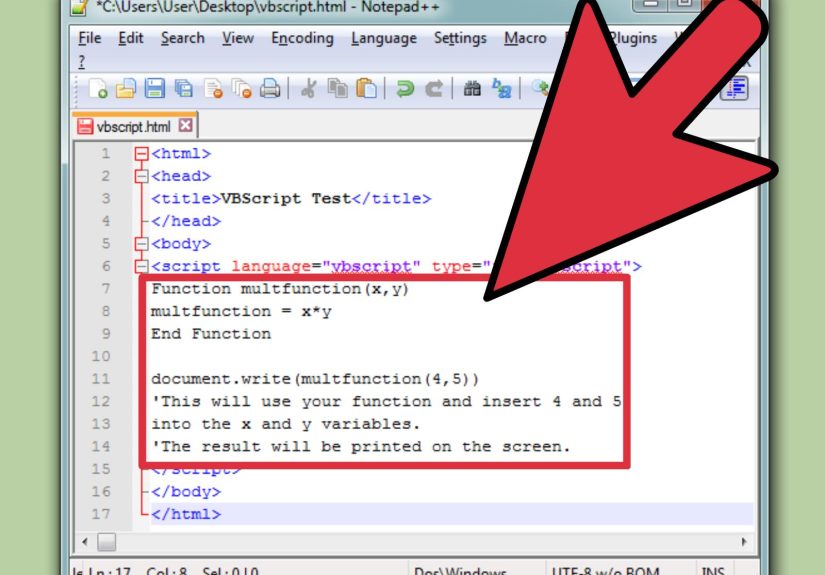
Functions and Subroutines
As your script grows, you should organize code into reusable chunks.
A Function returns a value. A Sub performs an action but does not return one.
Comments and Readability
Use an apostrophe to write comments.
Comments help future-you understand past-you. Future-you will appreciate the gesture. Future-you is often tired and slightly annoyed.
Step 3: Use VBScript for Real Tasks and Learn Basic Debugging
The final step is where VBScript becomes practical. Writing “Hello, world” is nice, but the real value comes from automation, file handling, and simple task scripting.
Work with Objects Using CreateObject
One of the most important VBScript techniques is creating automation objects. This is how scripts interact with parts of Windows or other Microsoft components.
A classic example is the FileSystemObject, often used to create, read, and manage files and folders.
This is where VBScript starts feeling powerful. Instead of just printing text, your script can inspect the system and act on real files.
Create and Write to a Text File
This simple pattern is useful for logs, exports, and reports.
Read Input from the User
If you want a basic interactive script, use InputBox:
Basic Error Handling
VBScript does not have fancy modern exception handling, but it does provide On Error Resume Next. Use it carefully. It tells the script to continue after an error, which is useful only if you immediately check whether something went wrong.
This pattern helps you debug without letting your script fail silently. Silent failures are the worst kind because they leave you staring at the screen like it owes you an apology.
Common Beginner Mistakes
- Saving the file as
.txtinstead of.vbs - Using smart quotes copied from a website
- Forgetting
Setwhen assigning objects - Running a pop-up script with
CScriptand wondering why it feels odd - Using VBScript for new web development, which is a museum-grade idea at this point
A Sample VBScript Program That Ties Everything Together
Here is a complete beginner-friendly example:
This tiny program uses variables, input, conditional logic, and type checking. That is a solid beginner milestone. Once you understand this, you are not just reading VBScript. You are programming with it.
Is VBScript Still Worth Learning?
That depends on your goal.
If you want to build modern websites, apps, or cloud tools, then no, VBScript should not be your main focus. JavaScript, Python, and PowerShell make far more sense today. VBScript is a legacy technology, and Microsoft has been moving away from it.
But if you need to understand old Windows automation, manage classic scripts, maintain aging ASP systems, or read enterprise code that somehow survived three office moves and a server migration, then yes, learning VBScript is absolutely worthwhile.
Think of it this way: learning VBScript today is like learning how to drive stick shift. It may not be the default anymore, but when you need it, you really need it.
Practical Tips for Learning VBScript Faster
- Start with tiny scripts and run them often
- Use
CScriptfor easier debugging in the terminal - Write comments so you understand your logic later
- Practice with file handling, conditions, and loops
- Read old scripts and rewrite small parts to understand them
- Keep expectations realistic: this is legacy scripting, not modern app development
Final Thoughts
Learning how to program with VBScript in 3 steps is really about learning how to think like a scripter. First, create and run a simple .vbs file. Second, understand variables, conditions, loops, and functions. Third, use objects and automation to perform real tasks and handle errors with care.
VBScript is not flashy. It is not trendy. It will not impress the cool JavaScript frameworks at the party. But it is readable, practical in the right environment, and still valuable when you are dealing with legacy Windows systems.
And honestly, there is something satisfying about making a tiny script do useful work with just a few lines of plain-English code. It feels like solving a problem with a tool that refuses to be fancy. Sometimes that is exactly what you need.
Experience and Lessons Learned from Programming with VBScript
One of the most interesting things about learning VBScript is how quickly it teaches you the difference between simple and easy. The syntax is simple. You can read a lot of it without breaking a sweat. But once you start using it in real Windows environments, you realize that the hard part is not always the language itself. The hard part is the environment around it: file permissions, script host behavior, old server settings, object availability, and the occasional machine that acts like it has never seen a .vbs file in its life.
That is actually a good thing for beginners. VBScript forces you to pay attention to context. You learn that code does not live in a vacuum. A script that works perfectly on one machine might fail on another because a folder path is different, a component is missing, or Windows is configured differently. Those lessons matter in every programming language, not just this one.
Another common experience with VBScript is that it makes you respect clean, readable logic. Because the language is not packed with modern developer conveniences, messy code gets ugly fast. If your variable names are vague and your conditionals are sloppy, your script starts looking like a note written during a caffeine emergency. On the other hand, if you keep your code organized, VBScript can be wonderfully easy to follow. That makes it a surprisingly good teaching language for clarity.
People who spend time with VBScript also tend to get better at troubleshooting. You learn to check the exact file name, verify the path, test outputs one line at a time, and inspect Err.Number and Err.Description instead of just hoping the computer will “figure it out.” Spoiler: it will not. Computers are amazing, but mind-reading is still not in the standard feature set.
There is also a practical career lesson here. Legacy technology does not disappear overnight. Businesses often keep old automation scripts running for years because they still do the job. A small VBScript might rename files, map drives, move reports, or support a dusty but important workflow nobody wants to touch before quarter-end. If you can read and repair that script, you become useful very quickly. Maybe not glamorous. But definitely useful. And useful pays better than trendy in more situations than people admit.
Finally, programming with VBScript teaches humility in a healthy way. It reminds you that programming is not always about chasing the newest language or shinier framework. Sometimes it is about understanding the tool that is already there, solving the problem in front of you, and writing code that another human can actually maintain. That is a timeless skill. Whether you move on to PowerShell, Python, or something else entirely, the discipline you build with VBScript still counts. The language may be old, but the lessons are very much alive.