Table of Contents >> Show >> Hide
- What Made the 8GB Raspberry Pi 4 a Big Deal?
- The Hardware: Familiar Pi 4, Bigger Memory Muscles
- Raspberry Pi OS and the 64-Bit Question
- Best Uses for the Raspberry Pi 4 8GB
- Where the 8GB Model Is Overkill
- Performance Reality: What Actually Improves?
- Raspberry Pi 4 8GB vs. 4GB: Which One Should You Choose?
- Why the 8GB Pi 4 Still Matters
- Buying Tips for a Better Raspberry Pi 4 8GB Setup
- Hands-On Experience: Living With the Raspberry Pi 4 8GB
- Conclusion
The Raspberry Pi 4 was already a tiny troublemaker in the best possible way: small enough to hide behind a monitor, cheap enough to buy without scheduling a family finance meeting, and flexible enough to become anything from a media server to a robot brain. Then came the 8GB model, and suddenly the humble single-board computer started looking less like a weekend toy and more like a serious little workstation wearing a hobbyist hoodie.
When the Raspberry Pi 4 8GB arrived, it did not reinvent the board from scratch. It did something more practical: it gave makers, developers, educators, and tinkerers more memory to play with. That extra RAM mattered because the Pi 4 had already taken a major leap forward with a stronger CPU, USB 3.0, true Gigabit Ethernet, dual micro-HDMI display support, and faster memory than earlier models. The missing piece for heavier workloads was headroom. The 8GB version supplied exactly that.
In plain English, the Raspberry Pi 4 8GB gave users more breathing room. More browser tabs. Larger software builds. Heavier server jobs. Bigger databases. More containers. Fewer moments where the system looks at you, sighs electronically, and asks whether you really needed to open twelve documentation pages, a code editor, and a YouTube tutorial at the same time.
What Made the 8GB Raspberry Pi 4 a Big Deal?
The Raspberry Pi line has always been about accessibility. It brought computing to students, makers, classrooms, labs, and garages without requiring a giant budget. But earlier Raspberry Pi boards had obvious limits. They were brilliant for learning Linux, programming GPIO pins, building retro gaming boxes, or running lightweight services, but nobody confused them with a desktop-class machine.
The Raspberry Pi 4 changed that conversation. With its quad-core ARM Cortex-A72 processor, improved I/O, dual-display capability, and faster networking, it became much easier to imagine the Pi as a real computer rather than just a clever controller board. The 8GB version pushed that idea further. It did not magically turn the Pi into a workstation beast, but it did allow more ambitious workloads to fit comfortably inside a board that still looked like it belonged in a mint tin.
More RAM Does Not Mean More Magic
Here is the important caveat: adding RAM does not automatically make every task faster. If an application is limited by CPU speed, storage performance, thermal throttling, or graphics capability, extra memory will not wave a wand and shout “performance boost!” like a tiny wizard in a lab coat.
Where the 8GB Raspberry Pi 4 shines is in memory-heavy scenarios. It helps when you are multitasking, running containers, compiling software, caching large files, experimenting with databases, or using the board as a lightweight desktop. In those cases, the extra memory prevents the system from leaning too hard on swap space, which can slow things down dramatically on microSD storage.
The Hardware: Familiar Pi 4, Bigger Memory Muscles
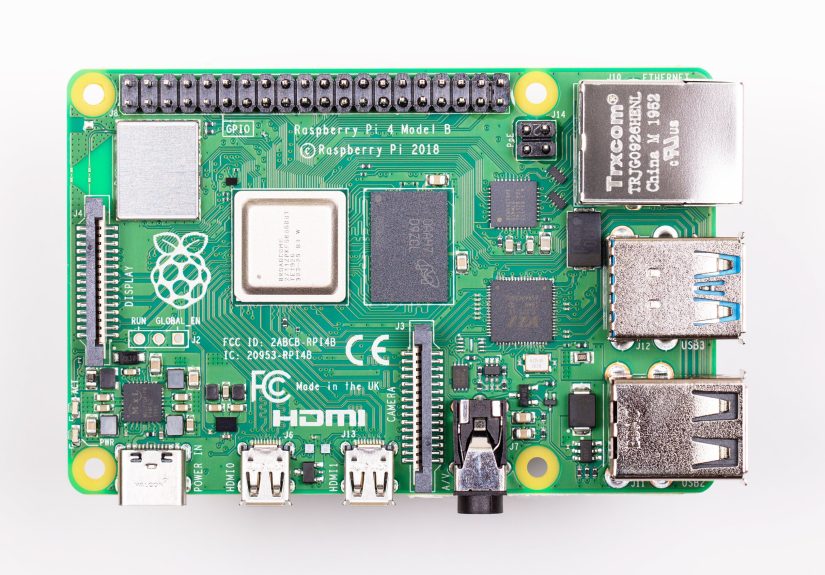
At first glance, the 8GB Raspberry Pi 4 looks like its smaller-memory siblings. It keeps the same general board layout, the same compact form factor, and the same maker-friendly identity. The major difference is the memory package and the supporting power circuitry needed to feed that larger RAM configuration.
The Raspberry Pi 4 Model B family includes a Broadcom BCM2711 processor, a 64-bit quad-core ARM Cortex-A72 CPU, LPDDR4 memory options, dual-band Wi-Fi, Bluetooth 5.0, Gigabit Ethernet, two USB 3.0 ports, two USB 2.0 ports, a 40-pin GPIO header, and two micro-HDMI ports. That combination is why the Pi 4 became such a popular upgrade over the Raspberry Pi 3. It was not just “a little faster.” It was a much more capable platform for modern projects.
Why 8GB Took Time
The 8GB version was not available at the original Raspberry Pi 4 launch because the right 8GB LPDDR4 package was not ready in the necessary form. The Pi 4’s processor could address more memory, but hardware reality has a rude habit of ruining wish lists. Once a suitable memory package became available, the Raspberry Pi team could finally release the long-rumored 8GB board.
The result was a Raspberry Pi that still felt familiar but could handle a larger working set. For developers, that meant more room for compilers, language servers, local databases, Docker containers, and development tools. For home lab fans, it meant better support for multi-service setups. For desktop experimenters, it meant Chromium could stretch its legs without immediately stepping on a rake.
Raspberry Pi OS and the 64-Bit Question
The 8GB Raspberry Pi 4 also made the operating system discussion more interesting. A 32-bit operating system can use memory in clever ways, but individual process limits can become a problem for workloads that need large memory spaces. That is why the move toward a 64-bit Raspberry Pi OS mattered so much.
When the 8GB model appeared, Raspberry Pi also introduced a beta 64-bit operating system path. Later, the 64-bit Raspberry Pi OS became broadly available, giving users a more natural way to use modern ARM64 software. This was especially useful for developers working with containers, server software, and packages increasingly built for 64-bit ARM systems.
Why 64-Bit Matters for Real Projects
For a beginner blinking an LED, the difference between 32-bit and 64-bit is not important. The LED will blink either way, bravely and repeatedly, like it has union protection. But for modern software stacks, 64-bit support can matter a lot.
Many Docker images, programming tools, databases, and server packages are better supported on 64-bit ARM than they were in the early Pi days. If you are using the Raspberry Pi 4 8GB as a mini server, Kubernetes node, development box, or test environment, 64-bit software can reduce friction. It makes the Pi feel less like a special case and more like a normal Linux machine that happens to be adorable.
Best Uses for the Raspberry Pi 4 8GB
The 8GB Raspberry Pi 4 is not the right choice for every project. If you are building a simple sensor logger, a basic Pi-hole server, a retro gaming console, or a small automation project, the 2GB or 4GB version may be perfectly fine. The 8GB model makes the most sense when memory is part of the workload, not just a number printed on a product listing.
1. Lightweight Desktop Computer
The Pi 4 8GB can work as a modest desktop for browsing, writing, coding, email, and learning Linux. It is not going to bully a modern laptop in performance tests, but it can serve as an affordable desktop for students, hobbyists, and minimalists. Pair it with a good power supply, a fast microSD card or USB SSD, a case with cooling, and reasonable expectations. That last accessory is not sold in stores, but it is very important.
2. Home Server
Home server projects are where the 8GB model becomes very appealing. You can run a local file server, media tools, network monitoring, a personal wiki, lightweight databases, automation services, and backup utilities. More RAM gives these services space to coexist without constantly fighting for resources like raccoons in a dumpster behind a data center.
3. Docker and Container Experiments
Containers can be memory-hungry, especially when you run several services at once. The Raspberry Pi 4 8GB gives developers and home lab enthusiasts more room for Docker Compose stacks, lightweight Kubernetes experiments, reverse proxies, databases, and monitoring tools. It is a friendly way to learn cloud-native concepts without renting cloud instances or explaining a surprise bill to your future self.
4. Programming and Software Builds
Compiling large projects can consume plenty of RAM. The 8GB Pi 4 gives programmers more comfort when building software, running IDEs, testing code locally, or working with languages that like memory a little too much. It will not replace a high-end developer workstation, but it can be a surprisingly capable ARM development environment.
5. Education and Computer Science Learning
The Pi has always been excellent for education. The 8GB version expands what students can explore: Linux administration, networking, databases, web servers, Python development, electronics, robotics, and containerized applications. It is still approachable, but it no longer feels as cramped when lessons move beyond the basics.
Where the 8GB Model Is Overkill
Not every Raspberry Pi project needs 8GB of RAM. A weather station does not need the memory budget of a small office PC. A simple GPIO project will not become more accurate because you bought the biggest model. A retro console focused on older systems may benefit more from storage quality, cooling, controllers, and software setup than from extra RAM.
This is the trap many buyers fall into: they purchase the highest-spec board because it feels “future-proof.” Sometimes that is smart. Other times it is like buying a pickup truck to carry one sandwich. Technically effective, but perhaps not the most elegant use of money.
Performance Reality: What Actually Improves?
In everyday use, the 8GB Raspberry Pi 4 feels most different when you push past the comfort zone of smaller models. If you open a few applications, run a browser, start a local server, and keep development tools active, the extra memory helps the system remain responsive. If you are only running one lightweight task, the difference may be invisible.
Storage speed also matters. A fast USB SSD can make the Pi 4 feel much better than a cheap microSD card. Cooling matters too, because the Pi 4 can run warm under sustained load. A good case, heatsink, or active fan can help the board maintain performance. In other words, RAM is one part of the recipe. The whole meal still needs decent ingredients.
Think of RAM as Workspace
A useful analogy is a workbench. More RAM gives you a bigger bench. You can spread out more tools, parts, documents, and half-finished ideas. But if your hands move slowly, your drill is weak, or your storage cabinet is across the street, the bigger bench alone does not make you a master craftsman. It simply lets you work without constantly clearing space.
Raspberry Pi 4 8GB vs. 4GB: Which One Should You Choose?
The 4GB Raspberry Pi 4 remains a sweet spot for many users. It is capable enough for desktop experiments, coding, media tasks, and many home server setups. The 8GB version is better for heavier multitasking, containers, larger builds, databases, and long-term flexibility.
If you already own a 4GB Pi 4 and your projects run smoothly, upgrading just for the number may not be necessary. If you are buying a Pi 4 for development, server use, or experimentation with modern ARM64 software, the 8GB model is easier to recommend. It gives you space to grow, and in small computers, headroom often becomes valuable sooner than expected.
Why the 8GB Pi 4 Still Matters
Newer Raspberry Pi models have arrived, but the Raspberry Pi 4 8GB remains important because it marked a turning point. It showed that the Pi was no longer only a teaching board or a maker gadget. It could be a compact Linux machine with enough memory for serious work. It also helped normalize the idea of Raspberry Pi boards as home lab computers, edge devices, and affordable development platforms.
The 8GB model also arrived at the right cultural moment. More people were learning from home, building small labs, exploring self-hosting, and experimenting with ARM hardware. The Raspberry Pi 4 8GB fit neatly into that trend. It was inexpensive compared with traditional PCs, power-efficient, well-documented, and supported by a giant community that has probably already tried your project, broken it twice, fixed it, and written a forum post about it.
Buying Tips for a Better Raspberry Pi 4 8GB Setup
The board is only the beginning. To get the best experience from a Raspberry Pi 4 8GB, choose the right supporting hardware. A weak power supply can cause instability. A slow microSD card can make the system feel sluggish. Poor cooling can reduce performance during sustained workloads. A messy setup can turn troubleshooting into a mystery novel, but with more cables.
Recommended Accessories
- Official or high-quality USB-C power supply: Stable power prevents random crashes and warning icons.
- Fast storage: A good microSD card works, but a USB SSD can make desktop and server use feel much smoother.
- Cooling case or fan: Especially helpful for long builds, server workloads, and desktop use.
- Micro-HDMI cable: The Pi 4 uses micro-HDMI, so check your cable drawer before blaming the universe.
- Reliable network connection: Gigabit Ethernet is excellent for server projects and file transfers.
Hands-On Experience: Living With the Raspberry Pi 4 8GB
Using the Raspberry Pi 4 8GB feels a bit like moving from a tiny studio apartment into a small but well-organized workshop. You are not suddenly living in a mansion, but you stop bumping your elbows every time you try to do something useful. The biggest improvement is not dramatic speed in one simple task; it is comfort when several things are happening at once.
For example, a typical development setup might include Chromium with documentation open, Visual Studio Code or another editor, a terminal session, a local web server, a database, and maybe Docker running in the background. On a smaller board, that combination can start to feel tight. The system may still work, but it becomes cautious, like it is walking across a frozen lake while carrying your source code. On the 8GB model, there is more room for those tools to run together without the same pressure.
The experience is also better when using the Pi as a home server. Running a few lightweight services is easy on many Raspberry Pi models, but the 8GB version gives you permission to be a little more ambitious. You can host a dashboard, a reverse proxy, a database, a media-related service, a personal notes app, and monitoring tools without immediately worrying that memory will become the villain of the story. CPU and storage still matter, but RAM stops being the first ceiling you hit.
Another practical lesson is that storage can define the whole mood of the machine. A Raspberry Pi 4 8GB booting from a cheap, tired microSD card may feel slower than expected. Move the system to a good USB SSD, and suddenly the board behaves with much more confidence. Applications open faster, package updates feel less painful, and server tasks become more reliable. The RAM helps, but fast storage makes the experience feel polished.
Cooling is equally important. The Pi 4 can get warm during sustained workloads, especially when compiling software or running multiple services. A passive heatsink case can help, while a small fan can keep temperatures under control during long sessions. This is not difficult, but it is worth planning from the start. Nothing ruins the “tiny computer genius” vibe faster than thermal throttling because the board is sealed in a plastic box with the airflow of a shoebox.
The most satisfying part of the Raspberry Pi 4 8GB is how approachable it remains. It is powerful enough to teach real Linux server concepts, real networking, real programming, and real troubleshooting. Yet it is still inexpensive and forgiving enough for experiments. You can break a configuration, reflash an image, and start again without feeling like you have damaged an expensive workstation. That freedom is exactly why Raspberry Pi became so beloved in the first place.
In daily use, the 8GB model rewards curiosity. Want to try a local development stack? Go ahead. Want to build a NAS-like file server? Reasonable. Want to learn containers? Perfect. Want to replace a modern gaming PC? Please sit down; we need to talk. The Pi 4 8GB is not magic, but it is wonderfully capable when matched with the right expectations.
Conclusion
The Raspberry Pi 4 8GB was more than a memory upgrade. It was a statement that the Raspberry Pi platform had grown up without losing its playful spirit. It kept the compact size, low cost, GPIO access, and community energy that made the Pi famous, while adding enough memory to support more serious desktop, development, and server workloads.
For beginners, the 8GB model offers room to learn without immediately outgrowing the board. For developers, it provides a flexible ARM64 Linux environment. For home lab fans, it is a small, efficient server platform. For makers, it remains a friendly brain for creative projects. The Raspberry Pi 4 did not become famous because it was the fastest computer in the room. It became famous because it made computing feel open, affordable, and fun. With 8GB of RAM, it simply had more room for the fun to get complicated.