Table of Contents >> Show >> Hide
- The Short Answer: Yes, but Don’t Expect Fireworks on Your Power Bill
- Why Chargers Use Power Even When Nothing Is Charging
- What Energy Experts Actually Recommend
- Is Leaving a Charger Plugged In Dangerous?
- When You Should Definitely Unplug Chargers
- When Leaving It Plugged In Is Usually Fine
- How to Cut Standby Power Without Turning Into an Outlet Ninja
- The Bottom Line
- Everyday Experiences With Unplugging Chargers and Noticing the Difference
Let’s start with the question behind the question: is that lonely phone charger in the wall secretly running up your electric bill like a tiny outlaw in a plastic shell? Sort of. But not dramatically. Energy experts generally agree that chargers left plugged in can keep drawing a small amount of electricity, even when they are not connected to a device. The catch is that the amount is usually pretty small for one modern charger. So yes, unplugging chargers can save energy, but the bigger story is about habits, safety, and knowing which plugged-in devices are actually worth worrying about.
That means the most honest answer is not a dramatic “unplug everything immediately!” and it is not a lazy “it makes no difference.” The real answer lives in the middle: unplugging chargers is a smart, low-effort habit, but it is rarely the biggest line item on your utility bill. If you want meaningful savings, you should think beyond phone chargers and look at all the stuff in your home that sits there quietly sipping power around the clock.
The Short Answer: Yes, but Don’t Expect Fireworks on Your Power Bill
If you unplug chargers when you are not using them, you will eliminate their standby electricity use. That part is simple. The more complicated part is whether it matters enough to change your life. For most households, unplugging one or two modern phone chargers will not create a dramatic monthly savings. We are talking about modest gains, not yacht money.
Still, modest does not mean meaningless. Small waste multiplied by many devices, every day, all year, becomes a real category of home energy use. That is why energy experts keep talking about standby power, also called phantom load or vampire power. It sounds like a Halloween special, but it is just electricity being used by products that are technically “off,” idle, or waiting to do something useful later.
Why Chargers Use Power Even When Nothing Is Charging
What “phantom load” actually means
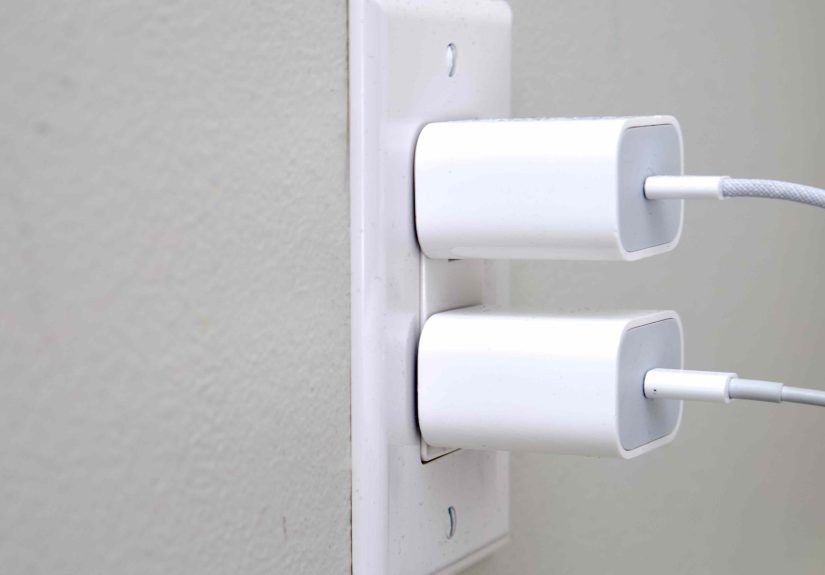
A charger plugged into the wall is still connected to electricity. Even if no phone, tablet, earbuds case, or laptop is attached, the charger itself may still consume a little power. In older or lower-quality chargers, that idle draw can be more noticeable. In many newer chargers, especially better-designed models, it is usually much lower. But “lower” is not the same as “zero.”
That distinction matters because people often treat chargers like an all-or-nothing issue. They imagine either a charger is draining huge amounts of power or it is doing absolutely nothing. Reality is less exciting and more useful: many modern chargers are efficient, but they are not magical. If they are plugged in, they may still draw a little electricity.
Why the bill impact feels smaller than people expect
One charger usually does not use much power by itself, which is why people unplug one phone cable for a week and do not suddenly feel like an energy mogul. But the total standby load in a home can come from dozens of little sources working together: chargers, printers, coffee makers with digital clocks, gaming consoles, sound systems, cable boxes, streaming devices, monitors, and appliances with always-on displays. That is where the real cost starts showing up.
Think of it this way: one forgotten charger is a drippy faucet. Annoying, a little wasteful, but not a catastrophe. A whole house full of always-on electronics is more like several faucets dripping all day while a speaker in the corner politely asks whether you would like to reorder paper towels.
What Energy Experts Actually Recommend
Energy guidance from experts tends to follow the same pattern. First, unplug chargers when they are not in use, especially battery chargers and adapters that do not need to stay connected. Second, focus on the bigger standby offenders in your home. Third, use tools like smart power strips or advanced power strips so you do not have to spend your evenings crawling under furniture like a plug-hunting detective.
This balanced approach matters because it keeps the advice practical. If your routine requires leaving a laptop charger in one convenient spot during the workday, you do not need to panic. But if you have a cluster of chargers, desk equipment, entertainment gear, and countertop appliances all plugged in around the clock, then yes, cutting that idle load is a sensible move.
Modern chargers are better, but not always perfect
Today’s chargers are usually far more efficient than the chunky heat-bricks of the past. Better design and energy standards have reduced how much power many adapters use in no-load mode. That is good news for your electric bill and for common sense. Still, efficiency varies by product quality, age, and design. A premium charger from a reputable brand is not the same thing as a mystery charger bought from the digital equivalent of a cardboard box under a folding table.
That is why the best advice is not just “unplug chargers,” but “use good chargers, and unplug the ones you are not using.” The second half helps your bill. The first half helps your nerves.
The bigger energy vampires deserve more attention
If your goal is real savings, chargers should not be the only stars of the show. Entertainment centers, desktop computer setups, printers, cable boxes, gaming consoles, and kitchen appliances with displays often waste more standby power than one little phone charger. In many homes, these are the real utility-bill nibblers.
So if you are serious about trimming electricity use, unplugging chargers is a good first habit, but not the finish line. Group your electronics on switchable strips. Shut off office equipment when the workday is done. Use smart plugs where it makes sense. And stop giving your game console the energy budget of a small celebrity.
Is Leaving a Charger Plugged In Dangerous?
Here is where the conversation gets more interesting. From a pure energy perspective, leaving a charger plugged in usually means small waste. From a safety perspective, the issue is less about a good-quality charger existing quietly in an outlet and more about which charger it is, what condition it is in, and where it is being used.
A well-made, undamaged charger from a reputable manufacturer is generally much less concerning than a frayed, overheating, wet, counterfeit, or recalled charger. Safety experts consistently focus on damaged cords, overheating, improper ventilation, moisture exposure, and low-quality or counterfeit charging accessories. In other words, the ordinary charger is not automatically a fire-breathing villain. The sketchy charger with cracked casing and bent prongs absolutely deserves side-eye.
Red flags you should never ignore
- The charger feels unusually hot when idle or during normal charging.
- The cable is frayed, cracked, loose, or has exposed wires.
- The plug blades are bent or damaged.
- The charger has been recalled or came from a questionable source.
- You are using it in a damp area, on a bed, under a pillow, or without airflow.
- Your device or charger smells odd, swells, pops, or changes color.
If any of those apply, do not just unplug it later. Stop using it. Replace it. The cost of a proper charger is much lower than the cost of pretending melted plastic is a personality trait.
When You Should Definitely Unplug Chargers
1. When the charger is not needed for long stretches
If a charger will sit unused for hours or days, unplugging it is the simplest way to eliminate even a small standby draw. This is especially true in guest rooms, home offices, and corners of the house where chargers tend to live rent-free for months.
2. Before traveling
Unplugging chargers before a trip is one of those tiny chores that makes sense on every level. It reduces unnecessary energy use, lowers exposure to power surges, and keeps you from forgetting the charger you actually need to pack. It is home maintenance and travel prep in one gloriously low-budget life hack.
3. During storms or when surge risk is high
Leaving electronics and chargers plugged in during severe weather can expose them to power surges. If storms are expected and you are able to unplug nonessential devices, it is a reasonable protective step.
4. If the charger is cheap, old, or suspicious
Not all chargers deserve equal trust. Off-brand, counterfeit, or visibly worn chargers should not stay plugged in any longer than necessary. If the charger looks like it came free with disappointment, retire it.
5. For devices with lithium-ion batteries or heat issues
Portable battery packs, tools, e-bikes, scooters, and other lithium-ion devices deserve more caution than an ordinary phone cable. These devices should be charged according to manufacturer guidance, kept away from heat and flammable materials, and disconnected if there are signs of damage or overheating.
When Leaving It Plugged In Is Usually Fine
If you are using a modern, undamaged charger from a reputable brand in a dry, ventilated area, leaving it plugged in for convenience is usually not the end of the world. It may waste a little electricity, yes, but in many cases the cost is minor. That is why this topic causes so many arguments: both sides are seeing a piece of the truth.
The “always unplug it” crowd is right that idle chargers can waste power and create avoidable safety exposure. The “it barely matters” crowd is right that one modern charger is usually not your biggest energy problem. The smartest view combines both: unplug when practical, prioritize higher-draw standby devices, and never ignore safety warning signs.
How to Cut Standby Power Without Turning Into an Outlet Ninja
Use smart or advanced power strips
Smart and advanced power strips are one of the easiest upgrades for home offices and entertainment centers. They cut power to groups of devices when they are not in use, which means you do not have to unplug your monitor, printer, speakers, lamp, and charger one by one like you are ending a tiny electrical friendship.
Create unplug zones
Keep chargers in one or two predictable places instead of scattering them through every room. That way, it is easier to unplug them when you are done and easier to spot the damaged ones before they become a problem.
Reserve your energy-saving effort for the biggest wins
If you only have five minutes to reduce electricity waste, do this first: turn off entertainment systems, switch off printers and desktop equipment, unplug small kitchen appliances you do not use daily, and consolidate chargers on a switched strip. That will usually beat the savings from obsessing over a single phone charger.
Buy better chargers
Look for reputable brands, solid build quality, and recognized safety certification. A safe, efficient charger is worth more than the few dollars you save buying an anonymous one with a suspiciously cheerful product photo.
The Bottom Line
So, should you unplug chargers when you are not using them? Yes, in most cases it is a good habit. It stops a small but real standby power draw, reduces clutter, and limits your exposure to damaged or overheating accessories. But it is not a miracle energy strategy on its own. One charger is usually a minor player. A house full of idle electronics is the real story.
If you want the practical expert answer, here it is: unplug chargers when it is easy, definitely unplug anything damaged or questionable, and put most of your energy-saving effort into bigger standby culprits and smarter power management. That is how you save electricity without making your home feel like a power-down drill.
Everyday Experiences With Unplugging Chargers and Noticing the Difference
People who start unplugging chargers usually notice something funny right away: the first benefit is not always the electric bill. It is often the feeling that the house is less cluttered, less random, and a little more under control. One family might realize they had six different charging bricks permanently living in the kitchen, all pretending to be essential. Another person may discover that the charger beside the sofa has been plugged in for so long it has become part of the architecture. Unplugging them does not create instant riches, but it does create awareness, and awareness tends to spread.
That is usually how the habit grows. Someone starts by unplugging a phone charger before bed. Then they notice the tablet charger, the smartwatch puck, the spare laptop adapter, and the ancient USB brick in the guest room that has not charged anything since a very enthusiastic fitness tracker phase in 2022. Before long, the issue stops being “Should I unplug this one charger?” and becomes “Why do I have so many idle devices quietly hanging around?”
In home offices, people often report the biggest difference when they stop treating the desk like a 24-hour power exhibit. A switched power strip lets them shut down the monitor, printer, speakers, desk lamp, and chargers in one move at the end of the day. It feels cleaner. It is faster. And it removes that vague guilt of knowing the room is still half-awake all night. No one throws a parade for your power strip, but it does earn silent respect.
Parents also tend to notice a safety benefit. Once you get into the habit of unplugging chargers, you are more likely to spot the frayed cable, the loose adapter, or the charger that gets weirdly warm for no good reason. That kind of attention matters. Many people do not identify bad charging accessories because they simply stop seeing them. They blend into everyday life until one day the cord is bent, the casing is cracked, or the plug is discolored. A regular unplug-and-check habit makes those problems more visible.
Frequent travelers often become the most loyal unpluggers for a completely different reason: they hate forgetting chargers. For them, unplugging is not only about standby power. It is a packing reminder. If the charger is still in the wall, it is easier to leave without it. If it is unplugged and stored, there is a much better chance it will make it into the bag instead of being left at home while the phone battery begins planning its early retirement.
Then there are the people who do not notice any dramatic financial difference at all, which is also an honest outcome. A single charger or two may not move the needle enough to show up in an obvious way. But even they often say the habit changed how they think about electricity. They become more strategic. They stop leaving countertop appliances plugged in by default. They use smart plugs. They shut down electronics clusters instead of letting them idle forever. The charger question becomes a gateway to better energy behavior overall.
That may be the most useful real-world lesson of all. Unplugging chargers is not about chasing pennies with superhero intensity. It is about building smarter habits, reducing avoidable waste, and paying closer attention to the gear you trust in your home every day. Once people understand that, the whole topic gets much less dramatic and much more practical.