Table of Contents >> Show >> Hide
- Meet the $14 MVP: The Speed Square
- Why Contractors Use It Daily
- Why the $14 Price Point Matters
- What to Look For in a Good Speed Square
- How Contractors Actually Use It in the Real World
- A 60-Second Accuracy Routine Before You Trust Any Square
- Common Beginner Mistakes (and Easy Fixes)
- Safety: The Non-Negotiable Part
- Who Should Buy One?
- Contractor-Level Use Cases You Can Copy This Weekend
- Is It Really Better Than “Just Being Careful”?
- Extended Field Experiences (Approx. )
- Conclusion
Every trade has that one humble tool nobody brags about at dinner partiesbut everyone reaches for before coffee. In carpentry, framing, remodeling, and even weekend DIY chaos, that tool is often the speed square (also called a rafter square). It’s cheap, simple, pocket-friendly, and somehow always doing five jobs at once while your “premium smart gadget” is still loading an app update.
And yes, the headline price is real. You can still find highly usable speed squares around the $14 range depending on brand and store. That means one tiny triangle of aluminum can help you mark angles, guide saw cuts, lay out rafters, and speed up repetitive workall for less than a takeout lunch and a fancy coffee.
This article breaks down why contractors actually use this tool every day, how to choose the right one, where beginners usually mess up, and how to use it safely and accurately. You’ll also get real-world experience notes at the endbecause tool talk is fun, but tool behavior on an actual job site is where the truth lives.
Meet the $14 MVP: The Speed Square
If you’ve never used one, a speed square looks like a thick triangular ruler with a lip (or “fence”) on one side. It’s often marketed as a 5-in-1 tool, typically combining the functions of:
- Try square (for 90° lines)
- Miter square (for 45° lines)
- Protractor (for angle layout)
- Line scriber
- Saw guide
That’s a lot for one small piece of metal. It’s basically the multitool of layout toolsexcept it doesn’t rattle in your pocket or pretend it can open wine bottles.
Why Contractors Use It Daily
1) Fast, repeatable layout
Contractors aren’t paid by the dramatic pause. They’re paid for clean, accurate, repeatable progress. A speed square makes it easy to mark square lines and common angles quickly across lumber. On framing days, that time savings compounds over hundreds of marks.
2) It doubles as a circular saw guide
For quick crosscuts, the square’s edge can guide your saw base plate for straighter cuts than “eyeballing and hoping.” It’s not a replacement for a miter saw station, but on-site or in tight spaces, it’s a practical, reliable move.
3) It helps with roof and stair math
The tool shines in rafter layout, roof pitch marking, and stair stringer work. Even if your project isn’t a full roof build, the angle functionality is useful for pergolas, shed roofs, ramps, and custom framing details.
4) It’s durable, portable, and always nearby
A good aluminum speed square can survive job-site drops, dusty tool bags, wet mornings, and being borrowed by “that one guy” who never returns pencils. It slips into a back pocket or pouch, which means it’s available when your tape is not.
5) It improves consistency for teams
When multiple people are cutting, layout consistency matters more than individual genius. A speed square gives everyone the same reference geometry, reducing cumulative errors across framing members, trim runs, and decking cuts.
Why the $14 Price Point Matters
There are excellent premium versions and specialty squares out there, but the brilliance of the speed square is that entry cost is low while utility is high. At around $14–$15, you can get a pro-capable square that lasts years if treated decently.
That affordability changes buying behavior in a good way: new DIYers actually buy one; pros can keep backups in multiple bags; apprentices can own one early without waiting for a “starter kit budget.” In practical terms, that means better layout habits start sooner.
What to Look For in a Good Speed Square
Material: Aluminum over plastic (usually)
Plastic squares are lightweight and cheap, and they’re fine for light-duty or delicate surfaces. But if you’re cutting, framing, or using it as a saw guide regularly, aluminum usually wins for rigidity and long-term accuracy.
Markings: Deeply etched or cast, easy to read
If the markings wear off, the tool becomes expensive scrap metal. Look for clear gradations, visible contrast, and markings that won’t fade under normal use.
Fence quality
The lip/fence should be straight and consistent. This is what you reference against lumber edges, so any slop here becomes layout error everywhere else.
Scribe notches and useful extras
Many modern models include scribe notches for quick rip lines and helpful cutouts for job-site workflows. These small touches can save a surprising amount of time over repeated cuts.
How Contractors Actually Use It in the Real World
Framing walls
Marking studs square, transferring lines, checking quick alignment, and guiding quick cuts when speed matters. In rough framing, this tool is almost an extension of the hand.
Deck building
Useful for repetitive board marking, angle cuts around posts, and ensuring cleaner lines on visible cuts. It helps reduce “one board at a time improvisation,” which is not a recognized carpentry method.
Trim and finish prep
Even though finish carpentry demands tighter tolerances and often different tools, the speed square still helps with fast references, short cut marks, and setup checks before more precise operations.
Roof and shed work
Rafter layout, pitch transfer, and angle verification are classic speed square territory. If you’ve ever tried to fake roof angles without one, you already know that regret has a sound.
A 60-Second Accuracy Routine Before You Trust Any Square
- Check for damage: bent corners or warped body = no thanks.
- Verify a 90° line test: draw, flip, redraw; lines should match.
- Confirm fence contact: no rocking, no wobble against a known straight edge.
- Clean the edge: sawdust under the fence creates sneaky error.
- Use a sharp pencil: fat lines make thin tolerances impossible.
This quick check prevents the most expensive problem in carpentry: confidently wrong cuts.
Common Beginner Mistakes (and Easy Fixes)
Mistake #1: Using it like a ruler only
Fix: Learn the pivot point and degree scale. The angle functions are half the value.
Mistake #2: Not seating the fence fully
Fix: Press the lip flush against the board edge before marking or cutting.
Mistake #3: Letting the saw drift away from the guide
Fix: Maintain consistent lateral pressure on the saw base plate against the square edge.
Mistake #4: Ignoring blade kerf orientation
Fix: Know which side of the pencil line your blade removes material from.
Mistake #5: Assuming cheap means inaccurate
Fix: Test every square. Price and precision are related, but not guaranteed twins.
Safety: The Non-Negotiable Part
The speed square often works alongside circular saws, and that means safety basics are mandatory, not optional:
- Use saws with functioning upper/lower guards.
- Keep hands out of the cut line.
- Clamp workpieces when possible.
- Wear eye protection (and hearing protection during extended cutting).
- Set proper blade depth and inspect blade condition.
- Never force cuts when the blade binds.
A speed square helps you cut straighter, not safer by itself. Your process does that.
Who Should Buy One?
Contractors: You probably already have one. Buy another. Keep one in each bag. You’ll thank yourself by Thursday.
DIY homeowners: If you do any woodworking, deck repairs, shelving, framing, or saw work, this is one of the highest-value tools you can own.
New apprentices: It teaches layout discipline early and pays for itself fast in avoided mistakes.
Content creators / workshop hobbyists: Great for camera-friendly, repeatable layout workflows that make projects look cleaner and more intentional.
Contractor-Level Use Cases You Can Copy This Weekend
Build a simple workbench
Use the square for straight crosscut guides and 90° leg layout. You’ll get cleaner joints and less “shave and pray” fitting.
Install garage shelving
Layout support cleats with consistent square marks, then use the square to transfer lines across multiple boards quickly.
Frame a small shed wall
Use it for repetitive stud marks and quick cut guidance. This is where the speed square earns its name in real time.
Cut angled braces for a pergola
Set angle marks with the protractor scale, then repeat confidently across matching braces for a cleaner final look.
Is It Really Better Than “Just Being Careful”?
Yes. “Being careful” is a mindset. A speed square is a system. Systems scale. They reduce variation, prevent tiny mistakes, and make average users more accurate. That’s exactly why contractors keep using this tiny triangle even when they own much more expensive tools.
If you only buy one low-cost layout tool this month, make it this one. The speed square is the rare tool that is beginner-friendly, contractor-approved, and stubbornly relevant no matter how advanced your tool collection gets.
Extended Field Experiences (Approx. )
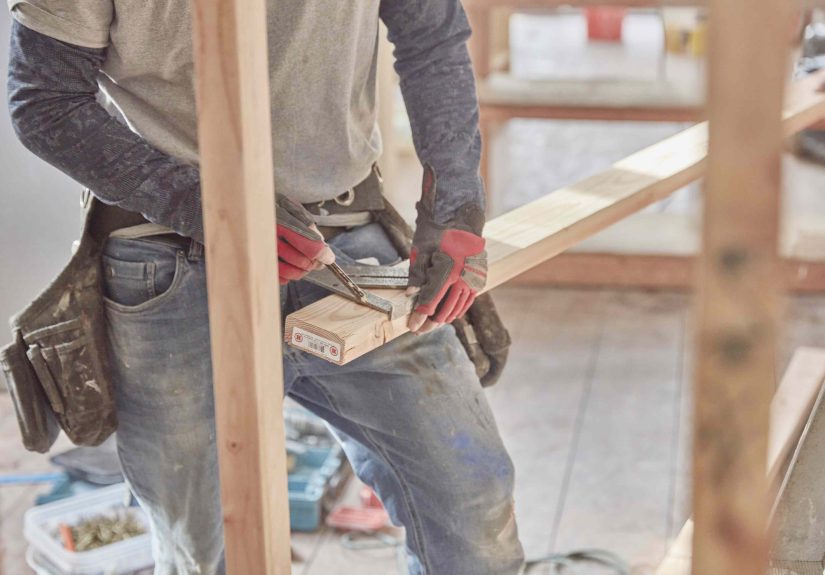
The fastest way to understand why contractors love this tool is to watch one during a normal dayno staged demo, no polished “before and after,” just real job-site momentum. Morning starts with a wall repair: damaged studs, old lumber, awkward spacing. The contractor grabs a tape, pencil, and speed square in one motion. Mark, slide, mark, cut, next. There’s no ceremony. The square is less a special instrument and more a reflex.
By late morning, the work shifts to blocking and brace cuts. This is where new DIYers usually lose time: measuring twice, second-guessing angles, rechecking, then discovering one cut is off by just enough to ruin confidence. With a speed square, those little delays collapse into muscle memory. The fence sits against the board edge, the line goes down cleanly, and the saw has a physical reference to follow. You still need skill, but you’re no longer relying on freehand luck.
On one porch rebuild, I watched a contractor run repetitive cuts for deck framing while talking through material choices with a homeowner. That’s a stressful multitasking setupyet every mark stayed consistent because the layout method was consistent. That’s the invisible value most people miss: the speed square protects quality when attention is split. It acts like a low-cost “stability device” for your process.
Another memorable moment happened on a shed roof project. The homeowner had already attempted a few angle cuts using a printed template and optimism. The result looked like geometry had lost a legal argument. The contractor reset the layout with a speed square, walked through pitch marks, and recut the pieces in under an hour. Same lumber category, same saw, different control system. Suddenly everything fit like it belonged together.
There’s also a comfort factor. Ask anyone who works with wood daily: a dependable square reduces mental load. You’re not constantly asking, “Did I mark that right?” The tool becomes a trusted checkpoint, and your brain is free to think about sequencing, joinery, and finish quality instead of micro-panicking over every line.
In trim work, where tolerances are tighter and finish is visible, contractors still keep a speed square nearby for quick references and setup checks. It may not perform every final precision step, but it accelerates the path to those steps. And in renovation workwhere old walls are rarely perfectquick verification tools are priceless.
One contractor summed it up perfectly: “It’s the tool I use when I don’t have time to be fancy, but I still need to be right.” That sentence explains the entire category. The speed square is not glamorous, not expensive, and not new. But it repeatedly turns messy, real-world work into cleaner results with fewer mistakes.
So yes, “we want one too” is the correct reaction. Because once you use a good speed square for a few projects, it stops feeling like a purchase and starts feeling like missing equipment that should’ve been in your toolbox all along.
Conclusion
The $14 speed square earns daily use because it solves real job-site problems: fast layout, repeatable accuracy, angle marking, and practical saw guidance. It’s affordable enough for beginners, dependable enough for contractors, and useful enough to stay relevant even in workshops filled with premium gear. If your cuts, angles, or layout routine feel slower and messier than they should, this small tool is one of the smartest low-cost upgrades you can make.