Table of Contents >> Show >> Hide
- What Is the Mouse Language?
- Why Run Mouse on an Arduino UNO?
- Inside UNO-MOUSE: A Tiny Computer With Big Retro Energy
- Why Stack-Based Languages Still Matter
- Arduino as a Retro-Computing Playground
- Specific Example: Thinking in Mouse Style
- The Limitations Are the Feature
- Who Should Try The Mouse Language on Arduino?
- Experience Notes: Building, Debugging, and Enjoying The Mouse Language on Arduino
- Why This Project Deserves Attention
- Conclusion
There are programming projects that make you say, “That is useful.” Then there are projects that make you say, “That is beautifully unnecessary, therefore I need it immediately.” The Mouse Language, running on Arduino, belongs proudly in the second categoryalthough, to be fair, it is far more useful than it first appears.
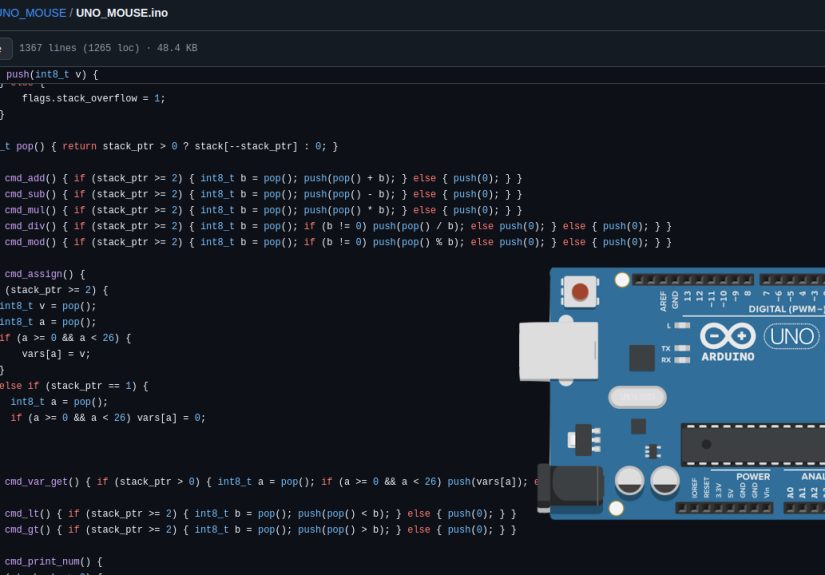
Before anyone reaches for a USB mouse, let’s clear up the tiny rodent in the room: MOUSE is not about moving a cursor. It is a minimalist, stack-based programming language created for small computers with limited memory. Now, thanks to the UNO-MOUSE project, that vintage idea has found a new home on one of the most beloved microcontroller boards ever made: the Arduino UNO.
The result is a pocket-sized retro-computing experiment that packs an interpreter, a line editor, simple graphics, PS/2 keyboard input, composite video output, EEPROM program storage, and a surprising amount of personality into the modest resources of an ATmega328P. In plain English: it turns an Arduino UNO into a tiny standalone computer that speaks a language from the age when every byte had to justify its existence.
What Is the Mouse Language?
The Mouse programming language, often written as MOUSE, was created by Dr. Peter Grogono in the late 1970s and early 1980s. It grew out of MUSYS, an earlier language connected to electronic music systems. That origin story already gives it a little synthesizer-scented charm, but the real attraction is its design philosophy: do a lot with very little.
Mouse is an interpreted language, meaning programs are read and executed directly rather than compiled into machine code first. It is also stack-based, which means values are pushed onto a stack and operations work with the most recent values. If you have used Forth, PostScript, or an old Hewlett-Packard calculator with Reverse Polish Notation, you already understand the neighborhood. If not, imagine a stack of plates at a buffet, except the plates are numbers, variables, and commands, and the buffet has strong opinions about memory efficiency.
Instead of long keywords, Mouse relies heavily on single-character instructions. A command might add two numbers, store a variable, print output, start a loop, or call a macro. This makes Mouse look cryptic at first glance, like a keyboard sneezed into a terminal. But once you understand the logic, the language becomes surprisingly elegant. It is not trying to be friendly in the modern “autocomplete your feelings” sense. It is trying to be small, direct, and teachable.
Why Run Mouse on an Arduino UNO?
The Arduino UNO is famous because it is approachable. It has introduced millions of students, makers, artists, engineers, and “I saw this on YouTube and now I own a soldering iron” hobbyists to embedded electronics. Its ATmega328P microcontroller runs at 16 MHz and offers 32 KB of flash memory, 2 KB of SRAM, and 1 KB of EEPROM. By modern standards, that is not a computer. That is a polite electronic postage stamp.
And that is exactly why it is perfect.
Mouse was designed for memory-constrained systems. Arduino UNO is a memory-constrained system. Put the two together, and you get a project that feels less like a gimmick and more like historical justice. The UNO-MOUSE implementation embraces the limitations instead of hiding them. It uses the UNO’s small memory budget to create a self-contained programming environment, proving that an interactive computer does not need gigabytes, cloud login screens, or a fan loud enough to alert nearby wildlife.
Inside UNO-MOUSE: A Tiny Computer With Big Retro Energy
The UNO-MOUSE project implements a Mouse-inspired stack-based language directly on the Arduino UNO. It includes a basic editor, a runtime interpreter, program storage, and visual output. That is an impressive list for a board many people first use to blink an LED.
A Stack-Based Interpreter
The interpreter is the heart of the system. A Mouse-style program is read as a sequence of characters, and each character triggers an action. Numbers are placed on the stack. Operators consume values from the stack. Variables store and recall data. Conditional statements and loops make programs more than simple calculators with stage fright.
For example, in a stack-based language, adding two numbers is usually written in postfix form: the values come first, then the operator. Instead of writing something like 2 + 3, the stack-based style is closer to 2 3 +. The machine sees 2, pushes it onto the stack, sees 3, pushes that too, then sees the plus sign and adds the two top values. It feels backward until it doesn’t. Then it feels pleasantly mechanical, like watching a very small factory work exactly as designed.
A Built-In Line Editor
UNO-MOUSE also includes a line editor, which means users can type and modify programs directly within the system. That matters because it turns the Arduino from a board that merely runs uploaded sketches into something closer to a standalone microcomputer. You are not constantly bouncing back to a laptop to recompile and upload. You can write, edit, run, and revise code in the environment itself.
That interactive loop is part of the magic. It resembles the feel of early home computers, where the machine invited you to type something and immediately find out whether you were a genius or had forgotten a closing symbol. Usually both.
EEPROM Program Storage
The Arduino UNO includes 1 KB of EEPROM, a type of non-volatile memory that keeps its data when power is removed. UNO-MOUSE uses that tiny storage space for user programs. The capacity is limited, but the limitation is the point. It encourages compact code, careful design, and an appreciation for the lost art of not wasting memory like it grows on server farms.
This also makes the project feel more like a real little computer. You can write a program, save it, power down, and return later. The Arduino remembers. Not much, admittedlybut enough to feel loyal.
Composite Video and PS/2 Keyboard Input
One of the most charming parts of the project is the use of composite video output and PS/2 keyboard input. With the help of supporting libraries, the Arduino can display low-resolution video and accept keyboard commands. This gives UNO-MOUSE a delightfully retro personality. It is not just code running silently on a board; it becomes something you can sit in front of and use.
The graphics are intentionally simple. The project supports low-resolution drawing primitives such as pixels, lines, circles, rectangles, and triangles. Nobody is rendering a cinematic universe here. But for a tiny interpreted environment running on an 8-bit microcontroller, drawing shapes on a screen is a small miracle wearing a resistor hat.
Why Stack-Based Languages Still Matter
Stack-based languages are not just historical oddities. They teach core computing ideas in a very direct way. When you use a stack, you can see how data moves. You understand why order matters. You learn that every operation has consequences, especially when you accidentally pop the wrong value and your program starts behaving like a caffeinated squirrel.
This is why Mouse remains educational. It strips programming down to essentials: input, output, arithmetic, memory, branching, loops, and reusable blocks. There is no massive framework to hide behind. No package manager arrives to rescue you with 900 dependencies. The language asks, “Do you understand what the machine is doing?” That question is still valuable.
Modern developers often work many layers above hardware. That is not a bad thing; nobody wants to manually allocate memory to write a shopping list app unless they have been cursed by a wizard. But small systems like UNO-MOUSE help programmers reconnect with the fundamentals. They show how interpreters work, how memory is managed, how input becomes action, and how a language can be built from simple rules.
Arduino as a Retro-Computing Playground
Arduino projects often start with sensors, motors, LEDs, and displays. UNO-MOUSE pushes the board into a different role: a miniature computer for language experimentation. It sits in the same broad maker tradition as tiny Forth systems, BASIC interpreters, and pocket operating environments that transform microcontrollers into interactive programming machines.
This matters because microcontrollers are usually treated as targets. You write code elsewhere, upload it, and the board performs a task. But with an interpreter running on the device, the board becomes a host. It accepts commands. It stores programs. It provides feedback. It becomes conversational.
That shift changes the learning experience. Instead of thinking only in terms of “upload and test,” users begin thinking in terms of exploration. What happens if I push this value? What if I draw a line? What if I build a loop? What if I accidentally create a program that prints numbers forever and must be stopped like a runaway shopping cart? These small experiments make embedded programming feel alive.
Specific Example: Thinking in Mouse Style
A simple Mouse-style exercise might print a sequence of numbers, calculate squares, or draw shapes on the display. The exact syntax depends on the implementation, but the thinking pattern is the important lesson. Instead of writing a long readable expression, you break the task into stack operations.
Suppose you want to multiply a number by itself. In a traditional language, you might write n * n. In a stack-oriented style, you push or recall the value twice, then apply multiplication. To print the result, you add the print command. The process is compact and procedural: place values, operate on them, output the result.
For graphics, the same idea applies. A command may expect coordinates or dimensions on the stack. You provide the numbers first, then call the drawing operation. This makes the system feel like a programmable plotter. The user feeds it small instructions, and the little Arduino draws back, as if saying, “I have 2 KB of SRAM and no fear.”
The Limitations Are the Feature
It is tempting to compare UNO-MOUSE with modern development boards and conclude that it is underpowered. Of course it is. That is like criticizing a bicycle for not being a freight train. The point is not raw performance. The point is understanding, elegance, and creative constraint.
With 2 KB of SRAM, every buffer matters. With 1 KB of EEPROM, every saved line matters. With low-resolution video, every pixel matters. This creates a programming environment where waste is visible. It teaches lessons that large systems often obscure: memory is finite, input handling costs something, display output is work, and simple features become impressive when squeezed into a small chip.
The limitations also make the project more fun. A small screen, a PS/2 keyboard, a handful of wires, and an Arduino UNO can become a strange little retro machine. It is the kind of project that reminds makers why constraints often produce more creativity than abundance.
Who Should Try The Mouse Language on Arduino?
This project is ideal for retro-computing fans, Arduino enthusiasts, programming language nerds, teachers, and anyone who has ever looked at a modern software stack and whispered, “Surely we can do less.” It is especially valuable for learners who want to understand interpreters without diving straight into compiler theory, abstract syntax trees, and textbooks that could double as emergency furniture.
It is also a strong classroom project. Students can see how a language processes symbols, how a stack works, how variables are stored, and how control flow is implemented. Because the system is small, it is easier to reason about. The Arduino UNO becomes a transparent machine rather than a black box.
Experienced developers may enjoy it for the opposite reason. It is refreshing. There are no bloated build chains, no cloud dashboard, and no mysterious background service asking for permissions. There is just a tiny board, a tiny language, and a very direct relationship between code and behavior.
Experience Notes: Building, Debugging, and Enjoying The Mouse Language on Arduino
The best way to approach a project like UNO-MOUSE is with patience, curiosity, and a healthy respect for wires that look connected but are secretly lying to you. A typical experience begins with the hardware setup: Arduino UNO, PS/2 keyboard, composite video display, and the required wiring for video and input. This is where the project immediately feels different from a normal Arduino sketch. You are not just plugging in a sensor. You are assembling a tiny computer ecosystem.
The first satisfying moment is seeing video output appear. Even low-resolution text or graphics can feel magical because it is coming from a board that many people still associate with blinking LEDs. The second satisfying moment is typing on a PS/2 keyboard and watching the Arduino respond. Suddenly the UNO feels less like a microcontroller and more like a machine with a personality. A very small personality, yes, but one that probably owns a vintage calculator.
Debugging teaches the most. If the display does not work, you check timing, pins, resistors, grounding, and library compatibility. If the keyboard does not respond, you inspect data and clock wiring. If programs behave strangely, you learn to think like the interpreter. Is the stack in the expected state? Did the program consume a value too early? Did a loop condition leave a number behind? These questions are not annoyances; they are the lesson.
Writing programs in a Mouse-style language also changes how you think. At first, the syntax can feel cramped. Single-character commands do not hold your hand. But after a while, the compactness becomes part of the fun. You begin to treat the stack like a workbench: place a value here, operate there, store something for later, print or draw when ready. Small victories feel big because the environment is so constrained.
The most rewarding projects are simple ones: number games, pattern generators, tiny drawing routines, math demonstrations, or visual experiments with lines and shapes. Trying to build something too large too soon can be frustrating because the memory limits are real. But when you design for the machine instead of against it, the Arduino rewards you. It reminds you that good programming is not always about adding more. Sometimes it is about finding the smallest path that still feels alive.
There is also a nostalgic pleasure in using older peripherals. A PS/2 keyboard and composite display make the setup feel like a homebrew computer from an alternate timeline where Arduino boards existed in 1983. The experience is part programming exercise, part electronics lesson, and part retro-computing theater. It is serious learning wearing a silly hat, which is often the best kind.
Why This Project Deserves Attention
The Mouse Language running on Arduino is more than a clever port. It is a reminder that programming languages are not only tools for producing apps. They are also ideas. Mouse asks what a language can be when memory is scarce. Arduino asks what hardware can do when the barrier to entry is low. UNO-MOUSE combines both questions and answers with a tiny, blinking, stack-based grin.
For SEO-minded readers searching for Mouse language Arduino, Arduino stack-based programming, Arduino UNO interpreter, or retro programming on Arduino, the short version is this: UNO-MOUSE is a fascinating embedded language project that turns the Arduino UNO into a small interactive computer. It is educational, weird, efficient, and fun in the way only a deeply constrained system can be.
Conclusion
The Mouse Language on Arduino proves that old ideas can still squeak loudly in modern maker culture. By combining a minimalist stack-based language with the familiar Arduino UNO, the project creates a hands-on lesson in interpreters, memory limits, retro interfaces, and embedded creativity. It will not replace Python, C++, or modern Arduino sketches, and it is not trying to. Its real value is deeper: it teaches how small systems think.
In an era where software often expands until it needs a small data center to display a login button, UNO-MOUSE feels refreshingly tiny. It celebrates the joy of doing more with less, the charm of retro computing, and the educational power of constraints. It is a project for anyone who wants to understand programming closer to the metaland maybe smile while an 8-bit board draws a line on a screen like it just invented civilization.