Table of Contents >> Show >> Hide
- What the Prime Day deal actually includes
- Why this can be the cheapest entry into Xbox gaming
- How “Xbox on a Fire TV Stick” works
- What you can play (and what you can’t)
- Performance reality check (the honest part)
- Is this better than buying an Xbox Series S?
- Prime Day buying tips (so you don’t accidentally buy the “almost right” thing)
- Frequently asked questions
- Final verdict
- Real-World Experiences: What it’s like to start Xbox gaming this way
Want to play Xbox games without dropping “new console” money? Prime Day has a habit of serving up an unexpectedly
budget-friendly on-ramp: a bundle that turns your TV into an Xbox-style gaming screen with a streaming stick,
a controller, and a month of Xbox Game Pass Ultimate. In other words, you can dip a toe into the Xbox ecosystem
for around the cost of a nice dinner (or two very chaotic pizzas), instead of committing to a full console purchase.
And here’s the sneaky part: this deal isn’t about buying an Xbox at all. It’s about playing Xbox games through
cloud streaming. If you’ve been “Xbox-curious” but your wallet has been politely declining the invitation,
this is the kind of Prime Day discount that makes trying Xbox feel less like a major life decision and more like,
“Sure, why not?”
What the Prime Day deal actually includes
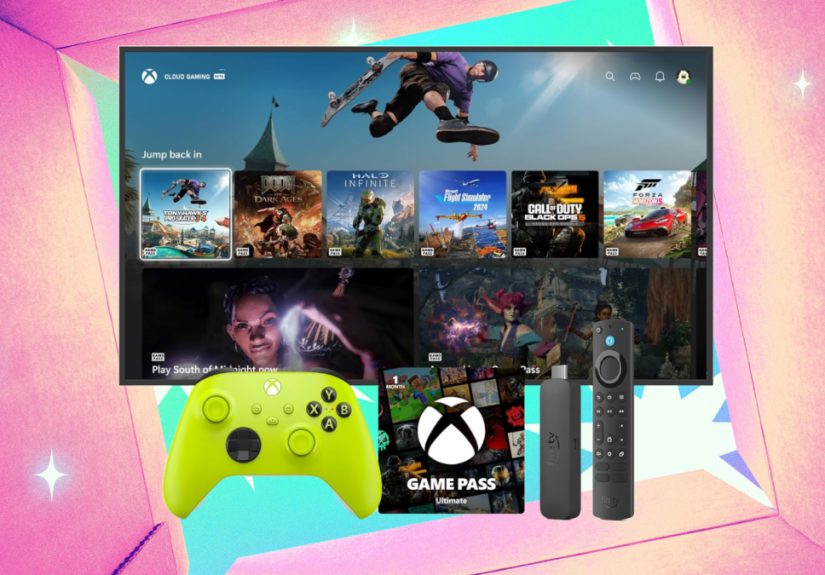
The headline bundle tends to look like this:
- An Amazon Fire TV Stick 4K or 4K Max (model varies by listing and year)
- An official Xbox Wireless Controller (often a standard “Core” controller in a specific color)
- 1 month of Xbox Game Pass Ultimate (usually delivered as a digital code)
Prices fluctuate by Prime Day event and by the exact Fire TV model, but the key point is the same: it’s often under $100,
and sometimes dips into the $70–$90 range. Compared to buying a current-gen console, it’s basically the “starter pack”
version of Xbox gamingno console required.
Why this can be the cheapest entry into Xbox gaming
In the current market, console prices can feel like they’re training for an Olympic high jump. Xbox Series consoles
have seen price increases in the U.S., with Series S and Series X pricing moving upward from earlier generations of pricing.
If your goal is simply “play Xbox games,” not “own a black rectangle that doubles as a living-room space heater,”
cloud streaming can be the cheaper path.
With this Prime Day-style bundle, your biggest upfront costs are the controller and the Fire TV Stick. The Game Pass Ultimate
month gives you immediate access to a large library to test-drive the experience. If you love it, you can keep subscribing.
If you don’t, you’re not stuck trying to justify a console purchase by replaying the same game for 900 hours.
A quick cost comparison (real-world math, not “girl math”)
- Bundle route: roughly $80–$110 upfront (depends on the exact deal) + ongoing subscription if you keep it
- Console route: hundreds upfront (console) + games or subscription + storage accessories if you need them
If you’re new, unsure, or just want the cheapest way to see what Xbox exclusives and Game Pass are about, the bundle route
is often the lowest-risk option.
How “Xbox on a Fire TV Stick” works
This is powered by Xbox Cloud Gaming, which streams games over the internetsimilar to how Netflix streams movies,
except you’re controlling the action in real time. Instead of installing games on a console, you’re essentially renting a powerful
Xbox-like experience in the cloud, then beaming it to your TV.
What you need to make it work
- A compatible Fire TV device (the bundle is designed to be compatible out of the box)
- A TV with an HDMI port (the bar is low herein a good way)
- A Bluetooth controller (the included Xbox controller checks this box)
- An Xbox account (Microsoft account login)
- Xbox Game Pass Ultimate for cloud streaming access
- Solid internet (more on that belowbecause yes, it matters)
Setup steps (no engineering degree required)
- Plug the Fire TV Stick into your TV’s HDMI port and power it up.
- Connect the Fire TV Stick to Wi-Fi (or Ethernet via an adapter, if you’re fancy).
- Download/open the Xbox app on Fire TV.
- Pair the Xbox controller via Bluetooth.
- Sign in to your Xbox account and redeem the Game Pass Ultimate code.
- Pick a game and start streaming.
From there, your TV becomes the “screen,” the Fire TV Stick becomes the “brain” that runs the app, and the cloud does the heavy lifting.
You’re basically borrowing an invisible console that lives in the internet.
What you can play (and what you can’t)
With Xbox Cloud Gaming, you can stream a large selection of titlesespecially games included with Game Pass.
Some free-to-play games can also be streamed with just a Microsoft account, depending on the title and current policy.
You can usually expect:
- Game Pass library access for cloud-enabled titles
- Big-name franchises that rotate in and out of the catalog
- “Try before you buy” vibesperfect for discovering what you actually like
You should also know about limitations:
- Not every Xbox game is streamable (cloud catalog availability varies)
- Competitive multiplayer can feel different if you’re sensitive to latency
- Ownership isn’t the same as access: if a game leaves the subscription library, you may lose access unless you buy it
- Offline play isn’t the point: cloud gaming needs the internet the way fish need water
Microsoft has also expanded options that let you stream some games you already own (where supported), which can make the cloud route
more useful over timeespecially if you already have a small Xbox library or plan to buy a few favorites.
Performance reality check (the honest part)
Cloud gaming is impressivebut it’s not magic. Your experience depends heavily on your internet connection and your home network setup.
If your Wi-Fi is powered by good intentions and a single stressed-out router from 2014, you may want to manage expectations.
What “good internet” means in practice
- Use 5GHz Wi-Fi if possible (less congestion, better speed)
- Keep the Fire TV Stick close to the router (walls are the enemy; brick walls are the final boss)
- Limit competing traffic during play (4K streaming + cloud gaming + giant file downloads = chaos)
- Consider Ethernet if your setup supports it (stability is king)
Image quality and responsiveness
Even though your Fire TV Stick can handle 4K video, cloud gaming quality is determined by the service and your connection.
Some games may look crisp and smooth, while others may show compression artifacts (like a slightly “soft” image),
especially during fast motion. Input response is usually good for most casual play, but the most timing-sensitive games
competitive shooters, fighting games, ultra-precise platformersare where you’ll notice the difference first.
The good news: cloud gaming has improved over time, and many players find it more than good enough for story games, racing,
co-op adventures, and “I just want to relax” gaming sessions.
Is this better than buying an Xbox Series S?
The Xbox Series S is still the “budget console” in the Xbox family, but it’s a very different value proposition.
A Series S gives you local installs, consistent performance, and offline capability for many games. It’s better if you want
a traditional console experience and don’t love the idea of relying on streaming.
However, once you factor in rising hardware prices and the fact that many new games are enormous downloads,
the “console-free” bundle has a strong argument for first-timers: it’s cheaper, easier, and doesn’t require committing
to a single box under your TV for the next several years.
Choose the bundle if you want:
- The cheapest entry point
- A low-commitment way to try Xbox/Game Pass
- A travel-friendly or second-TV setup
- To play casually without worrying about storage management
Choose a console if you want:
- Maximum consistency and minimum latency
- Offline play options
- Local installs and the “traditional” console feel
- Disc support (Series S doesn’t do discs; Series X does)
Prime Day buying tips (so you don’t accidentally buy the “almost right” thing)
- Check the Fire TV model: “4K” and “4K Max” aren’t the same, and year/version can matter.
- Read the Game Pass code terms: some codes may be for new or eligible members only.
- Confirm controller compatibility: official Xbox Wireless Controller is the safest bet.
- Plan your trial month: redeem when you actually have time to playdon’t waste your “free month” on your busiest month.
- Don’t forget sound: if you use Bluetooth headphones, test latency; wired options can be more reliable.
Frequently asked questions
Do I need an Xbox console at all?
Not for this setup. The whole point is streaming games through the Xbox app on Fire TV with a controller.
Do I need Amazon Prime?
Some deals are Prime-exclusive, while others may be available broadly during Prime Day events. Treat Prime as “likely helpful,”
not “always required.”
Can I play multiplayer?
Yes, as long as the streamed game supports it and your connection is stable. For fast competitive play, your mileage may vary.
What’s the catch?
The “catch” is that cloud gaming depends on internet quality, and access to many games is tied to the subscription.
But if you’re choosing the cheapest on-ramp, those tradeoffs are often worth it.
Final verdict
If your goal is to get into Xbox gaming as cheaply as possible, this Prime Day bundle is hard to beat. It lowers the cost of entry,
skips the console purchase, and gives you an immediate library to explore. Think of it as the “Xbox sampler platter”:
enough variety to figure out what you like, without buying the whole restaurant.
And if you end up loving it? Greatyou can keep streaming, upgrade later to a console, or do both. If you don’t?
You still have a solid streaming stick and one of the best controllers in gaming. Worst case scenario: you accidentally improved your living room.
Real-World Experiences: What it’s like to start Xbox gaming this way
Let’s talk about what new players tend to notice when they start Xbox gaming through a Prime Day-style Fire TV + controller bundlebecause
the experience is a little different from unboxing a console and downloading games overnight like it’s 2016.
First, the setup feels suspiciously easy. You plug in a Fire TV Stick, log into the Xbox app, pair the controller, and suddenly you’re staring
at a library of games like you just walked into a buffet with no cover charge. That “wait… is that it?” moment is real. Many people expect
a dozen cables, a 45-minute system update, and at least one existential crisis. Instead, it’s mostly click, click, done.
Second, the controller becomes the star of the show. If you’ve never used an Xbox controller before, the shape is comfortable and the buttons
are intuitiveeven for total beginners. The biggest “learning curve” is often muscle memory: remembering which button is A versus B
while a tutorial character politely insists you “press B to crouch” as if your thumbs didn’t just meet each other five minutes ago.
Third, cloud gaming changes how you browse games. People who start with a console often feel pressure to “pick the right game”
because downloads take time and storage space is limited. With streaming, you can bounce between titles more freely. You can test a racing game,
switch to an adventure game, then try something weird and indieall in the same evening. It encourages curiosity. That’s a big reason why this route
feels so welcoming for first-timers: it’s easier to discover what you actually enjoy instead of what you think you’re “supposed” to enjoy.
Fourth, internet quality becomes part of the gaming conversation. On a strong connection, the experience can feel remarkably close to local play,
especially for slower-paced games. But if Wi-Fi gets shaky, you’ll notice it: a brief blur during action scenes, a momentary hiccup when the household
starts streaming three different shows, or a slight “squishiness” to the image when the service compresses video to keep things moving.
For many new players, the fix is surprisingly simpleswitching to 5GHz Wi-Fi, moving the router, or playing at a time when the home network isn’t
doing backflips.
Finally, there’s a very specific kind of joy in realizing you didn’t have to buy a console to get the “Xbox vibe.”
New players often describe it as freeing: you’re not locked into a big hardware commitment, but you still get to participate in the ecosystem,
try popular franchises, and see what Game Pass is all about. And if you decide later that you want the full console experience?
You’ll already know what kinds of games you likeand you’ll already own the controller.