Table of Contents >> Show >> Hide
- What Is a Wearable Raspberry Pi Computer?
- The Original “Borg” Raspberry Pi Build
- Why Raspberry Pi Works So Well for Wearables
- The Display Is the Real Boss Fight
- What Can a Wearable Raspberry Pi Actually Do?
- Building Your Own Borg-Style Raspberry Pi Wearable
- Raspberry Pi Wearables and AI: The Modern Twist
- Common Problems and Smart Fixes
- Is This Better Than Smart Glasses?
- Experience Notes: What It Feels Like to Use a Wearable Raspberry Pi
- Conclusion
Some projects make you say, “That’s clever.” Others make you ask, “Do I need a soldering iron, a tiny screen, and permission from Starfleet?” A wearable Raspberry Pi computer sits firmly in the second category. It is part DIY cyberdeck, part smart glasses experiment, part weekend engineering adventure, and part “resistance is futile” cosplay without the scary assimilation paperwork.
The idea behind a wearable Raspberry Pi is wonderfully simple: take a tiny Linux computer, connect it to a display you can wear, add power, input, audio, and maybe a camera, then strap the whole digital sandwich to your body. Suddenly, you have a personal computing rig that can show notifications, stream video, capture images, run scripts, control IoT devices, play retro games, or make you look like a background character in a cyberpunk reboot of Star Trek.
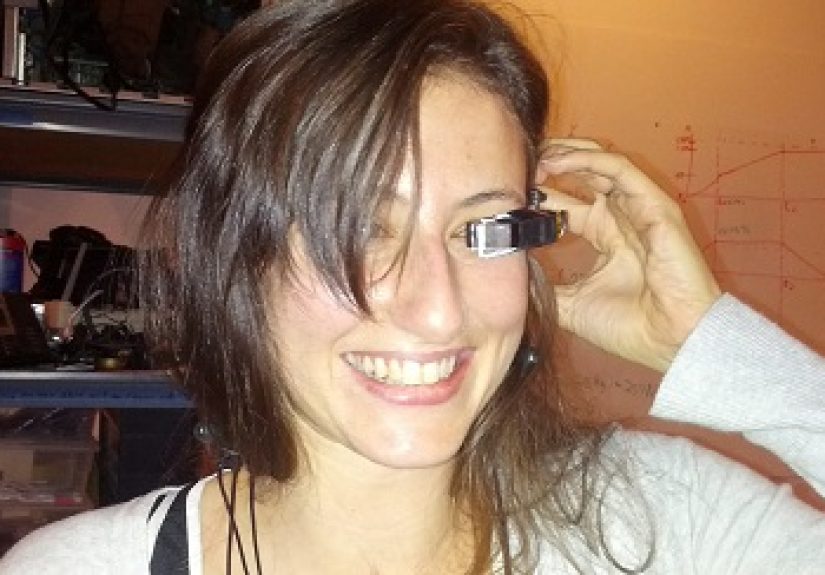
The famous “Wearable Raspberry Pi Turns You Into The Borg” concept came from the maker community’s favorite place: a room full of hackers, spare parts, and dangerous levels of enthusiasm. The original build used a Raspberry Pi, a small keyboard and mouse, a lithium-ion USB charger, a webcam, and modified video glasses. It was rough, clever, wireless in most of the right places, and delightfully ridiculous in the best possible way.
Today, the same idea is even more practical. Raspberry Pi boards are faster, displays are sharper, cameras are smaller, batteries are better, and 3D printing makes custom mounts far less painful than attacking plastic with hope and a rotary tool. A wearable Raspberry Pi still will not make you an actual Borg drone. But it can make you feel like you have a tiny command center hovering near your eye, which is close enough for a Saturday project.
What Is a Wearable Raspberry Pi Computer?
A wearable Raspberry Pi computer is a body-mounted or head-mounted computing system built around a Raspberry Pi single-board computer. Instead of sitting on a desk like a polite little machine, it travels with you. The Pi may sit in a pocket, on a belt, inside a 3D-printed enclosure, on the back of a hat, or mounted directly to a headset.
The essential parts are familiar to anyone who has built a Raspberry Pi project: a board, a microSD card, an operating system, a power source, and peripherals. What changes is the form factor. A wearable build needs to be lightweight, balanced, safe, and comfortable enough that you do not immediately remove it and question your life choices.
Most wearable Raspberry Pi projects include four core elements:
- A Raspberry Pi board: Often a Raspberry Pi Zero 2 W for compact builds, or a Raspberry Pi 4/5 when more processing power is needed.
- A display: This may be video glasses, a small HDMI screen, a Vufine-style monocular display, a tiny TFT, or a custom optical setup.
- Input: A Bluetooth keyboard, mini gamepad, voice commands, buttons, gesture sensor, phone-based SSH control, or web interface.
- Power: Usually a USB power bank, LiPo battery system, or regulated battery pack capable of supplying stable 5V power.
Add a camera and microphone, and the device becomes much more interesting. Now it can record point-of-view video, stream a live feed, run computer vision models, or act as a personal assistant. Add bone-conduction audio, and you get sound without blocking your ears. Add a small AI accelerator, and suddenly your homemade headgear starts recognizing objects like it has been taking night classes at the Collective.
The Original “Borg” Raspberry Pi Build
The original project that inspired the title was charming because it was not polished. It was a fast maker-space build, assembled to show what could be done with a Raspberry Pi and available parts. The system combined a Pi with a small Bluetooth keyboard/mouse combo, a USB charger with a lithium-ion battery, a webcam, and MyVu Crystal video glasses that were carefully disassembled and repurposed as a wearable display.
The biggest challenge was not the Raspberry Pi itself. The computer was small, affordable, and flexible. The hard part was the display. In 2012, wearable displays were not exactly stacked on hobby-shop shelves like resistors and jumper wires. Video glasses existed, but they were often expensive, low-resolution, or difficult to hack. That made the MyVu glasses a lucky find. They turned a pile of parts into something that looked like a prototype for a garage-built Google Glass alternative.
The result was nicknamed “Pi in the Face,” which is a name that deserves a tiny trophy. It had the right spirit: practical enough to run Linux, strange enough to attract comments, and funny enough to make people imagine a Raspberry Pi-powered Locutus of Borg wandering around the hackerspace asking for Wi-Fi credentials.
That early build still matters because it showed the maker formula that continues today: combine inexpensive computing with wearable displays, then experiment until the device becomes useful, hilarious, or both. The Raspberry Pi did not need to be perfect. It needed to be accessible. That accessibility is why wearable Pi projects keep coming back.
Why Raspberry Pi Works So Well for Wearables
Raspberry Pi boards are popular in wearable computing because they offer a rare mix of affordability, community support, Linux compatibility, GPIO access, camera support, and enough processing power for real projects. The Raspberry Pi Zero 2 W is especially appealing because it is tiny, light, and wireless. It includes Wi-Fi and Bluetooth, has a mini HDMI output, supports a camera connector, and is small enough to mount in places where a full-size board would feel like wearing a sandwich.
For a lightweight wearable computer, the Zero 2 W is often the sweet spot. It can handle simple dashboards, terminal work, media playback, camera capture, basic automation, and many maker-friendly applications. It is not a desktop replacement, but that is not the point. A wearable Pi is about glanceable information, mobile control, and personal experimentation.
Raspberry Pi 5, on the other hand, is the stronger choice when the project needs more horsepower. It can handle heavier desktop use, more demanding media tasks, better multitasking, and AI-assisted applications when paired with suitable hardware. The trade-off is power consumption, heat, size, and comfort. Wearing a Pi 5 is possible, but it needs better planning. A hot board near your face is not a feature. It is a warning label with GPIO pins.
The Display Is the Real Boss Fight
Every wearable computer project eventually meets the same villain: the display. A Raspberry Pi can output video easily, but getting that video into a comfortable, readable, wearable format is the tricky part. Your eyes are not designed to focus on a bare screen sitting two inches from your face. That is why head-mounted displays use lenses, mirrors, prisms, or optical combiners to make the image appear farther away.
Some DIY builds use monocular HDMI displays that clip near one eye. Others modify old video glasses. Some use small TFT screens positioned inside custom housings. More advanced designs use reflective optics, allowing the wearer to see both the digital image and the real world. That is how a heads-up display becomes more than a tiny television taped to your eyebrow.
Resolution matters, but comfort matters more. A display that technically works but turns text into blurry ant trails is not very useful. Brightness, eye relief, field of view, weight, heat, and cable routing all matter. A wearable Raspberry Pi should feel like a tool, not like a revenge prank from the electronics drawer.
Modern projects have improved this situation. Adafruit’s PiGlass builds, Vufine-style displays, compact HDMI screens, and 3D-printed mounts make the process more approachable than it was in the early days. Still, display selection remains the make-or-break decision. Choose poorly, and your “personal cybernetic assistant” becomes a forehead-mounted headache generator.
What Can a Wearable Raspberry Pi Actually Do?
A wearable Raspberry Pi can be as simple or as ambitious as you want. At the basic level, it can run a Linux desktop or terminal and display information on a small screen. That alone opens the door to portable dashboards, checklists, field notes, scripts, maps, timers, sensor data, and SSH sessions.
Add a camera, and the project becomes much more exciting. A head-mounted camera can capture point-of-view photos and video, stream footage, assist with documentation, or feed images into computer vision software. Raspberry Pi camera modules include compact options with autofocus, wide field-of-view variants, and AI-enabled models that can process visual data more efficiently.
Here are practical uses for a wearable Raspberry Pi:
- Hands-free reference display: View instructions, wiring diagrams, repair steps, or checklists while working.
- Field data logger: Pair the Pi with GPS, environmental sensors, or a camera for outdoor documentation.
- Portable cyberdeck: Run a command line, connect to servers, or control smart-home devices from a wearable interface.
- POV camera system: Capture video while hiking, building, teaching, or testing hardware.
- Retro gaming visor: Because apparently playing old games on a head-mounted Raspberry Pi is exactly the kind of chaos humanity was promised.
- Computer vision assistant: Use AI models for object detection, pose estimation, or experimental navigation aids.
The key is to match the idea to the hardware. A Zero 2 W is great for lightweight tasks. A Pi 5 with an AI HAT+ can handle more ambitious machine learning and camera projects, but it also needs more power, cooling, and space. Wearables are always a negotiation between capability and comfort.
Building Your Own Borg-Style Raspberry Pi Wearable
If you want to build a wearable Raspberry Pi, start with a realistic goal. Do not begin by planning a fully autonomous mixed-reality assistant with face recognition, live translation, gesture control, and a coffee-ordering protocol. Start with “I want to display text near my eye” or “I want a wearable camera that saves photos.” Your future self will thank you, possibly in all caps.
Step 1: Pick the Right Raspberry Pi
For most wearable builds, the Raspberry Pi Zero 2 W is the practical first choice. It is compact, light, affordable, and powerful enough for many projects. It also includes wireless connectivity, which reduces cable clutter. If your project needs a full desktop experience, heavier browser use, or AI acceleration, consider Raspberry Pi 5, but plan for power and heat from the beginning.
Step 2: Choose the Display Before Everything Else
The display determines the shape of the build. A monocular HDMI display is usually easier than designing optics from scratch. Salvaged video glasses can work, but they may require patience and delicate disassembly. Small TFT screens are affordable, but they may be better for wrist, chest, or forearm displays than eye-level reading.
Step 3: Solve Power Honestly
Wearable projects live or die by power. A weak battery causes crashes, flickering displays, corrupted files, and the unique sadness of debugging a device strapped to your hat. Use a reliable power bank or a proper battery management system. Check the current requirements of the Pi, display, camera, audio hardware, and accessories. Build with overhead rather than wishful thinking.
Step 4: Make Input Comfortable
A Bluetooth keyboard works, but it is not always wearable-friendly. A small gamepad, a few physical buttons, voice commands, a web dashboard, or phone-based SSH may be better. Adafruit’s PiGlass v2 approach used a gamepad and launcher-style software, which is a smart pattern. Wearable interfaces should be simple. Nobody wants to type a long terminal command while blinking at a floating screen like a confused cyborg accountant.
Step 5: Mount It Safely
Use 3D printing, straps, clips, or enclosures to distribute weight evenly. Keep sharp edges away from skin. Route cables so they do not snag. Avoid blocking your vision. Keep batteries in places where heat and impact are less concerning. And please, do not walk into traffic while testing your homemade HUD. The Collective can wait.
Raspberry Pi Wearables and AI: The Modern Twist
The original Borg-style wearable was mostly about portable computing and display hacking. Modern Raspberry Pi wearables can go further because edge AI is now accessible to hobbyists. Raspberry Pi’s AI Camera and AI HAT+ make it possible to run object detection, image segmentation, pose estimation, and other computer vision tasks more efficiently than relying on the CPU alone.
That matters for wearables because camera-based projects can become processor-hungry very quickly. If you want a headset that recognizes objects, tracks gestures, identifies tools, or detects motion, you need efficient inference. The goal is not just to make the system smart. The goal is to make it smart without draining the battery before lunch.
AI also changes the personality of the device. A simple wearable display gives you information. A wearable Pi with vision models can react to the world around you. It can label objects, count items, detect hands, monitor a workspace, or provide accessibility experiments. That is where the Borg joke becomes a little more real: the device is no longer just attached to you. It is sensing with you.
Of course, privacy must be part of the build. A wearable camera is powerful, but it can make people uncomfortable. Add visible indicators, avoid recording without consent, and be careful in public spaces. A good maker builds cool technology. A great maker builds cool technology without becoming the reason a coffee shop adds a “No Cyborg Headsets” sign.
Common Problems and Smart Fixes
The first problem is usually readability. Tiny screens can make text hard to read, especially with default desktop settings. Increase font sizes, use high-contrast interfaces, and design custom dashboards instead of trying to squeeze a full desktop into a postage-stamp display.
The second problem is cable management. HDMI adapters, USB cables, camera ribbons, and battery leads can quickly turn your wearable into a spaghetti tribute act. Short cables, right-angle adapters, custom enclosures, and strain relief make the build more reliable.
The third problem is heat. Even small computers generate warmth. Put the Pi where airflow is possible, avoid sealed enclosures around hot boards, and test temperatures before wearing the device for long sessions. Cooling is not glamorous, but neither is explaining why your hat smells like toasted electronics.
The fourth problem is social acceptance. A wearable Raspberry Pi can look fascinating, intimidating, or deeply suspicious depending on the setting. Around makers, it is a conversation starter. In a bank lobby, maybe less so. Design matters. A clean enclosure, visible purpose, and non-creepy camera behavior make the difference between “cool project” and “security would like a word.”
Is This Better Than Smart Glasses?
Commercial smart glasses are sleeker, lighter, and more socially acceptable than most DIY Raspberry Pi wearables. They also tend to be closed, expensive, and limited by the manufacturer’s software choices. A wearable Raspberry Pi is not about beating polished consumer hardware on elegance. It is about control.
With a Raspberry Pi wearable, you can run your own code, choose your own display, add sensors, modify the enclosure, connect to custom APIs, and repair the system yourself. You are not buying a gadget. You are building a platform. That is the magic.
The downside is obvious: it takes work. You will troubleshoot power problems. You will adjust mounts. You may spend an afternoon discovering that your display works perfectly except when you actually wear it. But that is part of the maker experience. Every successful wearable computer is built on a small mountain of zip ties, adapters, and lessons learned the hard way.
Experience Notes: What It Feels Like to Use a Wearable Raspberry Pi
Using a wearable Raspberry Pi is not like using a phone, laptop, smartwatch, or tablet. It feels more like carrying a secret terminal around with you, except the terminal is attached to your body and occasionally reminds you that gravity has opinions. The first few minutes are usually awkward. You adjust the display. You shift the battery. You wonder if the cable brushing your neck is normal. Then, when the screen finally lines up and the Pi boots, something clicks. You are suddenly looking at your own tiny command center.
The most surprising experience is how quickly small conveniences feel futuristic. A simple dashboard showing time, battery level, Wi-Fi status, weather, or a checklist can feel oddly powerful when it is always available. It is not because the technology is magical. It is because the interface changes your relationship with information. Instead of pulling a phone from your pocket, unlocking it, opening an app, and getting distracted by seventeen notifications, you glance. That glance is the whole point.
Camera-based use feels even more dramatic. Wearing a Pi-powered camera system while repairing something, cooking, organizing tools, or documenting a project makes the device feel like an assistant. It can capture what your hands are doing without needing someone else to film. For tutorials, maker logs, and field notes, that is genuinely useful. It also teaches you humility, because the first recording will probably include too much ceiling, half a screwdriver, and several minutes of you muttering, “Why is this not focusing?”
Input is where the romance meets reality. Voice commands sound amazing until background noise, accents, latency, and microphone placement join the party. Tiny keyboards work, but they are not great while moving. A small controller or button-based launcher often feels best because it reduces friction. The best wearable interface is not the one with the most features. It is the one you can operate without stopping everything else you are doing.
Battery life also shapes the experience. A wearable computer that lasts twenty minutes feels like a demo. One that lasts several hours feels like a tool. That is why power banks remain popular: they are simple, rechargeable, and easy to replace. The trade-off is weight. Put the battery in a pocket or on a belt instead of on your head unless you enjoy neck day at the gym.
The social experience is funny. Around tech people, a wearable Raspberry Pi attracts curiosity. Around everyone else, it attracts a careful pause followed by, “So… what is that?” This can be a feature. A good build starts conversations about open hardware, accessibility, DIY repair, cyberdecks, smart glasses, privacy, and the joy of making weird useful things. It also teaches you to explain the project in one sentence: “It’s a tiny Linux computer with a wearable display.” That sounds much better than “I am becoming one with the machine,” even if both are emotionally accurate.
The biggest lesson is that wearable Raspberry Pi projects are less about becoming the Borg and more about becoming a better designer. You learn ergonomics, power management, optics, Linux, scripting, cable routing, heat control, and human behavior. The project may begin as a joke, but it ends as a serious education in how personal computing could work when it leaves the desk and joins your daily environment.
Conclusion
A wearable Raspberry Pi turns the familiar single-board computer into something more personal, more experimental, and far more entertaining. It can be a head-mounted display, a DIY smart-glasses prototype, a portable Linux terminal, a POV camera, a field assistant, or a compact AI vision platform. The original Borg-inspired build proved that even a quick hackerspace project could spark big ideas. Modern hardware makes those ideas easier to build, customize, and improve.
No, a Raspberry Pi headset will not assimilate your neighbors. It will not connect you to a galactic hive mind. It probably will not make you cooler at parties unless those parties involve solder fumes and open-source debates. But it will teach you how wearable computing really works, from power and displays to comfort and control. And if the final result makes you look a little like a friendly cybernetic explorer, that is not a bug. That is the entire charm.