Table of Contents >> Show >> Hide
- What Is a Smart Blender?
- What “Smart” Features Do You Actually Get?
- 1) Automatic programs for consistent results
- 2) Container detection and automatic adjustment
- 3) App-guided recipes and downloadable blend cycles
- 4) Smart scale integration (the secret weapon)
- 5) Timers, touchscreens, and “less guesswork” controls
- 6) Updates, diagnostics, and long-term platform support
- Do Smart Blenders Make Better Smoothies (and Everything Else)?
- The Real Benefits of Smart Blenders
- The Tradeoffs (Yes, There Are Tradeoffs)
- How to Choose a Smart Blender That Actually Fits Your Life
- So… Do Smart Blenders Make a Difference?
- Experiences: What People Notice After Living With a Smart Blender
A blender used to be a simple deal: you push a button, it makes a loud noise, and your smoothie turns into… mostly smoothie.
Then someone looked at a perfectly fine appliance and thought, “What if it had an app?”
And just like that, we entered the era of the smart blendera countertop machine that doesn’t just blend,
but also tries to coach you, count your calories, remember your favorite recipes, and occasionally remind you it needs updates
(because apparently even soup requires firmware now).
But here’s the real question: do smart blenders actually make better food, or do they just make better notifications?
Let’s break down what “smart” means in blender-land, what features are genuinely helpful, what’s mostly marketing glitter,
and how to decide whether a connected blender is worth the extra money.
What Is a Smart Blender?
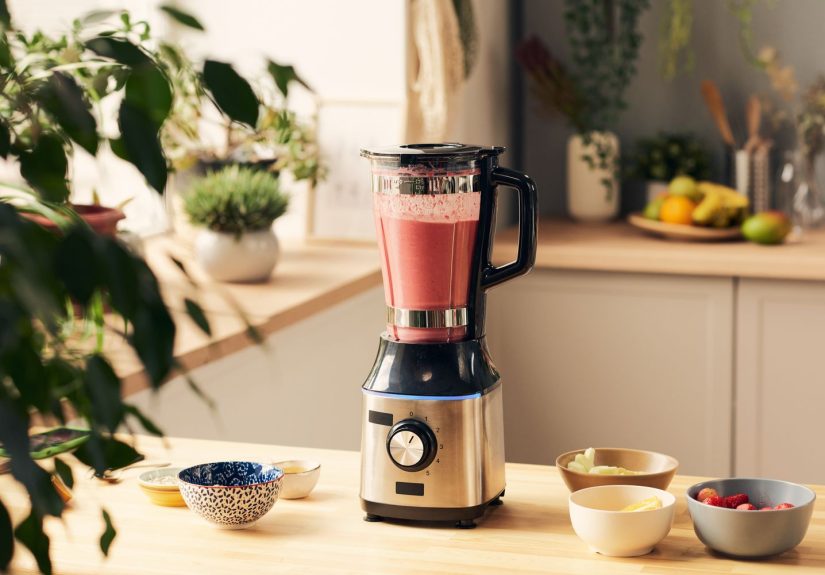
A smart blender is a blender that goes beyond basic on/off and speed control by adding
some mix of sensors, automation, and sometimes wireless connectivity
(Bluetooth and/or Wi-Fi). “Smart” can mean different things depending on the brand, but it usually falls into two buckets:
program-smart and connected-smart.
Program-smart: the “I’ve got presets” blender
These blenders use built-in programsthink smoothie, soup, frozen dessert, self-cleanso you can press a button and walk away.
The blender runs a timed or speed-changing routine designed to get consistent results without you babysitting it.
Many excellent blenders do this without ever touching your phone.
Connected-smart: the “pair me with your phone” blender
Connected smart blenders add Bluetooth or Wi-Fi so they can sync with an app, download blending programs,
access recipe libraries, or adjust settings automatically based on what’s attached (like different container sizes).
Some systems also support a companion smart scale so the app can guide you ingredient-by-ingredient right in the blender jar.
In other words: a smart blender might be smart because it can think (preset routines), or smart because it can
talk (app connectivity), or both.
What “Smart” Features Do You Actually Get?
Smart blender features vary, but the most common ones show up again and again across major brands and review labs.
Here are the ones that matter most in real kitchens.
1) Automatic programs for consistent results
Preset programs are the original “smart” feature: press smoothie, walk away, return to smoothie.
Good programs don’t just run a timerthey often ramp speeds up and down to pull ingredients into the blades,
crush ice efficiently, and finish with a final high-speed polish. This is especially useful for:
- Frozen fruit smoothies (where clumps love to hide in corners)
- Nut butters (where texture can go from “creamy” to “why is my blender smoking?” fast)
- Pureed soups (where you want velvety, not “surprise onion confetti”)
2) Container detection and automatic adjustment
Some smart systems can detect the size (and sometimes type) of the container you’re using and adjust the maximum blending time
or program behavior accordingly. The practical benefit is simple: fewer wrong-button disasters, more repeatable results
especially if you switch between a big family pitcher and a smaller personal cup.
3) App-guided recipes and downloadable blend cycles
This is where smart blenders start feeling like a cooking assistant. The app may:
- Offer a recipe library with step-by-step instructions
- Send an automatic blend program to your blender (for connected models)
- Let you scale recipes up or down
- Save favorites and build shopping lists
If you’re someone who loves guidanceor you’re teaching a teenager to make breakfast without turning the kitchen into a smoothie crime scene
app-driven recipes can be genuinely helpful.
4) Smart scale integration (the secret weapon)
Here’s a feature that can feel like magic when it’s done well: a companion smart scale that pairs with the recipe app.
Instead of dirtying measuring cups, you place the blender container on the scale and add ingredients until the app says “next.”
It’s faster, cleaner, and surprisingly good at making recipes repeatableespecially for things like:
- Protein smoothies (where “a little extra” can turn into pudding)
- Dressings and sauces (where ratios matter)
- Baking batters (where precision can save a batch)
5) Timers, touchscreens, and “less guesswork” controls
Even without an app, many higher-end blenders now include digital timers or touch interfaces.
The timer is underrated: it helps you repeat results and avoid over-blending delicate mixtures
(yes, you can over-blendespecially if you want texture, not baby food).
6) Updates, diagnostics, and long-term platform support
Some connected blenders advertise that wireless connectivity allows the product to “evolve” over time.
That can mean new programs, app improvements, or compatibility with new accessories.
The upside is future-proofing; the downside is that long-term value depends on the brand continuing to support the software.
Do Smart Blenders Make Better Smoothies (and Everything Else)?
Let’s be blunt in the most loving, kitchen-safe way possible:
a smart blender does not automatically make a better smoothie than a powerful, well-designed “non-smart” blender.
Texture is still driven mostly by the fundamentals:
- Motor strength and torque (especially for frozen ingredients and nut butters)
- Blade design and how it moves food into the cutting path
- Container shape (vortex-friendly designs tend to blend more evenly)
- Technique (ingredient order and liquid ratio matter more than people admit)
Reviews and test kitchens consistently praise “classic” high-performance blenders that don’t rely on app connectivity
for producing ultra-smooth textures, crushing ice, and handling tough tasks like nut butter and pureed soups.
That tells us something important: smart features are usually about convenience and consistency, not raw capability.
Where smart features genuinely improve results
Smart features can improve your end result when they reduce the two biggest causes of blender disappointment:
inconsistent ratios and inconsistent blending time.
-
Beginners get fewer “why is this chunky?” moments.
A good smoothie program is basically a training wheels mode that still tastes great. -
Repeatability goes way up.
If you make the same breakfast smoothie five days a week, a program + timer combo makes it taste the same every time
(instead of Monday’s perfection and Thursday’s “why is there a kale rope?”). -
Precision recipes become easier.
Smart scale guidance can tighten up results for dressings, sauces, and batters.
Where smart features don’t change much
If you already own a high-quality blender and you know what you’re doing, smart features may feel like:
“Cool… I guess… but I already have hands.”
- Experienced cooks often prefer manual control. They adjust on the fly based on texture.
- Apps can be redundant. If you don’t use recipe libraries, connectivity becomes a party trick.
- Power still wins. A weaker “smart” blender won’t outblend a strong “non-smart” one.
The Real Benefits of Smart Blenders
Smart blenders are at their best when they remove frictionthe tiny annoyances that make you skip healthy meals,
avoid homemade sauces, or settle for “good enough” textures.
Hands-free blending for busy mornings
When your morning is chaotic, a dependable preset matters. You can pour ingredients, press a button,
and pack your bag while the blender handles the rest. That’s not life-changing in theory,
but it’s absolutely the difference between making breakfast and grabbing a pastry the size of your head.
Better results with less trial-and-error
Smart programs compress learning time. Instead of experimenting with speed and timing for frozen drinks or nut butter,
the blender runs a tested routine. This is especially helpful for households with multiple cooks,
where one person’s “pulse a few times” is another person’s “hold high for three minutes and pray.”
Cleaner workflow (especially with scale-guided recipes)
Measuring in the blender container reduces dishes and mess. That sounds small until you realize most people don’t hate cooking
they hate the cleanup tax.
The Tradeoffs (Yes, There Are Tradeoffs)
Price: you’re paying for convenience
Smart features often show up on mid-to-premium models, and the price jump can be significant.
If the smart functionality doesn’t match your habits, you might be better served by spending on blending performance,
durability, and warranty rather than connectivity.
Privacy and data: “smart” sometimes means “collects information”
Any connected appliance can raise privacy questionswhat data is collected, how it’s used, and how long it’s stored.
For many people, a blender is not a device they want “phoning home.”
If you’re privacy-conscious, favor blenders that work fully offline and treat app features as optional,
ью
Longevity: will the app still work in five years?
Hardware can last a long time. Apps and cloud features are another story.
Before buying, look for two practical protections:
- Core functions should work without the app. A blender should still blend if your phone is dead.
- Strong warranty and brand support. Premium blenders often justify the cost with long warranties.
Maintenance and safety: stay informed
Like any kitchen appliance, blenders can have recalls or safety updates, especially for accessories and containers.
If you buy into an accessory ecosystem, make it a habit to register products and pay attention to manufacturer notices.
It’s not the fun part of smoothies, but it’s the part that keeps your smoothies from biting back.
How to Choose a Smart Blender That Actually Fits Your Life
Here’s a quick checklist to keep you from buying a “smart” blender that’s really just an expensive way to make loud air.
Start with performance (always)
- Can it handle your hardest job? Frozen fruit, ice, nut butter, fibrous greens?
- Does it create a smooth blend without constant stopping?
- Is the container shape good at forming a vortex?
Then evaluate smart features based on your habits
- If you want consistency: prioritize reliable preset programs and a timer.
- If you want guidance: prioritize a strong recipe app and downloadable cycles.
- If you hate measuring: look for smart scale integration.
- If you don’t like apps: pick a program-smart blender and ignore connectivity entirely.
Ask one brutally honest question
Will I use the smart features after the first two weeks?
If the answer is “probably not,” you’ll get more value from a simpler high-performance blender.
If the answer is “yes, I love guided recipes,” smart features can absolutely earn their keep.
So… Do Smart Blenders Make a Difference?
Yesbut mostly in convenience, consistency, and confidence.
Smart blenders can reduce mistakes, streamline your workflow, and help multiple people in a household get the same results.
They’re especially useful if you:
- Make smoothies (or soups) frequently and want repeatable texture
- Prefer push-button programs over manual speed control
- Like app-guided recipes and meal planning
- Want fewer measuring cups and more “add until the app says stop” simplicity
But if you’re already comfortable blending and you just want the smoothest possible result,
a top-tier “non-smart” blender can absolutely competeand sometimes wins on simplicity alone.
Experiences: What People Notice After Living With a Smart Blender
Below are common real-world experiences people report after the honeymoon phase fadeswhen the blender stops being “new”
and starts being “the thing that either makes breakfast easier or becomes a very expensive counter decoration.”
1) The busy-morning smoothie person
The biggest difference isn’t tasteit’s reliability. A preset smoothie program becomes a morning routine you don’t think about.
People often say they stop tweaking and start trusting: pour liquid, add frozen fruit, press the button, do literally anything else for a minute,
come back to a drink that’s consistently smooth. The surprising bonus is cleanup: when a blender includes a self-clean routine,
folks are more likely to rinse immediately instead of letting the jar sit “for later,” which is how jars evolve into archaeology.
2) The “I’m trying to eat healthier” household
For families, the app and guided recipes can lower friction. One person finds a recipe, another person follows the steps,
and everyone ends up with the same result. That consistency matters with green smoothies, where a small change in liquid or ice
can turn “refreshing” into “chewy.” People who stick with the app features tend to be the ones who like structuremeal plans,
shopping lists, and the little dopamine hit of checking off “breakfast: done.”
3) The home cook who loves sauces and soups
These users usually don’t care about connectivitythey care about texture. Smart features matter when they remove guesswork:
soup programs that deliver a consistent puree, timers that prevent over-processing, and containers that handle small batches
without leaving unblended pockets. The most common comment is that they make more “extras” (dressings, salsas, dips)
because the process feels easier. When it’s easier, you do it moreand that’s a difference you can taste.
4) The precision person (aka the one who owns a kitchen scale on purpose)
Smart scale integration can be a game-changer for the right personality. People who love this feature describe it as
“like having training wheels, but for adults who don’t want to wash measuring cups.” The app says “add almond milk to 10 ounces,”
you pour until it hits the number, and move on. Over time, it becomes less about the app and more about a cleaner workflow.
If you enjoy repeatable recipesespecially protein blends and dressingsthis is where “smart” feels truly useful.
5) The tech skeptic
Not everyone falls in love. Some users try the app once, decide they don’t want another account in their life,
and treat the blender like a normal blender forever. Interestingly, they’re often still happybecause the real value ends up being
the physical machine: solid power, good container design, and reliable controls. Their takeaway is usually:
“The blender is great. The smart stuff is optional.” And honestly, that’s how it should be.
6) The long-term owner
After months, what matters most is durability and support. People who remain satisfied tend to be the ones whose blender
still performs great even if they never open the app again. They appreciate warranties, available replacement parts,
and the feeling that the blender was built to be usednot just displayed. Their “difference” isn’t flashy;
it’s the quiet confidence that the machine will crush ice today, next week, and five years from now without drama.
Taken together, these experiences point to a simple truth: smart blenders make the biggest difference when they match your habits.
If you want hands-free consistency, guided recipes, and cleaner measuring, a smart blender can feel like an upgrade you use daily.
If you just want power and smoothness, prioritize the fundamentalsand treat smart features as a bonus, not the main event.