Table of Contents >> Show >> Hide
- What “Delayed in Transit” Usually Means
- Step 1: Check the Tracking Details Like a Detective, Not a Drama Character
- Step 2: Wait a Little, but Not Forever
- Step 3: Check for the Boring Problem That Causes a Lot of Drama
- Step 4: Figure Out Who Sold the Item
- Step 5: Contact Amazon or the Seller the Smart Way
- Step 6: Know When a Refund or Replacement Makes Sense
- Step 7: Use Carrier Tools If the Tracking Is Clearly Stalled
- Step 8: Protect Yourself if the Order Never Arrives
- Common Scenarios and What to Do
- What Not to Do
- The Bottom Line
- Real-World Experiences With Late Amazon Packages
- SEO Tags
Few modern plot twists are as annoying as this one: you ordered something from Amazon, tracked it like it was a tiny celebrity on tour, and then the status changed to delayed in transit. Suddenly your package is no longer “arriving tomorrow.” It is now somewhere in the mysterious universe known as logistics, where time moves differently and cardboard boxes apparently go on spiritual retreats.
The good news is that a late Amazon package does not automatically mean a lost package. In many cases, it means the parcel missed a scan, got held up by weather, ran into a regional sorting backup, or hit an address or access issue that slowed the final handoff. The less-good news is that waiting without a plan makes the experience feel longer than a dentist appointment with no Wi-Fi.
This guide walks you through exactly what to do when your Amazon package is delayed in transit, when to wait, when to contact Amazon, when to contact the seller, and when to ask for a refund or replacement. You will also learn how to read the situation without panicking, how to avoid making the delay worse, and how to protect your money if the order never shows up.
What “Delayed in Transit” Usually Means
When Amazon or a carrier marks a package as delayed in transit, it usually means the shipment is still moving through the network, but it is no longer expected to arrive on the original timeline. That can happen for several reasons, including:
- Weather or natural events slowing transportation routes
- Heavy seasonal volume during holidays or major sales
- A missed scan that makes tracking look frozen even though the box is still moving
- Sorting or trailer backlog at a regional hub
- Incorrect or incomplete address details
- Apartment, gate, locker, or mailroom access problems
- Carrier handoff delays between Amazon and USPS, UPS, or FedEx
- Undeliverable conditions that may trigger a return to sender
In plain English, “delayed in transit” often means late, not necessarily lost. That distinction matters because your next step depends on whether the package is simply lagging behind or has gone completely off the radar.
Step 1: Check the Tracking Details Like a Detective, Not a Drama Character
Your first move is to open Your Orders and review the full tracking history. Do not just stare at the latest status line and sigh heavily. Click into the details and look for clues.
What to look for
- Last scan location: Is the package still far away, or is it already in your city?
- Carrier name: Is Amazon Logistics handling it, or was it handed to USPS, UPS, or FedEx?
- Updated delivery date: Has Amazon provided a new estimate?
- Status wording: “Label created” is different from “carrier picked up package,” and both are different from “out for delivery.”
If the tracking shows that only a shipping label was created, the issue may be that the seller or shipper has not fully handed the package to the carrier yet. If the tracking shows multiple scans and then suddenly goes quiet, the package may be between facilities or waiting for a new scan. Carriers sometimes go a day or more without a visible update, which feels suspicious but is not unusual.
This is why the best first response is calm, structured checking, not instantly reordering the item and accidentally buying yourself two air fryers.
Step 2: Wait a Little, but Not Forever
Patience is useful here, but so is knowing when patience becomes unpaid customer service labor.
If Amazon has already sent you a revised delivery estimate, it usually makes sense to wait until that date passes. If there is no email or app alert and the order just looks late, give it a short window to correct itself. Some late packages arrive within 24 to 48 hours after the original promise date, especially when the delay is caused by a missed scan or a local routing hiccup.
That said, do not let a vague tracking message keep you in limbo for days without taking action. A good rule is this: if the package is late and the tracking has stopped making sense, start documenting what you see and prepare to escalate.
Step 3: Check for the Boring Problem That Causes a Lot of Drama
Before assuming the box is lost somewhere in a shipping Bermuda Triangle, verify the practical stuff:
- Your shipping address is correct in the order details
- Your apartment number, gate code, or business suite number is included
- Your phone number is current if the carrier needs to reach you
- Your delivery instructions still make sense
- Your mailbox, porch, locker, or mailroom can actually receive the package
Small details cause surprisingly large delays. A missing unit number can turn a simple delivery into an “undeliverable” event. A business address without receiving hours can cause repeated failed attempts. A full parcel locker can reroute the item. None of these problems are exciting, but all of them are real.
Step 4: Figure Out Who Sold the Item
This part matters more than many shoppers realize. On Amazon, some orders are sold directly by Amazon, while others are sold by a third-party seller. The resolution path can be different.
If Amazon sold or fulfilled the item
Amazon support is usually your main point of contact. If the order had a guaranteed delivery date and Amazon missed it, you may be eligible for a refund of the shipping fees. That does not mean every late package becomes free, but it does mean the shipping cost may be refundable on qualifying orders.
If a third-party seller sold the item
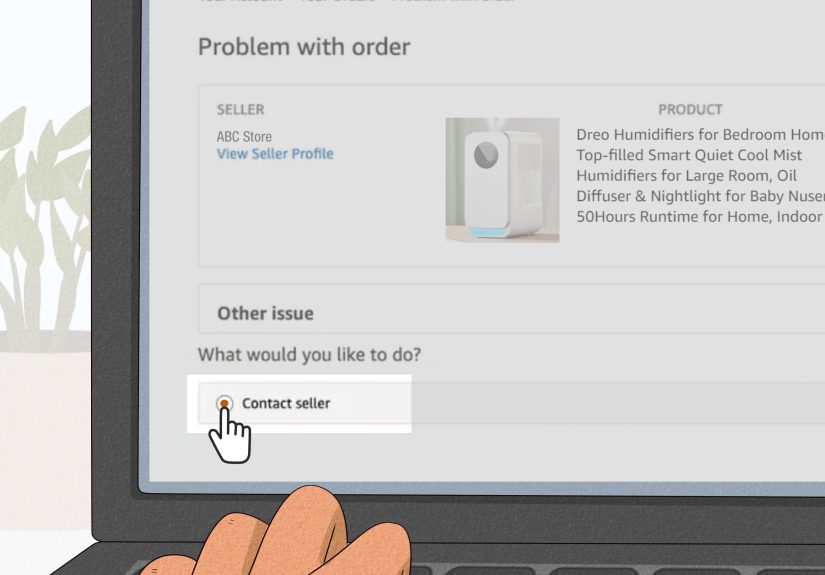
Start by contacting the seller through Amazon. Be clear, polite, and specific. Include the order number, promised delivery date, and the tracking status you see. If the seller does not respond within the required window or does not offer a reasonable solution, you may be able to escalate through the A-to-z Guarantee.
In other words, before you go full keyboard warrior, make sure you are aiming your message at the right party.
Step 5: Contact Amazon or the Seller the Smart Way
When you reach out, skip the emotional novel and send a short, useful message. Customer service moves faster when the facts are easy to scan.
Use a message like this
“Hi, my order is past the estimated delivery date and the tracking still shows delayed in transit. The order number is [number]. The last update was [date/time]. Please let me know whether I should wait, request a replacement, or get a refund.”
That message works because it is calm, direct, and gives support exactly what they need. It also creates a clean record in case you need to escalate later.
Step 6: Know When a Refund or Replacement Makes Sense
Not every delay deserves the same response. The best next step depends on the item and the timing.
Ask for a replacement when
- You still want the item
- The item is in stock
- The delay has become unreasonable
- The package appears lost, stalled, or headed back to the sender
Ask for a refund when
- You no longer need the item
- The delivery date mattered for an event or deadline
- The seller cannot confirm a realistic arrival date
- The package is officially undeliverable or returned
If the package becomes undeliverable and is returned to Amazon, a refund is typically processed rather than forcing you to wait indefinitely. That is helpful, though admittedly less comforting when the package contained the one thing you actually needed this week.
Step 7: Use Carrier Tools If the Tracking Is Clearly Stalled
If the package has been handed to a major carrier, their tracking tools can sometimes reveal more context than the Amazon order page alone.
USPS delays
If USPS is the final carrier and the mailpiece is late or appears stuck, start with USPS tracking and help request tools. If the issue remains unresolved after that process, USPS offers a Missing Mail search step. This is especially useful when the package has gone quiet after entering the postal network.
UPS and FedEx delays
UPS and FedEx both provide tracking support and delay guidance. A shipment may be delayed because of operational issues, weather, local disruptions, or delivery exceptions. If the carrier page shows a clear exception, use that information when you contact Amazon or the seller. In some cases, the shipper may need to open the formal trace or claim, so contacting Amazon with the carrier detail is often the fastest path.
The key point is simple: do not guess. Read the carrier notes, take screenshots, and use those details in your support request.
Step 8: Protect Yourself if the Order Never Arrives
If the delay drags on and you still do not have the item, switch from “wait and see” mode to “protect my money” mode.
Your practical protection checklist
- Save the order confirmation and promised delivery date
- Keep screenshots of tracking updates and delay notices
- Save any messages with Amazon or the seller
- Record when you contacted support and what was promised
These records matter. If a seller fails to deliver as promised and does not resolve the issue, consumer protections may allow you to dispute the charge, especially if you used a credit card and the item was never delivered as agreed. That is not the first step, but it is a strong backup plan if normal support channels fail.
Common Scenarios and What to Do
The package is one day late, but tracking still updates
Wait a bit. This is often a routine delivery delay, not a lost package.
The package has not moved for several days
Contact Amazon or the seller, especially if the estimated date has passed. Use carrier tracking details in your message.
The order was sold by a marketplace seller
Message the seller first. If they do not respond appropriately, use Amazon’s escalation options.
The item was time-sensitive
If the delay ruins the purpose of the order, request a refund instead of waiting endlessly for a package you no longer need.
The package shows delivered, but you do not have it
That is a different problem from delayed in transit, but it often overlaps. Check around your property, ask neighbors or building staff, wait briefly in case of an early scan, and then contact Amazon promptly.
What Not to Do
- Do not reorder instantly unless you are okay with possibly receiving both packages
- Do not delete tracking emails or chat records
- Do not assume a scan gap means theft or loss
- Do not wait too long to escalate if the promised date has clearly passed
- Do not message support with only “Where is it???” and expect miracles
A little organization beats a lot of frustration. Shipping problems feel personal, but they are usually procedural. Treat them that way, and you have a much better chance of getting a fast fix.
The Bottom Line
If your Amazon package is delayed in transit, the smartest move is not panic. It is process. Check the tracking details, confirm the address, wait a reasonable amount of time, identify whether Amazon or a third-party seller is responsible, and then contact support with a clear request. If the package misses a guaranteed date, you may qualify for a shipping-fee refund. If the seller fails to resolve a late or missing order, escalation and refund options exist. And if the item never arrives, your records can help you protect your purchase.
In other words, your package may be late, but your response does not have to be.
Real-World Experiences With Late Amazon Packages
One of the most common experiences shoppers describe is the “frozen tracking page” problem. The order looks perfectly normal for a day or two, then suddenly stops updating after it reaches a sorting center. Nothing changes. No new scan. No “out for delivery.” Just the same tired line sitting there like it pays rent. In many of these cases, the box still arrives within a day or two. The lesson is that a stalled scan is frustrating, but it does not always mean the shipment is gone.
Another familiar experience happens during holidays, Prime events, and major shopping weekends. A package that looked firmly on schedule gets bumped into a delay because the local network is overloaded. Shoppers often notice that the tracking moves again late at night or early the next morning, suggesting the parcel was still in the system all along, just caught in volume traffic. This is why a short wait period is often reasonable before escalating.
Apartment and condo deliveries create their own special brand of chaos. A buyer sees “delayed in transit,” but the real issue turns out to be access: no gate code, no secure entry, no mailroom staff on site, or a locker bank that is already full. In those situations, the delay is not dramatic or mysterious. It is simply operational. Many people only discover this after checking the full order details and realizing their delivery instructions were outdated or incomplete.
Then there is the “label created” situation, which can be confusing if you do not watch tracking closely. Shoppers think the package has been moving for days, when in reality the seller may have printed the label but not handed off the parcel yet. That creates the feeling of a transit delay when the real issue is a shipping delay before transit even properly began. It is a subtle difference, but it changes how you should respond.
Some shoppers also report the emotional roller coaster of a package being marked late, then out for delivery, then late again. That usually points to a local routing issue or a missed delivery window rather than a vanished parcel. The box may have made it to the delivery station but not onto the right truck in time. Annoying? Absolutely. Unusual? Not really.
There are also cases where the order matters less than the timing. A delayed phone charger is irritating. A delayed birthday gift or replacement medicine organizer feels much bigger because the value is tied to the date. In those moments, experienced shoppers tend to decide quickly: either keep waiting because the item still matters, or stop the uncertainty and ask for a refund or replacement. That mindset helps prevent the classic mistake of waiting too long for something that has already missed its purpose.
Finally, many people learn the same practical lesson after one or two shipping headaches: screenshots are your friend. When a promised date changes, when the carrier status stalls, or when support offers a fix, saving the details gives you leverage and clarity. It also makes your next support chat faster because you are not relying on memory while annoyed. And let’s be honest, “annoyed memory” is not exactly a precision instrument.