Table of Contents >> Show >> Hide
- What Creating and Saving Segments in Userpilot Actually Means
- Why Saved Segments Matter for User Onboarding and Product Adoption
- How to Create and Save Segments in Userpilot
- Where Saved Segments Become Useful in Userpilot
- Best Practices for Creating Better Segments
- Common Mistakes to Avoid
- Practical Segment Examples for Userpilot
- Experience Section: What Actually Happens When Teams Start Using Saved Segments Seriously
- Conclusion
- SEO Tags
If your product team still talks about “the users” like they’re one giant blob floating around your dashboard, it’s time for an intervention. Not a dramatic one with folding chairs and sad coffee. Just a smart segmentation strategy. In Userpilot, creating and saving segments is one of the simplest ways to stop guessing, start targeting, and make your onboarding, messaging, and product experiences feel relevant instead of randomly sprayed across your app like confetti at the wrong party.
Segments are the backbone of personalized product growth. They help you identify who your users are, what they’ve done, what they haven’t done, and what they’re likely to need next. In plain English: they keep you from showing an advanced feature tour to a brand-new trial user who still thinks your dashboard is a decorative wall mural. When used well, saved segments in Userpilot can power onboarding flows, in-app guidance, feedback campaigns, reporting, and retention plays with much better precision.
This guide breaks down how creating and saving segments in Userpilot works, why it matters, how to do it well, and what kind of mistakes quietly ruin otherwise good segmentation strategies. We’ll also cover real-world examples and field-tested lessons so this article does more than just admire the buttons on the screen.
What Creating and Saving Segments in Userpilot Actually Means
At its core, a segment in Userpilot is a saved group of users or companies defined by shared characteristics or behaviors. That could be something simple, like users on a trial plan, or something more meaningful, like admins from mid-market accounts who signed up in the last 14 days, viewed your analytics page, and still haven’t created their first dashboard.
That’s where Userpilot becomes useful instead of merely shiny. You’re not limited to a single data point. You can build segments using user properties, company properties, events, previously saved segments, page views, content engagement, and user feedback. In other words, you can segment people based on who they are, where they work, what they clicked, what they ignored, and whether they already rolled their eyes at your survey.
Saving a segment matters because it turns a one-time filter into a reusable asset. Instead of rebuilding the same audience every time you launch a flow or analyze feature adoption, you create it once, name it properly, and reuse it across campaigns, experiences, and reporting. That saves time, improves consistency, and dramatically lowers the odds of your team targeting the wrong users because someone rebuilt the logic from memory after two coffees and zero patience.
Why Saved Segments Matter for User Onboarding and Product Adoption
The biggest reason to use Userpilot saved segments is relevance. Good onboarding is not about showing more content. It’s about showing the right content to the right user at the right moment. A first-time user needs orientation. A returning user may need activation nudges. A power user probably needs feature expansion or upsell messaging. Treating all three the same is how products accidentally become annoying.
Saved segments make personalized onboarding possible without forcing your team to reinvent audience rules every week. You can create a segment for new signups, another for users who completed setup but haven’t used a key feature, and another for accounts that are healthy enough to receive expansion messaging. Suddenly, your product guidance looks intentional instead of improvised.
This also helps with feature adoption. Maybe one feature matters most for activation, while another matters most for retention. Segments let you isolate users who are close to value but not quite there, then serve contextual prompts that push them forward. That is a much smarter move than showing every message to everyone and hoping one of them sticks.
There’s also a reporting advantage. Segments help product, growth, and customer success teams look at behavior through a useful lens. You can compare new users to mature users, premium accounts to free accounts, or engaged users to at-risk users. Without segmentation, analytics often become a fancy way to describe averages that help nobody.
How to Create and Save Segments in Userpilot
1. Start with a clear goal, not random curiosity
Before you build a segment, decide what question you’re trying to answer or what action you want to trigger. Do you want to improve activation? Reduce churn? Target a checklist? Launch an NPS survey to the right audience? If the answer is just “I felt like clicking around,” step away from the segment builder.
A strong segment starts with a business objective. For example:
- Users who signed up this week but haven’t completed onboarding
- Accounts on a premium plan with low feature usage
- Admins who saw a flow but didn’t finish it
- Users who answered a survey in a specific way
2. Build the segment from the User or Company Overview
In Userpilot, you begin from the User Overview or Company Overview page, apply the conditions you want, and then click Save Segment. That workflow is important because it encourages you to build segments from actual filtering logic rather than vague audience ideas floating around in a slide deck.
You can create segments for individual users or for companies, depending on what you want to target. In a B2B SaaS environment, that distinction matters a lot. Sometimes the user behavior tells the story. Sometimes the account context does. Sometimes both do, and that’s when your product manager starts smiling in a slightly suspicious way.
3. Choose the right conditions
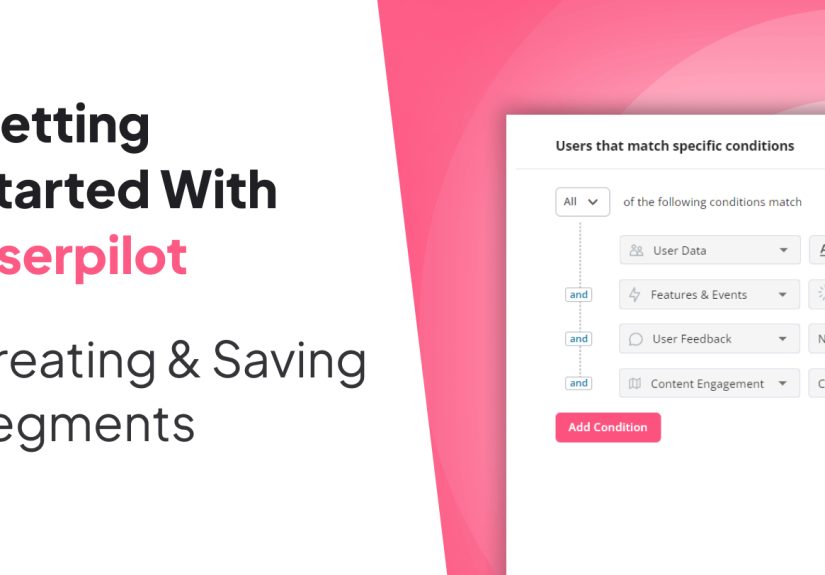
Userpilot gives you several condition types, and this is where the magic happens. You can filter by:
- User data such as role, signup date, plan, lifecycle stage, or custom properties
- Company data such as industry, account size, revenue band, subscription tier, or custom account traits
- Events including tracked, labeled, or custom events, plus frequency and event property filters
- Segments so you can layer saved audiences into more advanced targeting
- Pages to capture users who viewed or didn’t view specific tagged pages
- Content engagement with flows, checklists, banners, spotlights, surveys, and NPS
- User feedback based on survey responses, NPS responses, or form responses
This is what makes behavioral segmentation in Userpilot genuinely powerful. You’re not just tagging people by static demographics. You’re combining properties with actual in-product behavior, which is usually where the useful truth lives.
4. Use AND, OR, and logic groups like a grown-up
One of the easiest ways to ruin a segment is sloppy logic. Userpilot supports AND and OR operators, plus logic groups for more advanced combinations. This matters because “new users who created a dashboard or a report” is not the same thing as “new users who created a dashboard and a report.” One group is promising. The other is tiny and probably wearing a cape.
Use AND when every condition must be true. Use OR when users can match one of several paths. Use grouped logic when you want to combine conditions more intelligently. For example, you may want:
Signed up in the last 14 days AND (created project OR invited teammate)
That kind of grouping reflects real product behavior better than blunt filtering and makes your targeting much more accurate.
5. Name the segment so future-you doesn’t hate present-you
Once your logic is right, save the segment with a name that explains exactly what it is. Bad names include “Test 3,” “Users Final,” and the always-classic “New New New.” Good names include structure, timeframe, and purpose, such as:
- New Trial Users – Last 7 Days
- Admins – No Dashboard Created
- Expansion Candidates – High Usage Premium
- NPS Detractors – Active Last 30 Days
Clear naming conventions make saved segments reusable across teams and reduce targeting mistakes. This sounds boring until your customer success team launches the wrong experience to enterprise accounts. Then it becomes thrilling for all the wrong reasons.
Where Saved Segments Become Useful in Userpilot
Saved segments are not just neat little labels. They become operational building blocks throughout Userpilot.
Flows and onboarding experiences
You can use a saved segment to target a specific audience for flows. That means your onboarding modals, tooltips, walkthroughs, and checklists can be shown only to users who actually need them. A welcome flow can be limited to brand-new users. A feature spotlight can be shown only to users on a certain plan. An expansion flow can target engaged accounts that have not adopted a newly released capability.
Resource Center targeting
Saved segments can also determine who sees specific Resource Center modules. That’s useful when you want support content, guides, or announcements to appear only for certain roles, lifecycle stages, or adoption levels. Your admin users may need setup documentation. Your end users may need quick how-to tips. Your internal team definitely does not need to see customer-facing prompts while testing in production. That way lies chaos.
NPS and survey targeting
Not every user should receive the same feedback request. Segmentation helps you send NPS or in-app surveys to the right audience based on behavior, usage maturity, or other criteria. Asking a user to rate your product before they’ve experienced value is like asking someone to review a restaurant while they’re still looking for a parking spot.
Analytics, dashboards, and exports
Saved segments also improve analysis. You can use them as global filters in dashboards and even limit exports to specific segments. This is incredibly helpful when you want clean reporting for a particular audience instead of swimming through a giant pool of mixed intent and mixed maturity.
Best Practices for Creating Better Segments
Segment by behavior, not just profile data
Role, plan, and company size are useful, but behavior usually tells you more. A user on an enterprise account who never touched a core feature may need completely different guidance than a trial user who is already deeply engaged. Behavior closes the gap between theory and reality.
Keep segments actionable
A segment should help you do something: launch a flow, compare performance, send a survey, or prioritize follow-up. If a segment is interesting but not actionable, it may belong in a thought experiment rather than your workspace.
Review segment logic regularly
Your product changes. Your onboarding flow changes. Your event taxonomy changes. So your segments need maintenance too. A segment that made perfect sense six months ago may quietly become useless if the underlying events or user properties have changed.
Avoid overlap unless overlap is intentional
Mutually exclusive segments are often easier to reason about, especially for onboarding campaigns. If one user qualifies for five different flows at once, congratulations: you’ve built a digital ambush.
Common Mistakes to Avoid
The first mistake is building segments that are too broad. “All trial users” sounds useful until you realize it includes everyone from someone who signed up 10 minutes ago to someone who ignored your app for three weeks and came back by accident.
The second mistake is building segments that are too narrow. If your audience logic requires twelve conditions and a lunar eclipse, you may end up targeting three users and one confused intern.
The third mistake is relying only on static data. User properties matter, but product usage matters more. Segments should reflect what users are doing, not just what’s written on their profile.
The fourth mistake is forgetting segment naming hygiene. Nothing slows down execution like a cluttered list of vaguely named audiences that nobody trusts.
Practical Segment Examples for Userpilot
New users who need activation
Create a segment for users who signed up in the last seven days and have not completed a key activation event. Target them with a checklist, a tooltip sequence, or a welcome flow that drives them toward the first success milestone.
Engaged users ready for feature discovery
Create a segment for users who completed onboarding and regularly use one core feature but haven’t tried a complementary feature. Show them a contextual spotlight or modal introducing the next valuable workflow.
At-risk accounts
Create a company-level segment for accounts with low recent activity, incomplete setup, or limited feature usage. This can inform success outreach, in-app rescue messaging, or survey campaigns designed to uncover friction.
Power users for advocacy
Create a segment for highly active users with strong usage patterns and positive feedback. These users are prime candidates for beta access, testimonials, referral asks, or advanced education content.
Experience Section: What Actually Happens When Teams Start Using Saved Segments Seriously
Here’s the part most software articles skip: what it feels like in practice when a team starts using segmentation well. In my experience, the first thing that changes is not conversion rate. It’s clarity. Teams stop arguing in vague language and start describing users in ways that can actually be measured. Instead of saying, “We should help struggling users,” they say, “Let’s target users on the trial plan who signed up in the last 10 days, viewed the setup page, and still haven’t completed their first project.” That’s when product work gets sharper.
The second thing that changes is the tone of in-app messaging. Bad targeting makes every message feel like spam wearing a blazer. Good targeting makes messages feel timely, almost helpful enough that users don’t resent them. That’s the dream. Not applause. Just less resentment.
I’ve also seen teams discover that their “best users” were not who they thought they were. The loudest customers are not always the most engaged. The biggest accounts are not always the healthiest. Sometimes a supposedly low-priority segment turns out to be quietly adopting the product faster than everyone else. Saved segments help expose those patterns because they force you to define audiences based on real properties and behaviors instead of assumptions and office folklore.
Another useful lesson: segmentation gets better when multiple teams use the same language. Product may define activation one way, customer success another way, and marketing a third way. That creates chaos fast. But when saved segments become shared assets, everyone starts working from the same audience definitions. Now the onboarding flow, the success playbook, and the reporting dashboard all point to the same reality. It’s not glamorous, but it is wildly effective.
There’s also a psychological benefit. Once teams see that they can save a segment and reuse it across flows, surveys, and analysis, they stop treating targeting as a one-off task. It becomes part of system design. They ask better questions. Should this message go to all users, or only to admins? Should this checklist appear before or after a user completes setup? Should this NPS survey wait until a meaningful success event happens? Those questions lead to better user experiences because they respect timing and context.
Of course, no segmentation strategy stays perfect forever. Products evolve. Events change. User behavior shifts. Segments drift. The teams that get the most value from Userpilot are the ones that revisit segment definitions regularly and treat them like living infrastructure. That sounds very serious, but it’s true. A neglected segment is like a plant in a conference room: technically alive, practically doomed.
The best outcome of all is that saved segments help teams become more empathetic without becoming less analytical. You can look at the data and still remember there’s a human on the other side of the screen trying to get something done. That’s the sweet spot. Segmentation is not about putting users into boxes for fun. It’s about removing friction, improving relevance, and making the product feel more intuitive. When Userpilot segments are created thoughtfully and saved with purpose, they stop being admin clutter and start becoming one of the most valuable assets in your growth stack.
Conclusion
Creating and saving segments in Userpilot is not just a housekeeping task for organized product people. It is one of the most practical ways to improve user onboarding, drive feature adoption, personalize in-app experiences, and make analytics dramatically more useful. The strength of Userpilot segmentation lies in its flexibility: you can combine user data, company data, events, page views, engagement history, and feedback to build audiences that reflect real behavior instead of lazy assumptions.
If you want better onboarding, smarter targeting, cleaner reporting, and fewer “why did this message show up for me?” moments, saved segments are the answer. Build them around business goals, keep them actionable, review them often, and name them like someone else has to use them later. Because someone else usually does. And that someone will either thank you or curse you quietly on a Monday morning.
Note: This article is intentionally written as original web-ready copy and cleaned of unnecessary reference artifacts for publishing.