Table of Contents >> Show >> Hide
- What the Romma Cable Management Box Is (and What It’s Not)
- Quick Product Snapshot
- Why a Cable Management Box Actually Matters
- How to Set Up the Romma Cable Management Box (Without Turning It Into a Puzzle)
- Safety and Common Sense: The “Don’t Burn Down Your Charging Station” Section
- Where the Romma Cable Management Box Works Best
- Romma vs. Other Cable Management Boxes
- Care and Maintenance
- FAQ
- Experiences With the Romma Cable Management Box (The “Before & After” Reality)
Cords have a special talent: they can turn a gorgeous room into “IT Closet Chic” in about 30 seconds.
One minute you’re charging a phone. The next, you’re staring at a knotted vine of black noodles that somehow
multiplied while you blinked.
Enter the Romma Cable Management Box: a simple, lidded box designed to hide the not-so-cute parts of modern life
(power strips, adapters, and the “mystery cord” that definitely goes to something important).
It’s tidy on the outside, functional on the inside, and minimal enough to blend into a desk setup, TV stand, or kitchen counterwithout
screaming, “Hello, I am storage.”
What the Romma Cable Management Box Is (and What It’s Not)
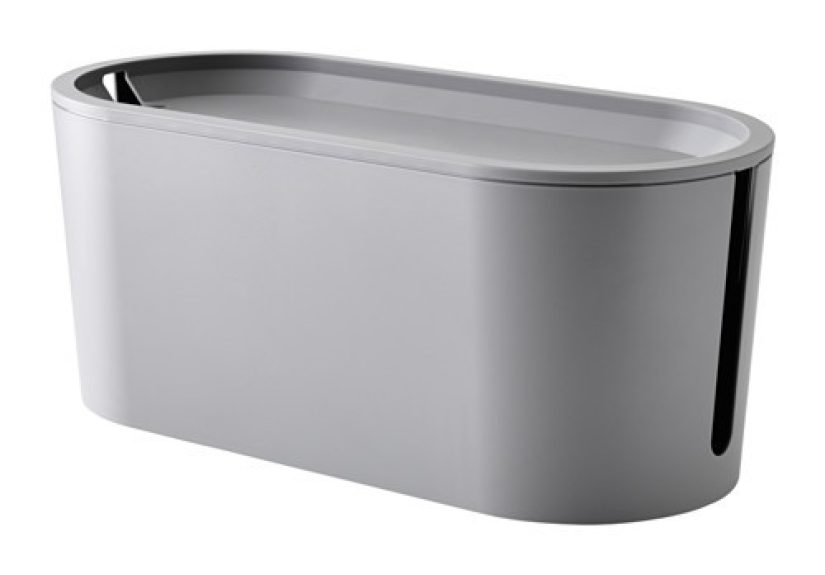
Romma is best described as a “cord corral.” It’s built to hold an extension lead/power strip and the extra cable slack you’d rather not see,
while still letting you run cords out through openings in the lid or sides so devices can charge normally.
It is not a magical safety vault that makes electrical rules disappear. Think “organizer,” not “armored bunker.”
You still need to use a quality, appropriately rated power strip/surge protector, avoid overloading it, and keep the setup ventilated and dry.
Romma helps with neatness and basic cord control; good electrical habits handle the rest.
Quick Product Snapshot
Size, Shape, and Material
The Romma Cable Management Box is made from ABS plastic and measures about 33 cm wide × 15 cm deep × 14 cm high
(roughly 13 in × 6 in × 5.5 in). That size is “power strip friendly” without becoming a piece of furniture.
It’s large enough for many common power strips plus the usual suspects: USB bricks, smart plug hubs, and a few loops of cable slack.
Cord Exits That Don’t Fight You
A cable box is only useful if it actually lets you use the cords. Romma is designed so you can pull a cord through an opening in the top or side,
charge what you need, and keep the rest tucked away. That means you’re not stuck with a “closed box” that requires you to pinch cables under the lid
like you’re sealing leftovers in a container that’s one millimeter too small.
Minimal Look, Maximum “Finally”
Visually, it’s the kind of clean, neutral piece that plays nice with most décor styles: modern, Scandinavian, minimalist, or “I just want my desk to look
like I have my life together.” It doesn’t ask for attention. It simply removes chaos.
Why a Cable Management Box Actually Matters
Let’s be honest: cable clutter is annoying, but it also has practical downsides. Loose cords can snag on vacuum cleaners, get tugged by rolling desk chairs,
and collect dust like they’re training for the Olympics. If you have kids or pets, cords and power strips can become an irresistible “forbidden toy.”
A cable management box like Romma helps by:
- Reducing visual clutter (your brain relaxes when the spaghetti disappears).
- Keeping cords contained so they’re less likely to get yanked, twisted, or chewed.
- Making cleaning easierwipe around one box instead of dusting a cord jungle.
- Creating a charging station that feels intentional rather than improvised.
How to Set Up the Romma Cable Management Box (Without Turning It Into a Puzzle)
1) Pick the Right Location
Choose a spot where the box will be accessible but out of the main traffic laneunder a desk, behind a media console, next to a side table, or along a wall.
Make sure it won’t be pressed tightly against soft items like blankets or piles of paper. Neat is good; smothered is not.
2) Use the Right Power Strip (or Surge Protector)
Romma is a container, not a power strip. Your setup is only as safe as what you put inside. Look for a quality strip with overload protection and, for electronics,
surge protection. If a strip looks damaged, feels unusually hot, or has loose outlets, it’s not “fine.” It’s on its villain arc.
3) Plug In Smart (Low-Wattage Wins)
Cable management boxes shine for low-wattage desk and entertainment gear: phone chargers, tablets, lamps, a Wi-Fi router, a monitor, speakers,
or a TV setup. Avoid plugging high-draw appliances into a typical power stripitems with big heating elements or motors are often the problem children.
A simple rule many electricians repeat: if it heats, cools, or has a motor, it usually deserves a wall outlet.
(This is why space heaters and power strips are the “most toxic couple” in home safety.)
4) Route Cords Cleanly Through the Openings
Feed the device cords through the top or side openings so the box can close neatly. Keep enough slack so cords aren’t pulling on plugs,
but don’t coil everything into tight loops like you’re winding a garden hose for winter storage.
5) Label What You Can
If you’ve ever unplugged your “monitor charger” and accidentally killed your Wi-Fi during an important video call, you already know the value of labels.
A tiny tag (or even a piece of masking tape) can save you from playing “Guess That Plug.”
6) Do a Quick Safety Check
Once everything is running, check that cords aren’t pinched and that the box isn’t sitting in a damp area. Periodically feel the outside of the box;
warm is one thing, but hot is a warning sign. If anything seems off, unplug and reassess.
Safety and Common Sense: The “Don’t Burn Down Your Charging Station” Section
Romma itself is an organizer, but your power strip and devices still follow the laws of electricity (tragically, electricity does not care about aesthetics).
Here are the big safety points to keep your setup practical and low-stress.
Avoid Overloading (Yes, Even If It “Fits”)
A power strip can be physically full and still electrically fineor it can look harmless and be overloaded. Many typical 15-amp strips top out around
1,800 watts (and safety guidance often recommends staying below the maximum). If you’re running multiple devices, add up the wattage or
keep it to low-draw electronics.
Don’t Daisy-Chain Power Strips
Plugging a power strip into another strip (or into an extension cord “because it was just a little short”) is a known safety issue and a common cause of overheating risk.
If your setup requires a chain of adapters to reach the outlet, it’s usually a sign you need a better layoutor an electrician-installed outlet where you actually need one.
Ventilation Matters More Than People Think
Power strips and adapters can generate heat under load. Crowding them, burying them, or placing them in areas with limited air circulation can increase risk.
A cable management box should keep things contained, not packed like a suitcase you’re sitting on to get it closed.
Keep It Dry
Avoid placing the box near sinks, tubs, or anywhere it could be splashed. Water and power strips are not a fun science experiment.
If you need power in a damp-prone area, consider solutions designed for that environment and consult a pro when in doubt.
Use the Box for What It’s Good At
Romma is ideal for charging hubs and media setups. It’s not the right place to stash high-wattage appliances. If you’re tempted to hide a space heater plug in there,
that’s your cue to step away slowly and choose a wall outlet.
Where the Romma Cable Management Box Works Best
1) Home Office “Command Center”
Put Romma under or beside your desk and route the cords for your monitor, laptop charger, desk lamp, and phone charger through the openings.
Pair it with a few cable clips under the desk, and you’ll go from “cord vines” to “calm workspace” fast.
2) TV and Entertainment Setup
Media consoles are cable chaos magnets: TV, streaming box, game console, soundbar, smart speaker. Romma helps by hiding the power strip and the “excess cord loops”
that usually end up stuffed behind the cabinet like secrets you’re hoping never resurface.
3) Family Charging Station
One box + one power strip + a few labeled charging cords = a household peace treaty. Put it on a shelf or counter away from water sources, and suddenly
nobody has to ask, “Has anyone seen my charger?” (They still will. But at least you can point dramatically at the box.)
4) Bedroom Nightstand Cleanup
If your nightstand is a tangle of cords and glowing bricks, Romma can move most of that mess off the surface. Run only the cord ends you actually use
through the opening and keep the rest concealed.
Romma vs. Other Cable Management Boxes
Cable management boxes come in a range of stylessome extra-large for big surge protectors, some decorative (wood-look, fabric-wrapped), some with heavier-duty features.
Reviews and testing coverage in the U.S. market emphasize differences like size, ventilation, cord exits, and ease of access.
Romma’s sweet spot is its balance: compact enough to look clean, roomy enough for a typical home setup, and simple enough that you don’t need an engineering degree
(or a sacrifice to the cable gods) to use it.
When You Might Want Something Else
- You have a giant power brick collection (gaming PCs, docking stations, multiple monitors) and need a larger, more ventilated enclosure.
- Your cords need longer runs and you’d benefit from wall cord covers or under-desk trays in addition to a box.
- You want a decorative statementsome boxes are designed to look like décor rather than “organization.”
Care and Maintenance
Keeping Romma clean is refreshingly low-drama: wipe it with a damp cloth, then wipe dry. That’s it. The bigger maintenance win is what happens inside:
every few months, open the lid, remove dust, check cords for wear, and make sure nothing looks damaged or overheated.
FAQ
Will Romma fit my power strip?
It fits many standard home/office strips, but not all. Measure your strip’s length and heightespecially if it has chunky switches or angled plugs.
Use Romma’s approximate dimensions (about 13 in wide) as your reference point, and remember the inside space will be slightly smaller than the outside.
Can I close the lid while everything is charging?
That’s the point of a cable management boxbut only if your setup is appropriate (low-wattage electronics), cords aren’t pinched, and the area stays cool and dry.
If you notice heat buildup, reduce the load and improve airflow.
Is it okay to put a surge protector inside?
Many people use cable boxes to hide surge protectors in desk and media setups. Choose a quality unit, avoid overloading, and keep the area ventilated.
When in doubtespecially with high-draw devicesuse a wall outlet or consult an electrician.
What should I absolutely not plug into a power strip in this box?
Common examples include space heaters, large kitchen appliances, microwaves/toaster ovens, air conditioners, and many power tools.
When something draws a lot of power or generates heat, it generally belongs in a dedicated outlet.
How do I make it look even cleaner?
Combine the box with small add-ons: cable clips under your desk, Velcro wraps for slack, and labels for each cord.
The box hides the bulky part; the clips and wraps keep the “exit cords” from turning into a second mess.
Experiences With the Romma Cable Management Box (The “Before & After” Reality)
The first experience most people have with a cable management box like Romma is a weird sense of relief that’s way bigger than the object itself.
You don’t realize how visually loud cables are until they’re gone. It’s like cleaning your glasses and suddenly noticing your room has edges again.
One minute your desk looks like a tech octopus lives under it; the next, it looks like a workspace instead of a troubleshooting station.
In a home office, the biggest “aha” moment usually comes when you stop catching your foot on cordsor rolling a chair wheel over a charging cable
and wondering why your laptop is at 7% again. Romma encourages a little bit of planning: you choose which cords deserve to be accessible, route those cleanly,
and tuck the rest away. The result isn’t just prettier; it’s calmer. Your brain isn’t subconsciously tracking three loose cables like tripwires.
Even quick tasks like wiping down the desk get easier because you’re not constantly lifting cords, chasing adapters, or discovering new dust species.
In an entertainment center, Romma often becomes the difference between “I’ll organize this later” and “Oh… that’s actually done.”
Streaming boxes, game consoles, smart speakerseach one brings its own power cord and extra cable length that never has a good home.
People commonly report that once the power strip and adapter pile is inside a box, the whole area feels less fragile. You can move the console to vacuum,
dust behind the TV stand, or swap a device without pulling a tangled mass from the shadows. And because the cords exit through a controlled path,
you don’t get that messy “cord waterfall” down the back of the cabinet.
For households, the family charging station effect is almost comical. Without a designated spot, charging becomes a scavenger hunt:
cords migrate to bedrooms, chargers disappear into backpacks, and someone is always borrowing the one cable that “charges faster.”
With Romma, the experience shifts from chaotic to predictable. People start leaving phones and tablets in one place because it’s easier than hunting.
Labels help, but even without labels, a single box creates a default location that gently trains the whole household.
It doesn’t solve every “Where’s my charger?” moment, but it reduces the frequency enough to feel like you gained five minutes of life per day.
The most unexpectedly satisfying experience is the “reset.” Every few months, opening the lid and doing a quick audit
unplugging what you don’t use, swapping in a better charger, rerouting a cordfeels like decluttering a junk drawer, but for your electronics.
Romma makes that reset easier because everything is already centralized. Instead of crawling behind furniture and wrestling cables like a reluctant electrician,
you lift a lid, tidy up, and close it again. It turns cable management from a dreaded weekend project into a short maintenance habit.
And yes, there’s a final experience that’s practically universal: the moment a friend visits, glances at your desk or TV setup,
and says, “How is it so… clean?” You’ll shrug casually, like it’s no big deal, while internally taking a victory lap.
Because the truth is, the Romma Cable Management Box doesn’t just hide cablesit hides the evidence of modern life.
And sometimes, that’s the kind of peace we all deserve.