Table of Contents >> Show >> Hide
- What “A Dial Phone SIPs Asterisk” Actually Means
- Why This Project Still Captures So Much Attention
- How the Pieces Fit Together
- What You Need for a Rotary-to-SIP Build
- FXS, FXO, and the Part That Usually Confuses Everyone
- Basic Setup Flow
- Real-World Limitations You Should Expect
- Why PJSIP Is the Smarter Modern Choice
- Security Matters, Even When the Handset Looks Harmless
- The Best Use Cases for This Kind of Setup
- Hands-On Experience: What Living With a Rotary SIP Phone Is Really Like
- Conclusion
There are two kinds of people in the world: people who see a rotary phone and smile, and people who see a rotary phone and ask where the touchscreen went. “A Dial Phone SIPs Asterisk” lives right at the intersection of nostalgia and nerd joy. It describes a wonderfully odd but very real idea: taking an old pulse-dial telephone, connecting it to a modern SIP-based VoIP system, and letting Asterisk act as the switchboard brain behind the curtain.
It sounds like a joke someone told in a server room, but it is absolutely doable. In fact, with the right analog telephone adapter, a pulse-dial phone can behave like a modern extension on an Asterisk PBX. The result is equal parts practical project, conversation starter, and tiny victory over disposable technology. Your vintage phone gets a second life, your network gets a little more personality, and your office or home suddenly feels like it has a hotline to 1957.
What “A Dial Phone SIPs Asterisk” Actually Means
The title is a pun, but the technology behind it is straightforward. A traditional rotary phone speaks in pulse dialing, not touch tones. A modern VoIP environment usually expects a SIP endpoint, whether that endpoint is a desk phone, a softphone, or an analog telephone adapter. Asterisk sits in the middle as the call-control engine, deciding what happens when someone dials, answers, transfers, or lands in voicemail.
In plain English, the chain looks like this: the vintage phone sends dial pulses, an ATA with an FXS port converts the analog line behavior into SIP signaling, and Asterisk routes the call wherever you want it to go. That could be another extension, a voicemail box, an IVR, a SIP trunk, or a full-blown business call flow. The old phone does not know or care about any of that. It just rings, clicks, and complains in a very stylish way.
Why This Project Still Captures So Much Attention
Part of the appeal is obvious: rotary phones are cool. They have weight, presence, and a mechanical confidence that modern plastic handsets rarely manage. But the deeper appeal is that this project proves how flexible telephony still is. Asterisk was built to route and transform calls, and it does not mind whether the call started from a slick SIP desk set or a phone that looks like it once sat on the desk of a newspaper editor barking, “Get me Chicago!”
There is also a practical side. If you already run Asterisk at home, in a lab, or in a small office, adding a rotary phone as an extension is a fun but legitimate use case. It can serve as an internal line, a courtesy phone, a museum demo, a novelty office handset, or even a dedicated hotline to a single destination. For makers and retro-tech fans, it scratches the same itch as restoring an old radio or wiring an arcade cabinet: preserving the charm while sneaking modern infrastructure underneath.
How the Pieces Fit Together
The Phone
A classic dial phone is an analog device. It opens and closes the line rapidly to represent digits. That means the number 5 is not “a tone for 5”; it is literally five pulses. Charming? Yes. Fast? Not remotely.
The ATA
This is the secret weapon. An analog telephone adapter provides the line conditions an analog phone expects and presents itself to the network as a SIP client. The important detail is that not every ATA handles rotary dialing well. For this project, you need one that can recognize pulse dialing, not just DTMF tones. That is where older or specifically configurable adapters become valuable.
The Asterisk Server
Asterisk is the brains of the operation. It registers the endpoint, maps extensions, runs the dialplan, handles voicemail, and can connect the call to outside providers. In a modern setup, that usually means PJSIP, which is the current SIP framework most new Asterisk deployments use. Older hobby projects sometimes show chan_sip, and some still work that way, but current best practice leans toward PJSIP.
What You Need for a Rotary-to-SIP Build
- A working rotary dial telephone
- An ATA with pulse-dial support and an FXS port
- An Asterisk server on your LAN or reachable network
- A simple extension plan and, optionally, a SIP trunk
- A little patience, because old phones enjoy drama
That last item is not a joke. Some vintage phones have been rewired over the decades, some were configured for old party-line arrangements, and some ringers were intentionally muted or mechanically disabled. If the phone looks fine but refuses to ring, do not immediately blame Asterisk. Sometimes the mystery is inside the handset, not inside the PBX.
FXS, FXO, and the Part That Usually Confuses Everyone
Here is the simplest version: a standard analog phone is an FXO device, which means it plugs into an FXS port. So the phone goes into the ATA’s FXS port. Not the other way around. This matters because a lot of old-telephone projects die on the hill of “I bought a box with the wrong kind of jack and now I am learning telephony through tears.”
Once the phone is on the right port, the ATA provides line voltage, ring current behavior, and hook-flash handling. Asterisk only sees a SIP endpoint on the network side. That is why the experience can feel almost magical: from the PBX point of view, your rotary phone becomes just another extension.
Basic Setup Flow
1. Register the ATA to Asterisk
At the server level, you create a transport, endpoint, authentication object, and AOR. That sounds dramatic, but it is really just the plumbing that lets the ATA log in and tell Asterisk, “Hi, I am extension 6001 and I would like to exist now.”
This is not meant to be a full production template, but it shows the basic logic. The ATA becomes a SIP endpoint, and Asterisk knows what to do when it shows up.
2. Enable Pulse Dialing on the ATA
This is the make-or-break setting. If pulse dialing is disabled, your rotary phone will behave like an actor who forgot the script. You will hear dial tone, spin the wheel, and absolutely nothing useful will happen. Some adapters also let you tune pulse standards and hook-flash timing, which matters if your phone is a little quirky or comes from a different market.
3. Create a Friendly Dialplan
Asterisk’s dialplan is where the fun starts. You can make the phone behave like a normal office extension, or you can get playful: dial 100 for a recorded greeting, 200 for voicemail, 300 for a weather line, 400 for a joke service, or 500 for a hotline to another SIP device. A rotary phone makes simple numbering feel elegant again, because every extra digit is another moment of waiting for the wheel to return home.
That tiny sample captures the spirit of the project. Asterisk can answer the call, play something, route calls to live endpoints, and fall back to voicemail. The old phone still feels old; the backend is doing all the modern work.
Real-World Limitations You Should Expect
Star Codes Are Awkward
Rotary phones do not naturally dial * and #. That means many modern feature codes are not a perfect fit. The solution is usually to redesign the dialplan around numeric extensions, use hook flash for certain actions, or assign alternate routes for classic features like transfer or voicemail access.
Ringing Can Be Tricky
A vintage ringer is glorious when it works and stubborn when it does not. Some phones need internal adjustment, some are muted without the owner realizing it, and some are simply pickier about line conditions than a new analog handset. This is one reason rotary-phone builders often describe the project as equal parts telephony and archaeology.
NAT Can Turn a Simple Build Into a Side Quest
If the ATA and Asterisk live on the same local network, life is usually easy. If one device is behind another router, or you are bridging odd network segments, SIP can become temperamental. That is not the phone being rebellious. That is SIP being SIP.
Why PJSIP Is the Smarter Modern Choice
If you browse hobby projects, you will still find examples built with chan_sip. That is understandable. Older setups worked, and many people kept what already functioned. But for a fresh deployment, PJSIP on Asterisk is the more current path. It is better documented in modern Asterisk materials, easier to reason about in current examples, and better aligned with how new endpoints are usually configured.
That does not mean your build has to be complicated. In fact, one of the best lessons from “A Dial Phone SIPs Asterisk” is that the backend can be surprisingly minimal. A single registered endpoint, a few dialplan entries, and one properly configured ATA are enough to make a sixty- or seventy-year-old handset behave like it belongs on today’s network.
Security Matters, Even When the Handset Looks Harmless
Never let the adorable old phone fool you into being casual about the server. Asterisk is still a real communications platform, and SIP exposure can attract trouble fast. Use strong credentials, restrict access with a firewall, avoid unnecessary calling permissions, and be careful with international dialing if you connect the system to an outside provider. Nobody wants the sentence, “My antique desk phone accidentally helped commit toll fraud.”
The Best Use Cases for This Kind of Setup
- A retro extension in a home lab or maker space
- A lobby or front-desk conversation piece
- A museum or exhibit demonstration phone
- A hotline phone that always dials one service or destination
- A fun internal extension in a small office running Asterisk
The beauty of the idea is that it can be serious, silly, or both. One person may use it as a functioning office extension. Another may use it to trigger a recorded story, a house intercom, or a joke line. Asterisk does not care. It just routes the call.
Hands-On Experience: What Living With a Rotary SIP Phone Is Really Like
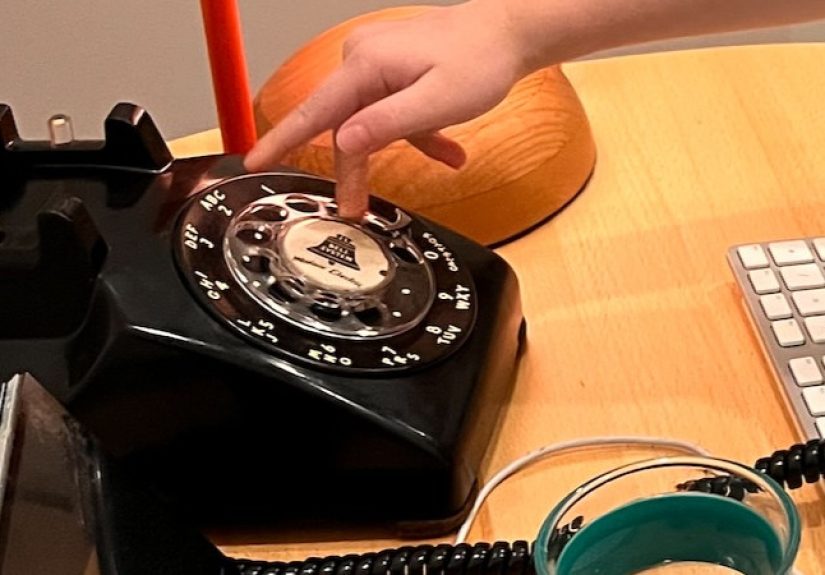
Using a dial phone on Asterisk is one of those rare tech experiences that feels more human after you add more technology. That sounds backwards, but it is true. Modern phones are efficient in the way microwaves are efficient: useful, fast, and emotionally neutral. A rotary SIP phone is different. It makes every call feel deliberate. You pick up the handset, hear real dial tone, place your finger in the dial, and wait through the soft mechanical return after each number. It slows you down just enough to make the act of calling feel noticeable again.
In day-to-day use, the first thing people react to is the sound. The bell on an old phone does not politely chirp like a smartphone. It announces itself. In an office or workshop, that ring instantly changes the mood of the room. The second thing people notice is the tactile rhythm of dialing. Nobody “speed dials” on a rotary phone unless they have a very creative definition of speed. That means extension design matters. Short, clean numbering plans feel better. Dialing 203 is charming. Dialing 9184726 feels like a wrist workout and a life choice.
There is also a funny learning curve for anyone who did not grow up with one of these phones. At first, people overspin the dial, undercount their digits, or stare at the finger wheel like it just asked them to solve a tax form. Then it clicks. Once they understand that the phone is generating pulses instead of tones, the whole system suddenly makes sense. That moment is part of the fun. The phone stops being a museum object and becomes a working terminal again.
From an admin perspective, the experience is surprisingly satisfying. When the ATA registers cleanly, the dialplan loads, and the phone makes its first successful call, it feels less like you configured a PBX and more like you resurrected an artifact. Troubleshooting is part of the story too. Maybe the phone would not ring because the ringer was muted decades ago. Maybe hook-flash timing needed adjustment. Maybe the adapter was fine, but pulse dialing was disabled in a buried web menu. These are not glamorous problems, but solving them is immensely rewarding because each fix makes the old hardware feel more alive.
Over time, the setup becomes less of a novelty and more of a personality feature. People remember the extension. Guests ask to try it. Coworkers invent reasons to call it. And because Asterisk is behind it, you can make the experience richer without ruining the vintage feel. You can send callers to voicemail, route the line to a softphone after hours, build a tiny IVR, or turn the phone into a dedicated hotline. That blend is the real magic: the user experience stays delightfully old, while the system underneath remains flexible, programmable, and modern.
So yes, “A Dial Phone SIPs Asterisk” is a technical project. But it is also an experience project. It reminds you that good interfaces are not always the newest ones, and that sometimes the most memorable device on the network is the one that clicks, rings, and weighs as much as a small anvil.
Conclusion
A dial phone can absolutely “sip” Asterisk, and that is exactly why the project is so much fun. With the right pulse-capable ATA, a clean PJSIP setup, and a simple dialplan, a rotary phone can live comfortably on a modern VoIP system. It will not be as fast as a softphone, and it will never love star codes, but it offers something far better: character. More importantly, it proves that old hardware does not have to be dead hardware. Sometimes it just needs an FXS port, a SIP registration, and a PBX with a sense of humor.