Table of Contents >> Show >> Hide
- Before You Delete Your Ashley Madison Account
- How to Delete an Ashley Madison Account on Mobile
- How to Delete an Ashley Madison Account on a Computer
- What Happens After You Delete an Ashley Madison Account?
- How to Request Deletion of Personal Data
- Privacy Checklist After Deleting Your Account
- Common Problems and How to Fix Them
- Is Deleting an Ashley Madison Account Safe?
- Quick FAQ About Deleting an Ashley Madison Account
- Real-World Experience: What People Usually Learn During Account Deletion
- Conclusion
- SEO Tags
Deleting an Ashley Madison account should not feel like decoding a spy novel written by someone who really loves hidden menus. Whether you are using the mobile app or a desktop browser, the basic idea is simple: sign in, open your account settings, choose the deletion option, and confirm your decision. The part people often miss is that deleting the app is not the same as deleting the account, and deleting the account is not always the same as canceling a paid subscription.
This guide explains how to delete an Ashley Madison account on mobile and computer, what to do before you click the final button, how to cancel billing, and how to protect your privacy afterward. We will keep it practical, calm, and just a little funnybecause if you are closing an account on a discreet dating site, you probably already have enough drama in your tabs.
Before You Delete Your Ashley Madison Account
Before you remove your profile, take a few minutes to prepare. Account deletion can be permanent, and once the process is complete, you may lose access to messages, photos, credits, account history, and profile information. That may be exactly what you want, but it is better to make the choice with your eyes open rather than panic-clicking like your laptop is on fire.
1. Decide Between Deactivation and Deletion
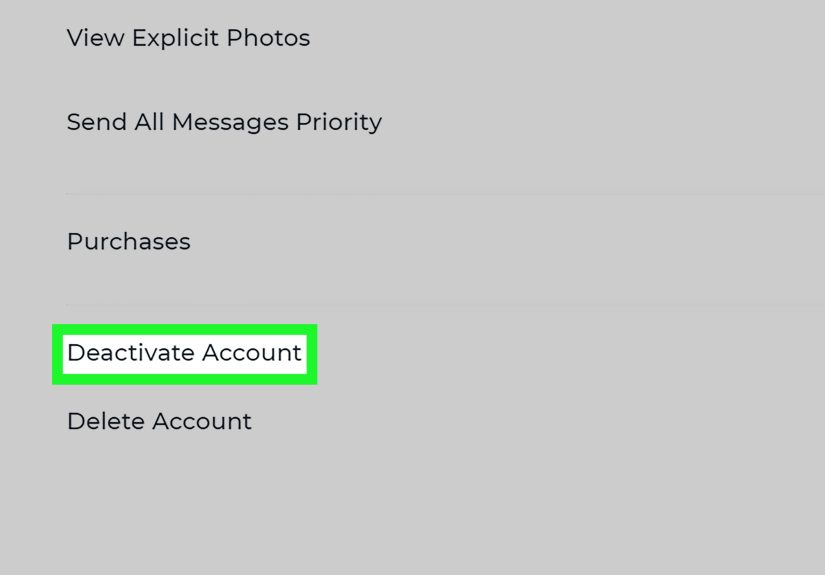
Ashley Madison may offer both deactivation and deletion. Deactivation usually hides or pauses your profile, while deletion is intended to remove the account more permanently. If you think you may return later, deactivation may be the safer option. If your goal is to remove your profile and associated account data, choose account deletion or full deletion when available.
2. Cancel Any Paid Subscription or Auto-Renewal
This is the big one. Deleting your profile does not always automatically cancel every type of billing arrangement, especially if a payment was set up through Apple, Google Play, or another billing provider. If you subscribed through an app store, cancel the subscription from your Apple or Google account. If you paid directly through Ashley Madison, check the billing or credit history area and contact support if needed.
3. Use or Accept Losing Remaining Credits
If your account has unused credits, deletion may cause you to lose them. Credits, premium features, and purchased extras are commonly tied to the active account. If you care about the balance, review it before deleting. If you do not care, congratulationsyou have reached the peaceful stage of account cleanup.
4. Remove Sensitive Profile Details First
Before deletion, consider manually removing profile photos, personal descriptions, location details, saved messages, or connected information if the site allows it. This extra step is not a magic privacy shield, but it can reduce what remains visible if the deletion process fails, stalls, or requires confirmation.
5. Save Proof of Cancellation
Take screenshots of cancellation confirmations, deletion pages, and support emails. Keep the date, the email address used, and any confirmation number. If billing continues later, these records are far more useful than saying, “I’m pretty sure I clicked something near the bottom.”
How to Delete an Ashley Madison Account on Mobile
The mobile process may vary slightly depending on whether you are using iPhone, iPad, Android, or the mobile website. Still, the general path is similar: open the app, go to settings, find account information, and select the account deletion option.
Steps to Delete on the Ashley Madison Mobile App
- Open the Ashley Madison app on your phone or tablet.
- Log in with the email address and password connected to your account.
- Tap the menu icon, often shown as three horizontal lines in the top-left corner.
- Select Settings.
- Tap Account Information or a similar account-related option.
- Scroll to the bottom of the screen.
- Choose Delete Account, Full Deletion, or the closest available deletion option.
- Follow the prompts to confirm your choice.
- Check your email for a confirmation message, if one is sent.
Some versions of the app may use slightly different labels, such as “Account,” “My Account,” or “Manage Profile.” If you cannot find the option, update the app, log out and back in, or use a mobile browser instead.
Important: Deleting the App Does Not Delete the Account
Uninstalling the Ashley Madison app only removes the app from your device. It does not automatically erase your profile, cancel your subscription, remove your messages, or close the account. Think of it like throwing away the TV remote: the TV is still there, and unfortunately, it may still be playing.
How to Cancel an Ashley Madison Subscription on iPhone
If your Ashley Madison payment was handled through Apple, cancel it from your Apple account:
- Open the Settings app on your iPhone or iPad.
- Tap your name at the top.
- Select Subscriptions.
- Find the Ashley Madison subscription, if listed.
- Tap Cancel Subscription.
- If there is no cancel button, the subscription may already be canceled.
How to Cancel an Ashley Madison Subscription on Android
If your billing runs through Google Play, cancel it from your Google account:
- Open the Google Play app.
- Tap your profile icon.
- Go to Payments & subscriptions.
- Select Subscriptions.
- Choose Ashley Madison, if it appears.
- Tap Cancel subscription and follow the instructions.
If you do not see Ashley Madison in Apple or Google subscriptions, the account may have been billed directly by Ashley Madison or through another payment method. In that case, check your Ashley Madison billing settings and your email receipts.
How to Delete an Ashley Madison Account on a Computer
Deleting your Ashley Madison account from a desktop or laptop can be easier because the larger screen makes settings less sneaky. If the app feels like a maze, use a web browser on your computer.
Steps to Delete on Desktop
- Open your preferred browser and go to the Ashley Madison website.
- Log in to your account.
- Open Settings, Account Settings, or Manage Profile.
- Look for Account Information, My Account, or a similar section.
- Scroll down until you see Delete Account, Full Deletion, or a related removal option.
- Click the deletion option.
- Confirm your choice by following the on-screen prompts.
- Save or screenshot the final confirmation page.
If the website asks why you are leaving, choose the most accurate reason or select a neutral option if available. If it asks for your password again, enter it carefully. This extra step helps prevent accidental account deletion, which is helpful unless your cat is known for walking across keyboards with strong opinions.
If You Cannot Find the Delete Account Button
If the deletion button does not appear, try these fixes:
- Use a desktop browser instead of the app.
- Clear your browser cache or open a private browsing window.
- Disable browser extensions that may block scripts.
- Check whether your profile must be completed before account removal.
- Try another browser such as Chrome, Safari, Firefox, or Edge.
- Contact Ashley Madison support or use the privacy contact listed in its policy.
If you still cannot delete the account, send a clear written request. Include the email address tied to the account, your username if known, and a direct request to delete the account and associated personal data. Do not include unnecessary personal details. Support teams need enough information to verify the account, not your autobiography in three acts.
What Happens After You Delete an Ashley Madison Account?
After deletion, your profile should no longer be publicly active on Ashley Madison. Your photos, profile details, and messages may be removed from the service according to the platform’s deletion process and privacy policy. However, there are a few important limits to understand.
Deletion Does Not Erase Everything Everywhere
Deleting your account does not remove screenshots, saved conversations, email receipts, bank records, app store receipts, browser history, password manager entries, or data already shared outside the platform. It also may not instantly erase information that a company is allowed or required to retain for legal, security, fraud-prevention, tax, or billing reasons.
Deletion May Be Permanent
If you choose full deletion, assume you cannot restore the account later. That means messages, matches, credits, profile content, and saved settings may be gone. If you want only a break, consider deactivation instead of permanent deletion.
Billing May Continue If You Do Not Cancel Separately
This is worth repeating because unwanted charges have a talent for appearing when you least want them. Account deletion and subscription cancellation are related but not identical. Always cancel through Apple, Google Play, or Ashley Madison billing settings depending on how you paid.
How to Request Deletion of Personal Data
If your goal is not only to close the profile but also to request removal of personal information, look for the privacy contact or data protection contact in Ashley Madison’s privacy policy. The company’s public privacy information has referenced data deletion requests through a dedicated privacy email address. When sending a privacy request, keep the message simple and professional.
Sample Data Deletion Request
You can write something like this:
“Hello, I am requesting deletion of my Ashley Madison account and associated personal data. The email address connected to the account is [your email]. Please confirm when the account has been deleted and tell me if you need any additional verification.”
Do not send passwords, payment card numbers, government ID numbers, or private screenshots unless the company specifically requests a secure verification method. Privacy requests should reduce risk, not create a new folder labeled “Things I Should Not Have Emailed.”
Privacy Checklist After Deleting Your Account
Once your account is deleted, do a quick cleanup of your devices and online accounts. This step is especially useful for a sensitive service where privacy is part of the reason people want to delete in the first place.
Clean Up Your Phone
- Uninstall the Ashley Madison app after completing deletion.
- Clear app notifications and old screenshots.
- Check saved passwords on your phone.
- Remove any calendar reminders or notes connected to the account.
Clean Up Your Computer
- Delete saved browser passwords if you no longer need them.
- Clear browser history and cache if privacy matters.
- Remove bookmarked login pages.
- Check downloads for saved images or receipts.
Review Email and Payment Records
- Search your inbox for Ashley Madison emails.
- Save cancellation confirmations if you may need them later.
- Delete promotional messages if you no longer want them.
- Review your bank or credit card statement for future charges.
Ashley Madison has historically emphasized discreet billing descriptors, but you should still check your statements after cancellation. If a charge appears after you cancel, contact the billing provider quickly and include your confirmation records.
Common Problems and How to Fix Them
You Forgot Your Password
Use the password reset option on the login page. Check your spam or junk folder if the reset email does not appear. If you no longer have access to the email account, you may need to contact support and verify ownership another way.
You Deleted the App but Still See Charges
That means the app was removed from your phone, but the subscription may still be active. Open Apple Subscriptions or Google Play Subscriptions and cancel from there. If the charge is direct, contact Ashley Madison billing support.
You Cannot Log In
Try resetting your password first. If the account is suspended, locked, or under review, contact customer support. Explain that you are trying to delete the account, not reactivate it.
You See Deactivation but Not Deletion
Look for wording such as “Full Deletion,” “Delete Account,” “Remove Account,” or “Close Account.” If you only see deactivation, use the desktop website or contact support for permanent deletion instructions.
You Want Proof the Account Is Gone
After deletion, try logging in again after some time has passed. You can also search your email for confirmation and contact support asking for written confirmation that the account has been deleted.
Is Deleting an Ashley Madison Account Safe?
Deleting an account is generally safer than leaving an unwanted profile active, especially if the profile contains photos, location clues, personal descriptions, or messages you no longer want online. Still, account deletion should be treated as one part of a broader privacy cleanup.
Ashley Madison’s history makes privacy an especially important topic. The platform was involved in a widely reported 2015 data breach, and U.S. regulators later raised concerns about data security and past deletion practices. That does not mean every current deletion request fails, but it does mean users should be careful, keep records, and understand what deletion can and cannot do.
The smartest approach is simple: delete the account through the official settings, cancel billing through the correct payment provider, request personal data deletion if needed, and keep confirmation records. It is not glamorous, but neither is arguing with a subscription charge at 11:47 p.m.
Quick FAQ About Deleting an Ashley Madison Account
Can I delete my Ashley Madison account from my phone?
Yes. Open the app, go to the menu, select Settings, open Account Information, and choose Delete Account or Full Deletion. If the option is missing, use the desktop website.
Can I delete my Ashley Madison account from a computer?
Yes. Log in through the Ashley Madison website, open account settings or manage profile, find the account information area, and select the deletion option.
Does deleting Ashley Madison cancel my subscription?
Not always. Cancel Apple subscriptions through your Apple account, Google Play subscriptions through Google Play, and direct billing through Ashley Madison billing settings or support.
Can I reactivate a deleted Ashley Madison account?
Full deletion is typically intended to be permanent. If you may want the account later, choose deactivation instead of deletion.
Will deleting my account remove all my data?
It should remove your active profile and account content according to the platform’s process, but it may not remove data that must be retained for legal, security, billing, or fraud-prevention purposes. It also cannot remove copies saved outside Ashley Madison.
Real-World Experience: What People Usually Learn During Account Deletion
The biggest lesson from deleting an Ashley Madison account is that privacy cleanup is rarely one click. The delete button matters, of course, but the real work is making sure the account, subscription, device traces, and email records are all handled. Many users start by thinking, “I just need to remove the app.” Then they discover the account is still online, the subscription may still renew, and the inbox has enough old notifications to build a tiny digital museum.
A practical experience-based approach is to move in order: first billing, then account deletion, then device cleanup. Billing comes first because money has a way of making small problems feel large. If you subscribed through an iPhone, check Apple Subscriptions before deleting the app. If you used Android, check Google Play. If you paid directly, review account billing or credit history. When users skip this step, they often end up asking why a charge appeared after the account was supposedly gone. The answer is usually not mysterious; the subscription lived in a different billing system.
The next experience many users report is menu confusion. Mobile apps change layouts, and deletion buttons are sometimes placed at the bottom of account pages where only determined scrollers survive. If the mobile app is not clear, switching to a desktop browser often helps. A full-size screen makes it easier to see account settings, manage profile options, and confirmation prompts. It also makes screenshots easier, which is useful if support later asks what happened.
Another common lesson is that deletion can feel emotionally bigger than expected. Even if the account was barely used, closing it may connect to privacy worries, relationship changes, embarrassment, regret, curiosity, or simply the desire to declutter. That is normal. Treat the process like any other digital cleanup: calm, organized, and boring on purpose. Boring is good here. Boring means no surprise renewals, no missing confirmation, and no “wait, did I actually delete it?” moment two weeks later.
Users also learn that online privacy is not only about one website. After deleting Ashley Madison, check saved passwords, browser autofill, screenshots, app notifications, and email folders. Search your inbox for account confirmations, payment receipts, password resets, and promotional messages. Keep the cancellation confirmation, but remove anything you do not need. If you used the same password elsewhere, change it. If you used a personal or work email and wish you had not, consider creating a separate email address for sensitive accounts in the future.
The final lesson is simple: trust confirmation, not memory. When deleting any sensitive account, take screenshots, save emails, and write down the date. A clean paper trail can save you time if support needs to verify the request or if a payment provider asks for proof. Deleting an Ashley Madison account is not difficult, but doing it carefully is what makes the process feel finished.