Table of Contents >> Show >> Hide
- What Is a Polaroid 600 Camera?
- Before You Start: What You Need
- How to Load a Polaroid 600 Camera: 8 Steps
- Step 1: Confirm You Have the Right Film
- Step 2: Remove the Film from the Box and Foil Wrapper
- Step 3: Open the Film Door
- Step 4: Check the Rollers Before Loading
- Step 5: Insert the Film Pack Correctly
- Step 6: Close the Film Door Firmly
- Step 7: Remove the Darkslide and Check the Film Counter
- Step 8: Take a Test Photo and Protect It from Light
- Common Mistakes When Loading a Polaroid 600 Camera
- Troubleshooting: What If the Darkslide Does Not Eject?
- Tips for Better Polaroid 600 Photos After Loading
- How to Remove an Empty Polaroid 600 Film Pack
- Experience Notes: What Loading a Polaroid 600 Camera Feels Like in Real Life
- Conclusion
Loading a Polaroid 600 camera is one of those tasks that looks mysterious for about twelve secondsthen suddenly feels wonderfully simple. The camera has no complicated menus, no memory card slot, no app begging for Bluetooth access, and no tiny battery door hiding under a screw from 1987. Instead, most classic Polaroid 600 cameras are powered by the battery built into the film pack itself. In other words, the film is not just film; it is also the camera’s morning coffee.
This guide walks you through exactly how to load a Polaroid 600 camera in 8 clear steps, from choosing the right film to confirming that the darkslide ejects correctly. Whether you found a vintage OneStep, Sun 600, Impulse, JobPro, or another 600-series model at a thrift store, in a family closet, or on an online marketplace, the basic loading process is very similar across most models.
The key is simple: use real Polaroid 600 film, insert it with the darkslide facing up, close the film door firmly, and wait for the camera to eject the darkslide. After that, you are ready to shoot your first instant photopreferably of something more exciting than your kitchen sink, unless your kitchen sink has a strong personal brand.
What Is a Polaroid 600 Camera?
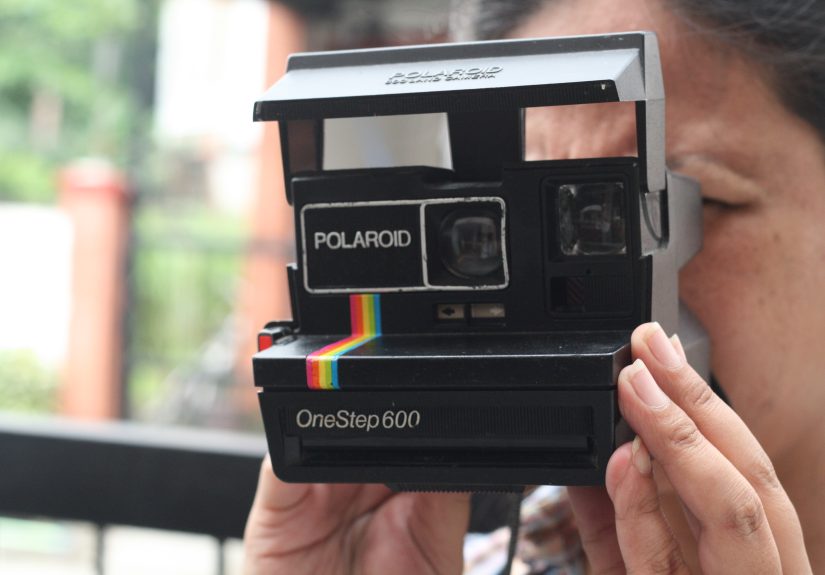
A Polaroid 600 camera is a classic instant camera designed for 600-type integral film. These cameras became wildly popular because they were easy to use: load a pack, aim, press the shutter, and watch the print emerge. Many models include a built-in flash, fixed-focus or autofocus lens systems, and simple exposure controls such as a lighten/darken slider.
The most important thing to know is that vintage Polaroid 600 cameras usually depend on the battery inside the 600 film cartridge. That is why i-Type film, although similar in photo format, is not the correct choice for most vintage 600 cameras. i-Type film does not contain a battery because it is made for newer Polaroid cameras with built-in rechargeable power. For a classic 600 camera, stick with Polaroid 600 film.
Before You Start: What You Need
Polaroid 600 Film
Use a fresh pack of Polaroid 600 film. Modern packs typically include 8 exposures. You can choose color film, black-and-white film, or special-edition frames if you want your photos to arrive dressed for a party.
A Working Polaroid 600 Camera
Inspect the camera before loading film. The film door should open and close smoothly, the rollers should look reasonably clean, and the camera body should not have obvious cracks near the film compartment. If the camera has a folding flash unit, lift it until it clicks into place before shooting.
A Clean, Shaded Area
Load your camera away from harsh direct sunlight. The film is protected inside the cartridge, but instant film chemistry is sensitive, and unnecessary bright light is never invited to the loading party.
How to Load a Polaroid 600 Camera: 8 Steps
Step 1: Confirm You Have the Right Film
Before opening the camera, check the box or foil package and make sure it says Polaroid 600 film. Do not use SX-70 film, Go film, 8×10 film, or i-Type film in a vintage Polaroid 600 camera unless you have a specific modified camera setup. For the standard user, Polaroid 600 film is the correct match.
This matters because 600 film includes a battery pack that powers many vintage 600 cameras. If you load the wrong film type, the camera may do absolutely nothing. That can feel dramatic, but the camera is not being rudeit simply has no power source.
Step 2: Remove the Film from the Box and Foil Wrapper
Open the cardboard box and remove the sealed foil pack. Tear the foil open carefully and take out the film cartridge. Hold it by the sides rather than pressing on the flat surfaces. Avoid touching the darkslide, the top sheet that protects the film from light.
Do not remove the darkslide manually. The camera is designed to eject it automatically after the film pack is loaded. Pulling or bending it before loading can cause problems, waste film, or make the camera behave like it has just been handed a bad sandwich.
Step 3: Open the Film Door
Find the film door latch. On many Polaroid 600 cameras, it is located on the front or side of the camera near the film compartment. Slide or press the latch to open the film door. The door should swing down, revealing the empty film chamber.
If an old cartridge is inside, remove it by pulling the tab. Used cartridges may still contain a dead battery, so do not assume a camera is broken just because an ancient pack inside does not power it. A fresh pack is the real test.
Step 4: Check the Rollers Before Loading
Look inside the film door area and inspect the rollers. These rollers help spread the developer chemistry across the photo as it exits the camera. If they are dirty, sticky, or streaked with old residue, your photos may develop with lines, uneven patches, or strange marks.
If needed, clean the rollers gently with a soft, slightly damp cloth. Let them dry fully before inserting film. Do not use aggressive cleaners or scratchy tools. Vintage cameras deserve respect; they have probably survived more decades than your phone charger.
Step 5: Insert the Film Pack Correctly
Hold the film pack with the darkslide facing up and the plastic base facing down. The pull-tab sticker should face outward so you can remove the cartridge later when the pack is empty. Slide the cartridge straight into the film chamber until it is fully seated.
Do not force the pack at an angle. It should glide in with firm but reasonable pressure. If it feels blocked, remove it and check the orientation. Most loading problems come from inserting the cartridge upside down, backward, or with the confidence of someone assembling furniture without reading the instructions.
Step 6: Close the Film Door Firmly
Once the film pack is fully inserted, close the film door until it clicks shut. That click is important because it tells you the cartridge is seated and the door is locked. A half-closed door can prevent the camera from ejecting the darkslide properly.
After the door closes, the camera should automatically eject the darkslide. This is the black protective card on top of the film pack. Do not panic when it slides out; that is exactly what should happen. Congratulations, your camera has just performed its tiny analog handshake.
Step 7: Remove the Darkslide and Check the Film Counter
Take the ejected darkslide and set it aside. Many Polaroid fans save darkslides for notes, labels, bookmarks, test covers, or tiny pieces of accidental desk art. If your camera has a film counter, it should now show the number of photos available, usually 8 on a fresh modern pack.
If the darkslide does not eject, do not keep pressing random buttons in a panic. First, make sure the film door is closed firmly. Then check that the flash unit is open if your model requires it. If nothing happens, the film pack battery may be weak, the camera contacts may be dirty, or the camera may need repair.
Step 8: Take a Test Photo and Protect It from Light
Frame your subject, hold the camera steady, and press the shutter button. When the photo ejects, protect it from bright light immediately. Many 600 cameras have a built-in film shield, but it is still smart to place the photo face down or keep it shaded while it begins to develop.
Do not shake the photo. Yes, the song was catchy. No, the chemistry does not appreciate interpretive dance. Shaking can interfere with the development process. Let the photo rest flat in a safe place and give it time to develop naturally.
Common Mistakes When Loading a Polaroid 600 Camera
Using i-Type Film in a Vintage 600 Camera
This is one of the most common mistakes. i-Type film looks similar, but it does not include the battery that vintage 600 cameras need. If your camera does not power on after loading i-Type film, the camera may not be brokenyou may simply be using the wrong film.
Pulling Out the Darkslide by Hand
The darkslide should be ejected by the camera after loading. Pulling it out manually before inserting the cartridge can expose or damage the film stack. Let the camera do the job. It has waited patiently since the Reagan era; give it a moment to shine.
Loading in Direct Sunlight
Although the film pack protects the sheets inside, loading in harsh sun is not ideal. Choose a shaded spot, especially if you are outdoors. Instant film rewards gentle handling and punishes chaos with weird colors, streaks, and emotional damage.
Ignoring Dirty Rollers
Dirty rollers can ruin otherwise good photos. If you see repeated lines or marks across your prints, inspect the rollers. A quick cleaning can make a major difference in image quality.
Troubleshooting: What If the Darkslide Does Not Eject?
If the darkslide does not eject after you close the film door, start with the basics. Make sure the film pack is inserted all the way, the darkslide is facing up, and the film door is fully latched. If your model has a pop-up flash, open it completely. Some models will not fire correctly unless the flash unit is raised.
Next, check the camera contacts inside the film chamber. These small metal contacts connect with the battery in the film pack. If they are dirty or corroded, the camera may not receive power. A careful cleaning with a dry cotton swab may help, but avoid bending or scraping the contacts.
If the camera still does not respond with a fresh 600 pack, the issue may be internal. Vintage electronics can fail over time. At that point, you can test the film in another working 600 camera or have the camera inspected by a repair specialist.
Tips for Better Polaroid 600 Photos After Loading
Use Plenty of Light
Polaroid 600 film likes light. Bright shade, window light, and outdoor daylight usually produce more pleasing results than dim rooms. The built-in flash helps indoors, but it has limits. If your subject is too far away, the flash may not reach them effectively.
Keep the Film at a Comfortable Temperature
Instant film chemistry performs best in moderate temperatures. Extreme cold can make photos look blue or slow to develop, while heat can create color shifts or muddy results. Store unopened film in a cool, dry place, and allow refrigerated film to warm to room temperature before loading.
Shield Fresh Prints
Fresh Polaroid photos are sensitive when they first come out. Keep them out of direct sun and bright light during the early development stage. A pocket, empty film box, or shaded tabletop can work well.
Do Not Open the Film Door Mid-Pack
Once a pack is loaded, avoid opening the film door until all photos are used. Opening the door can expose the remaining film and cause wasted shots. If you absolutely must remove a pack early, understand that you may lose one or more exposures.
How to Remove an Empty Polaroid 600 Film Pack
When the film counter reaches zero, open the film door and pull the cartridge out using the pull-tab. Dispose of the empty cartridge according to local recycling and battery disposal rules where available. Because 600 cartridges contain a battery, do not treat them exactly like ordinary paper waste.
Then you can load a new pack by repeating the same steps: open the door, insert the cartridge with the darkslide up, close the door, and wait for the darkslide to eject. After a few rounds, the process becomes second nature. You may even start loading film with the calm authority of a person who owns at least one denim jacket.
Experience Notes: What Loading a Polaroid 600 Camera Feels Like in Real Life
The first time you load a Polaroid 600 camera, the process can feel oddly ceremonial. You open the foil pack, hold the cartridge, and suddenly realize you are handling actual chemistry, not just another digital accessory. There is a small thrill in that. Unlike a phone camera, which can take 400 versions of the same latte without judgment, a Polaroid 600 pack gives you a limited number of shots. That limit makes every frame feel more intentional.
In practice, the most important habit is slowing down. Do not rush the film pack into the camera. Look for the darkslide, keep it facing up, and make sure the pull tab is facing out. The camera will usually tell you when you have done things correctly by ejecting the darkslide with a satisfying mechanical sound. That sound is part of the charm. It is not silent, sleek, or futuristic. It is clunky in the best possible way, like a tiny printer from a parallel universe where everyone wears sunglasses indoors.
Another experience worth mentioning is how much the environment matters. Loading film in a calm, shaded place is easier than trying to do it at a windy picnic while someone asks, “Did it take the picture yet?” If you are bringing your 600 camera to a party, wedding, road trip, or family gathering, load the film before the big moment. That way, you are not fumbling with the cartridge while the perfect photo opportunity walks away holding a cupcake.
After loading, shoot your first frame in good light if possible. Many beginners test the camera indoors at night and then wonder why the photo looks dark, soft, or moody enough to be an album cover. Polaroid 600 cameras can handle indoor flash portraits, but they do best when the subject is not too far away. For crisp, lively images, try bright window light, open shade, or outdoor scenes with balanced lighting.
One of the best practical tricks is to keep the empty film box with you. When a photo ejects, you can slide it into the box to protect it from light while it develops. This is especially useful outside. It also keeps excited friends from grabbing the print and waving it around like they just won a tiny rectangle-shaped trophy.
Finally, remember that Polaroid results are not supposed to be clinically perfect. A little softness, a slight color shift, or an unpredictable glow is part of the appeal. Loading the camera correctly gives the film its best chance, but the magic comes from the combination of chemistry, light, timing, and a little analog weirdness. That is why people still love these cameras: every photo feels like a small event.
Conclusion
Learning how to load a Polaroid 600 camera is simple once you understand the basics. Use the correct Polaroid 600 film, insert the pack with the darkslide facing up, close the film door firmly, and let the camera eject the darkslide automatically. From there, you are ready to shoot instant photos with all the charm, surprise, and occasional delightful imperfection that makes Polaroid photography so addictive.
The best results come from treating the camera and film gently. Keep your rollers clean, avoid harsh sunlight while loading, protect fresh prints from light, and give the film enough time to develop. Do that, and your vintage Polaroid 600 camera can still deliver memorable instant photos decades after it first left the factory.
Note: This article is written for standard vintage Polaroid 600 cameras. Some special, modified, or repaired models may behave differently, so always check the specific camera model if something seems unusual.