Table of Contents >> Show >> Hide
- Why the VTech PreComputer 1000 mattered
- First impressions: a toy dressed like a serious machine
- Opening the case: what’s actually inside?
- The cartridge slot: small doorway, big idea
- PRE-BASIC 1.0: the best surprise in the box
- What the teardown tells us about 1980s educational hardware
- Would the VTech PreComputer 1000 hold up today?
- Experience: using and tearing down a VTech PreComputer 1000 today
- Conclusion
There was a very specific kind of optimism in late-1980s tech. Adults were convinced computers would shape the future, kids were told they needed “computer literacy,” and toy makers rushed in with products that looked just serious enough to impress parents. The VTech PreComputer 1000 sits right in the middle of that moment. It was sold as a 3-in-1 “computer teacher” for kids, but crack the case open and the machine reveals something much more interesting: not just a toy, but a stripped-down little Z80-era computer hiding in a plastic shell that politely asked children to learn touch typing instead of conquering galaxies.
This is what makes a teardown of the VTech PreComputer 1000 so much fun. You start with nostalgia, but end up staring at a very real piece of late-80s engineering. Under the hood are familiar ingredients from classic home computing: a Z80-family processor, RAM, ROM, support logic, cartridge expansion, and a BASIC environment. Sure, the display is tiny. Sure, the sound is more “alarmed smoke detector” than “symphony.” But the bones are legit. The PreComputer 1000 may have worn toy-store clothing, yet it thought like a budget microcomputer.
Why the VTech PreComputer 1000 mattered
The PreComputer 1000 arrived during an era when “learning computer” products were sold as stepping stones to the digital future. Its marketing was wonderfully direct: this was a machine for ages 9 and up that taught touch typing, basic computer programming, and more than 1,000 facts. It also packed math activities, a built-in calculator with memory, quiz categories such as history, geography, science, and general knowledge, plus optional cartridges that expanded the content library. In other words, it was sold less like a game machine and more like a junior workstation for ambitious fourth graders.
That positioning matters because it explains why the PreComputer 1000 looks the way it does. VTech was not trying to build a flashy toy with cartoon graphics. It was trying to sell the idea of real computing in a less intimidating package. The full QWERTY keyboard, the sober clamshell-like shape, the side-mounted cartridge slot, and the programming mode all signal the same message: “This isn’t just for play. This is for your future.” Subtle? Not remotely. Effective? Absolutely.
First impressions: a toy dressed like a serious machine
The case design does half the teaching
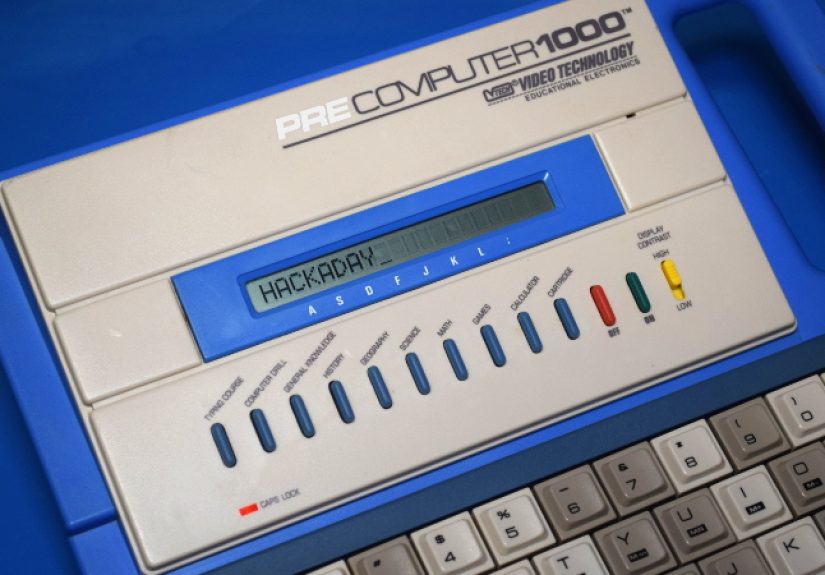
Before you even unscrew the case, the PreComputer 1000 tells you what it wants to be. It borrows cues from real portable computers of the era: a hinged upper section, a keyboard-forward layout, and a restrained industrial design that feels closer to office equipment than toy aisle chaos. For a kid in the late 1980s, this was a very convincing prop. If you had never touched an Apple II, TRS-80, or IBM-compatible system, the PreComputer 1000 gave you a pretty good first impression of what “using a computer” was supposed to feel like.
That illusion is helped by the keyboard. Even modern retro enthusiasts still comment on how important that choice was. The machine used a full QWERTY layout with real computer ambitions, not an alphabet strip pretending to be input. Some users praise it for being surprisingly usable for a membrane board; others describe it as mushy enough to make toast jealous. Both can be true. What matters is that VTech knew the keyboard had to look and function like the real thing, because the keyboard was part of the lesson.
The display is where the fantasy gets humble
Then your eyes hit the screen and the dream takes a tiny, rectangular reality check. The PreComputer 1000 uses a one-line, 20-character dot-matrix LCD. That means the machine can absolutely display text, menus, and simple program output, but it does so with all the spacious elegance of trying to write a novel through a mail slot. It works. It just never lets you forget that you are operating within limits.
Still, the tiny display tells us a lot about VTech’s priorities. This machine was built to hit a consumer toy price point while preserving the illusion of “real computing.” A full graphical screen would have pushed the cost up. A one-line LCD, by contrast, was cheap, robust, low power, and good enough for drills, quizzes, menus, and BASIC listings. It was not glamorous, but it was practical. The PreComputer 1000 is full of decisions like that.
Opening the case: what’s actually inside?
A real processor, real memory, real ambition
Once opened, the PreComputer 1000 becomes much more interesting than its cheerful educational branding suggests. Teardowns and board inspections have identified a 4 MHz Z80-family processor inside, with examples including chips labeled as Zilog Z84C0004PEC or Toshiba TMPZ84C00AP depending on revision or region. That is not toy-like in spirit. That is a recognizable 8-bit computing platform.
Backing the CPU is a modest but real memory arrangement: about 2 KB of SRAM and a 1 Mbit mask ROM, or 128 KB, for firmware and content. Support logic on inspected boards includes devices such as a 74HC244 line driver, HCF4011 NAND gate, and CD4508 latch. None of this is exotic, but that is exactly the point. The PreComputer 1000 is built out of sensible, familiar parts. It is a low-cost system assembled from components that would not look embarrassing in earlier home computers or embedded systems of the period.
The sound hardware is minimal, relying on an internal piezo beeper. “Minimal” is the diplomatic term. “A shrill electronic goblin trapped in a lunchbox” is the less diplomatic one. Either way, it gets the job done for prompts, little tunes, and BASIC sound output. Combined with the LCD, it forms a very inexpensive I/O strategy: enough feedback to feel interactive, not enough to make anyone forget they are using a budget educational machine.
Power and portability: toy economics at work
The machine was designed to run from six C-cell batteries and also offered a DC power jack. That power arrangement explains some of the system’s charm. It was portable in the most 1980s way possible: not sleek, not featherweight, but movable enough to carry from desk to couch to car ride. This was not a laptop in the modern sense. It was a battery-powered learning brick with aspirations, and honestly, that is part of its appeal.
Battery operation also reinforces how cleverly constrained the design was. A low-power processor, a simple LCD, and a piezo beeper meant the PreComputer 1000 could deliver long sessions without demanding desktop-class power. VTech was not building a mini office computer; it was building the feeling of one, distilled into something durable and affordable.
The cartridge slot: small doorway, big idea
Expansion was not an afterthought
One of the smartest choices in the PreComputer 1000 design is the cartridge slot mounted on the side. From a marketing standpoint, it let VTech sell more content. From a hardware standpoint, it gave the system an expandable identity. That matters because expansion is one of the traits people associate with “real” computers. You do not just buy a toy and use it. You build a small ecosystem around it.
Documented cartridge titles include Bible Knowledge, Fantasy Trivia, General Knowledge II, Super Science, Speller, and other later-compatible learning packs. Teardown work on cartridges shows that they are essentially ROM delivery systems, sometimes using the same 128 KB-class Toshiba mask ROM family as the base machine. In plain English: the cartridge concept was simple, cost-effective, and surprisingly generous. The add-ons were mostly content packs, but the storage capacity suggests VTech could have done more had it wanted to.
The slot also reveals VTech’s cost discipline
Retro hardware analysis has pointed out a wonderfully thrifty detail: the machine uses a male cartridge edge on the computer side, keeping the more expensive female connector in the cartridge. That is exactly the kind of penny-pinching engineering choice you expect in a mass-market product. It saves money where it counts while preserving functionality. The PreComputer 1000 is full of these quiet compromises. None of them are glamorous, but together they make the machine possible.
PRE-BASIC 1.0: the best surprise in the box
This is where the PreComputer 1000 stops being “just a toy”
The feature that turns the PreComputer 1000 from educational gadget into retrocomputing conversation piece is PRE-BASIC 1.0. VTech tucked the programming mode into the interface like a reward for the curious. Once there, users could explore sample programs or write their own code using a simplified line-based BASIC interpreter. On a machine with a one-line display, this was equal parts inspiring and mildly ridiculous. You have not truly known patience until you have edited BASIC one row at a time on a tiny LCD.
Yet the language itself was more capable than many people expect. Manual-derived documentation describes support for numeric and string variables, arrays up to three dimensions, LIST, PRINT, INPUT, DATA and READ, IF/THEN/ELSE, FOR/NEXT, GOSUB/RETURN, string functions like LEFT$ and CHR$, math functions such as ABS and TAN, and even sound commands with 31 notes and nine durations. That is not a fake programming mode. That is actual structured experimentation for kids who were ready to peek behind the curtain.
The limitations are the lesson
Of course, the limitations were fierce. With around 2 KB of RAM, a one-line display, and no luxurious storage setup, PRE-BASIC was never going to turn the machine into a software powerhouse. But that is part of the educational value. It forced kids to think small, debug carefully, and respect memory constraints. In a weird way, the PreComputer 1000 may have taught better habits than some friendlier modern tools. It did not flatter you. It simply waited for you to figure things out.
What the teardown tells us about 1980s educational hardware
The deeper lesson of this teardown is that 1980s educational electronics often sat much closer to “real computing” than we remember. The PreComputer 1000 was not a console in disguise. It was a low-cost, purpose-built Z80 system wrapped in educational content and sold through the toy market. That distinction matters. VTech was not merely simulating a computer-themed experience. It was delivering a constrained but authentic microcomputer environment optimized for drills, typing practice, quizzes, and beginner programming.
That also explains why the machine still attracts hardware tinkerers. Once you discover that the core is a standardish 8-bit architecture with ROM cartridges and discrete logic, your imagination starts causing trouble. Could the cartridge slot be repurposed? Could the ROM be dumped? Could new content be made? Could someone turn it into a cyberdeck for people who think practicality is overrated but style is eternal? The answer to at least one of those questions is yes, because enthusiasts already have.
Would the VTech PreComputer 1000 hold up today?
As a practical learning machine in 2026, not really. Modern kids have access to better keyboards, brighter displays, richer programming environments, and software that does not make them scroll line by line like tiny office workers trapped in a beige timeline. But as a retro hardware object, the PreComputer 1000 absolutely holds up. It is easy to understand, fun to explore, and revealing in all the right ways. It shows how manufacturers translated the cultural demand for computer literacy into affordable consumer hardware.
That is why the teardown matters. The PreComputer 1000 is not memorable because it was powerful. It is memorable because it was sincere. It genuinely tried to teach computing concepts with the hardware budget of a toy. And in doing so, it became a fascinating snapshot of an era when simply having a keyboard, cartridges, and BASIC could make a child feel like they had entered the future.
Experience: using and tearing down a VTech PreComputer 1000 today
Spending time with a VTech PreComputer 1000 today is one of those rare retro experiences that is equal parts archaeology, comedy, and admiration. The first thing you notice is that the machine still knows how to make an entrance. It does not boot with the silent confidence of a modern device. It announces itself. The keyboard stares back at you like it expects a term paper, the screen offers exactly one line of visual hospitality, and the speaker is ready to chirp with the emotional subtlety of a caffeinated smoke alarm. Within seconds, you understand that this was a machine built to be memorable.
Actually using it is oddly charming. Typing on the keyboard creates a strange emotional tug-of-war. Part of you wants to laugh because it feels like office equipment designed by a toy company after a long weekend and two cups of optimism. Another part of you has to admit it works better than it probably has any right to. The layout makes sense. The commands feel intentional. The quizzes, typing drills, and educational modes all reinforce the original sales pitch. You can see exactly why a kid in the late 1980s would have looked at this and thought, “I own a real computer now.”
Then you wander into PRE-BASIC and the machine becomes even more endearing. Programming on a one-line display is gloriously inconvenient. Every edit feels like threading a needle while wearing oven mitts. And yet, once you settle into its rhythm, the system starts to make sense. You begin thinking in shorter lines, cleaner logic, smaller goals. A simple loop feels like an achievement. Printing a message feels like victory. Making the speaker beep on command feels like you have brokered peace with a tiny electronic goblin. It is primitive, yes, but it is not fake. The experience is limited without being hollow.
The teardown itself adds another layer of appreciation. Opening the case turns nostalgia into evidence. The plastic shell gives way to a board that is far more honest than the branding suggests. There is the CPU. There is the ROM. There is the small SRAM footprint. There is the support logic doing exactly what it needs to do and absolutely nothing extra. The whole design feels like a masterclass in disciplined compromise. No part is there to impress you. Every part is there because it had a job and the budget was not interested in arguments.
That is the emotional twist of the PreComputer 1000. You expect to uncover a toy and dismiss it. Instead, you uncover a clever, stripped-down educational computer that reveals a lot about its era. It shows how companies like VTech translated big cultural anxieties about the computer age into products families could actually buy. It also reminds you that a generation of kids first touched programming, typing, and structured logic through machines that modern users would consider hilariously limited. The experience today is not about efficiency. It is about perspective. And in that sense, the PreComputer 1000 still teaches something useful.
Conclusion
The VTech PreComputer 1000 earns more respect the deeper you dig. On the surface, it is an educational toy from the late 1980s, all wholesome ambition and carefully targeted “computer literacy” messaging. Inside, though, it is a compact lesson in cost-conscious hardware design: a Z80-family CPU, a small SRAM pool, a mask ROM packed with activities, a cartridge slot for expansion, and a BASIC environment that gave kids a surprisingly authentic taste of programming. It was limited, awkward, and sometimes gloriously annoying. It was also real. And that is exactly why a teardown of the PreComputer 1000 is so satisfying. It reveals a machine that was never powerful enough to dominate a desk, but was clever enough to leave an impression that lasted decades.