Table of Contents >> Show >> Hide
- What “Turning a Pi Into a PDP” Actually Means
- Why the PDP Still Matters
- How the Raspberry Pi Pulls Off the Trick
- What You Learn by Building One
- PDP-8 or PDP-11: Which Flavor of Retro Madness?
- The Practical Side: What Makes a Good Build
- Why This Project Still Feels Fresh
- Who Should Try It?
- Final Thoughts
- Hands-On Experience: What It Feels Like to Live With a Pi-Powered PDP
Note: This article is an original, web-ready synthesis based on real historical and technical information, rewritten in a fresh style for publication.
There are ambitious Raspberry Pi projects, and then there are Raspberry Pi projects that look like they escaped from a 1970s engineering lab wearing a disco-era front panel. Turning a Pi into a PDP falls squarely into the second category, and that is exactly why it is so irresistible.
At first glance, the idea sounds mildly unhinged. Why would anyone take a compact modern board computer and use it to imitate a hulking DEC minicomputer from the days when storage was loud, switches were satisfying, and a blinking light meant something more meaningful than “your router needs attention”? The answer is part nostalgia, part education, and part pure maker joy. A Raspberry Pi has more than enough power to emulate classic systems like the PDP-8 or PDP-11, but the real magic happens when you pair that computing muscle with a replica front panel full of switches and LEDs. Suddenly, the Pi is not just running software. It is performing history.
That is the heart of the modern Pi-powered PDP project. You are not building a museum-grade restoration with cabinets the size of a washing machine and a power bill that makes your wallet file a complaint. You are building a compact, affordable, remarkably faithful experience: a small machine that captures the look, feel, and workflow of the original Programmed Data Processor line while using modern hardware to do the heavy lifting behind the curtain.
What “Turning a Pi Into a PDP” Actually Means
Let’s clear up the most important point: a Raspberry Pi does not literally become a vintage DEC machine. It does something almost better for hobbyists. It emulates one.
Most modern Pi-to-PDP builds rely on a software emulator such as SIMH, a long-running open-source project that simulates historically significant computer systems. On the Pi, SIMH can recreate the behavior of a PDP-8, PDP-11, and other classic machines well enough to boot original-style operating systems, run old software, and let users experience the architecture in a way that feels uncannily authentic. Add a physical control panel wired to the Pi’s GPIO pins, and the result is no longer just an emulator on a screen. It becomes an object you can operate with your hands.
That tactile experience is the secret sauce. A PDP without a front panel is still interesting. A PDP with toggle switches, run lights, address displays, and that glorious “I am about to enter a boot loader one bit at a time” energy is a whole different beast. The front panel turns retrocomputing from a software demo into a ritual.
Why the PDP Still Matters
The PDP family matters because it helped make computing smaller, cheaper, and more accessible. Before minicomputers, computing tended to live in rooms, budgets, and bureaucracies. Systems like the PDP-8 and PDP-11 helped bring serious computing power to universities, labs, factories, and businesses that could not justify a mainframe. That shift changed who got to use computers and what they could be used for.
The PDP-8 became famous for being one of the first commercially successful minicomputers. The PDP-11 later became even more influential, thanks to its elegant architecture, broad adoption, and deep connection to the history of Unix. If the phrase “this old machine shaped modern computing” gets tossed around too casually on the internet, the PDP-11 is one of the rare machines that actually deserves it.
That historical weight is one reason makers keep coming back to these systems. Recreating one on a Raspberry Pi is not just cosplay for computer nerds. It is a hands-on way to understand how earlier machines worked, why operating systems evolved the way they did, and how programmers once thought at a much lower level. It is also a very effective cure for taking gigabytes, GUIs, and instant boot times for granted.
How the Raspberry Pi Pulls Off the Trick
The Pi Handles the Brains
The Raspberry Pi runs the emulator, disk images, and any supporting software. In practical terms, it acts like a tiny modern host that pretends to be an older machine. That means the Pi is not trying to electrically duplicate a PDP with period-correct components. Instead, it is simulating the machine’s processor, memory, and peripherals in software.
This is why the project is so approachable. You do not need to track down rare DEC modules or dedicate half your home office to a beige steel monument. A Pi, an SD card, and the right software stack can get you surprisingly far before you even add the flashy panel hardware.
The Front Panel Delivers the Drama
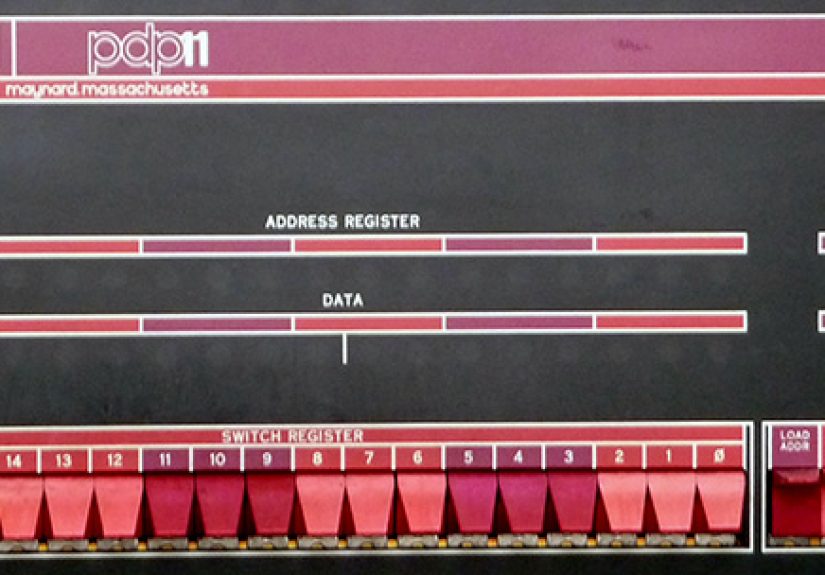
The physical panel is where the project transforms from clever to captivating. Replica builds such as the PiDP-8/I and PiDP-11 use custom boards, LEDs, switches, and a case designed to echo the original machines. The GPIO interface lets the Pi read switch positions and drive lamp patterns so the user can halt, single-step, inspect addresses, and poke values much like an operator would have done decades ago.
And yes, this is the part where normal people ask, “Couldn’t you just use a keyboard?” Technically, sure. But that misses the point in the same way that looking at a picture of a pinball machine is not the same as hearing it clack, flash, and taunt you in person. The panel is not decoration. It is the human interface story of early computing made visible.
Software Makes It Feel Real
With the right setup, a Pi-powered PDP can boot classic environments and run period software. On the PDP-11 side, hobbyists often gravitate toward systems like RT-11, RSTS, 2.11BSD, or historical Unix variants. On the PDP-8 side, the appeal is even more elemental: smaller memory models, simpler instruction sets, and a front panel that makes you appreciate every bit as if it were a family heirloom.
The result is a machine that lets you do more than stare at lights. You can actually explore old workflows, load programs, study machine architecture, and understand why bootstrapping used to sound like a verb and a survival skill at the same time.
What You Learn by Building One
This is where the project gets sneakily educational. A Pi-to-PDP build teaches hardware assembly, software setup, and a good amount of troubleshooting. But more importantly, it teaches computing concepts that modern systems hide under layers of convenience.
You become more aware of the relationship between processor state, memory addressing, and input/output. You start to see why front panels once mattered. You understand why octal shows up so often in PDP culture, why boot loaders could be tiny enough to toggle manually, and why programmers from that era tend to speak about hardware with the kind of respect usually reserved for master carpenters discussing old hand tools.
Even a simple act like halting the system and stepping through instructions changes your perspective. Today, most users expect software to either work or not work, with the details politely hidden. A Pi-powered PDP invites you to stop being polite and inspect the machine’s soul one register at a time.
PDP-8 or PDP-11: Which Flavor of Retro Madness?
If you are choosing between a PDP-8-style build and a PDP-11-style build, the answer depends on what kind of history lesson you want.
The PDP-8 feels earlier, leaner, and more minimal. It is the machine for people who want to experience computing with fewer abstractions and a stronger sense of “wow, they did a lot with very little.” It has an almost archaeological charm. You are not just using a computer; you are excavating one.
The PDP-11, on the other hand, feels more familiar to modern programmers. Its architecture influenced later systems, and its association with Unix gives it extra gravity. If your idea of a good time includes exploring how operating systems matured, how C grew up, or how a minicomputer became a bridge to modern software culture, the PDP-11 is a very persuasive choice.
In short, the PDP-8 is a brilliant history lesson in minimalism. The PDP-11 is a greatest-hits album for people who enjoy tracing modern computing back to its roots.
The Practical Side: What Makes a Good Build
A good Pi-powered PDP project balances authenticity with sanity. You want enough historical flavor to feel the machine’s personality, but not so much realism that your build becomes a six-month hostage situation involving a soldering iron, a bag of stubborn switches, and several existential talks with a misbehaving LED row.
For most builders, the sweet spot includes a Raspberry Pi with stable power, a tested software image, a reliable panel interface, and a case that captures the visual charm of the original. The best builds also embrace the modern conveniences that make the project livable: SD card storage, accessible documentation, and a community of fellow enthusiasts who have already made every possible mistake on your behalf.
That community matters. Retrocomputing projects look romantic on day one and suspiciously like detective work on day three. Someone, somewhere, has already solved your issue with GPIO timing, disk image boot order, or a front panel lamp that insists on expressing modern art instead of binary truth.
Why This Project Still Feels Fresh
There is a reason “Turning A Pi Into A PDP” continues to grab attention years after the first kits and write-ups appeared. It combines several irresistible ideas into one project: computing history, physical making, open-source software, education, and aesthetics. It scratches the itch for people who want technology to be understandable again.
Modern devices are astonishingly capable, but they are also sealed, abstracted, and emotionally flat. A Pi-powered PDP is the opposite. It exposes process. It celebrates visible state. It asks you to slow down and notice what the machine is doing. When the lights flicker, they are not decorative ambiance. They are evidence. The computer is thinking in public.
That alone explains much of the appeal. In an era of invisible cloud services and polished black rectangles, a front panel full of lamps feels almost rebellious. It says computing can still be legible, playful, and tactile.
Who Should Try It?
This project is perfect for retrocomputing fans, electronics hobbyists, computer science students, museum educators, and anyone who has ever looked at a modern laptop and thought, “You know what this needs? More switches.”
It is also surprisingly good for teaching. A Pi-powered PDP can demonstrate architecture, instruction flow, operating system history, and human-computer interaction in ways that a slide deck simply cannot. Students may not remember every lecture about registers, but they will remember the day they halted a machine, watched the panel state change, and realized the computer was no longer a magical box.
Final Thoughts
Turning a Raspberry Pi into a PDP is one of those rare projects that is fun, beautiful, educational, and just impractical enough to be charming. It is not about raw performance. Your phone could crush it before breakfast. It is about recovering something modern computing often hides: the feeling that a computer is a machine you can understand.
With the right software, a thoughtfully designed front panel, and a little patience, a tiny modern board can channel the spirit of a minicomputer era that shaped everything from laboratory automation to Unix culture. That makes the project more than a novelty. It becomes a working conversation between past and present.
And honestly, there is something deeply satisfying about using a twenty-first-century microcomputer to impersonate a twentieth-century minicomputer so you can better understand twenty-first-century computing. It is a weird circle. It is a beautiful circle. And it blinks.
Hands-On Experience: What It Feels Like to Live With a Pi-Powered PDP
The experience of using a Pi-powered PDP is different from building most Raspberry Pi projects because it does not feel like a quick weekend gadget. It feels like adopting a tiny, opinionated time machine. The first surprise is how much personality the machine seems to gain once the front panel comes alive. A bare emulator in a terminal window is interesting. A panel full of lights, switches, and deliberate interaction suddenly feels like a machine with manners, mood swings, and a strong opinion about whether you deserve to boot it correctly.
Early on, the build experience tends to alternate between delight and detective work. One moment you are admiring the panel layout and thinking you have created the world’s most charming desk ornament. The next moment you are chasing a wiring mistake or wondering whether one stubborn lamp is installed backward, misaddressed, or simply choosing chaos. That learning curve is part of the charm. The project teaches patience because vintage-style computing does not reward rushing. It rewards attention.
Once the system is running properly, the everyday experience becomes strangely calming. You flip a switch, halt the processor, inspect state, and suddenly modern computing feels hilariously overcaffeinated by comparison. There is no avalanche of notifications, no background update demanding a restart at the worst possible time, and no glossy interface trying to guess what you meant. The machine waits. It responds. It makes you participate.
That participation changes how you think. You begin noticing structure rather than just outcomes. You become aware of addresses, registers, boot sequences, and the logic behind operations that modern systems bury beneath layers of abstraction. Even people with solid programming experience often describe a Pi-powered PDP as a reset for the brain. It is a reminder that computing is not magic. It is a series of understandable steps, and every flashing lamp is basically the machine saying, “I can explain.”
There is also a social side to the project that sneaks up on people. Retro builds like this attract questions from friends, coworkers, students, and total strangers who would normally not care about computer history. Put a Pi in a plastic case, and you have a gadget. Put it behind a panel that looks like mission control for a moon landing, and suddenly everyone wants a tour. The project becomes a storytelling device. You get to explain what a PDP was, why Unix matters, why front panels existed, and why entering tiny programs by hand once counted as normal behavior rather than a cry for help.
Over time, the machine earns a kind of permanent place on the desk. Not because it replaces a modern computer, but because it complements one. It is equal parts teaching tool, conversation piece, and mechanical meditation. A Pi-powered PDP does not ask to be practical in the everyday sense. It asks to be meaningful. It rewards curiosity, celebrates visible computation, and reminds you that the history of computing is not dead text in a book. It is something you can wire up, boot, operate, and enjoy one blinking light at a time.